
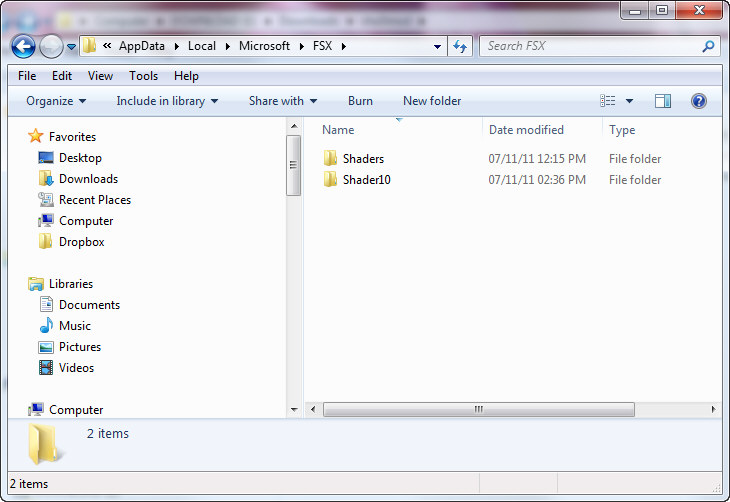
When FSX was run the first time, a cache was also created under the C:\Users\<user name>\AppData\Local\Microsoft\FSX folder. It contains a sub-folder called Shaders (some systems may have an additional folder called Shader10) in which instructions and codes that are frequently accessed by FSX are stored. Every time FSX is run, contents of the cache will be optimized further to improve overall system performance.
However, this cache is prone to be messed up when settings of fsx.CFG are changed or system is toggled between DX9 and DX10, etc.
One symptom of this cache problem is the introduction of stutters in areas where no stutters were experienecd before. The other is the failure of proper rendering of graphic capabilities, such as abnormal anti-aliasing.
To fix the issue, go to the folder mentioned above and delete everything inside the folder. The cache will be refreshed and rebuilt the next time FSX is run.
Regarding the cache maintenance for the flying zone approach, simple command lines could be added to the BASIC files to delete content of the shader automatically everytime a region is changed. However, this step is not mandatory.
Although adding SHADER_CACHE_VERSION=x (where x = any number) under [GRAPHICS] section of fsx.CFG could achieve a similar result, completely removing the Shaders folders brings a promising error-free result.
 FS Times
Didn’t do anything,flickering textures all over the place.
Time to consign FSX to the old people’s home.
Xplane 11.10 is the new king
FSX is awful with modern systems.
I have Orbx scenery addons as well and not a patch on Xplane with free scenery.
Tried every tweak known to man to stop the flickering textures in FSX,it’s time is done.
LikeLike
FSX surely is too old to compete with others. However, there are still many people quite happy with it.
LikeLike
I don’t have those files
LikeLike
The location might vary according to the windows system you are using.
LikeLike