
Adding Altitude Callout for decending aircrafts in FSX is as simple as calling out 1000, 500, 300, 100, 50, 40, 30, 20, 10, …
STEP 1: FSUIPC (If FSUIPC is already installed, skip to STEP 2)
a) Download FSUIPC4 from schiratti.com
b) Run the FSUIPC4 installer
c) No need to register FSUIPC; just press ESC to finish the installation
d) If using the flying zone approach, ensure FSUIPC module is included in all DLL.XML files
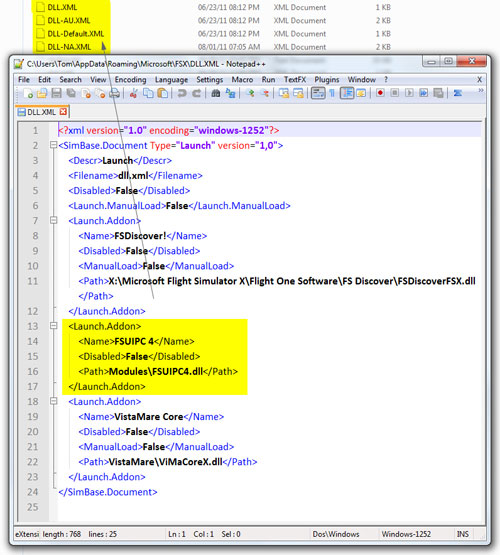
e) Run FSX one time to activate the FSUIPC module and then exit FSX
STEP 2: pmSounds
a) Install pmSounds (link removed as it now a payware) from Project Magenta
b) When installation is complete, run pmsounds.exe (better create a shortcut for future access)
c) By default, all *.wav files on the left are checked, uncheck those sounds you don’t want
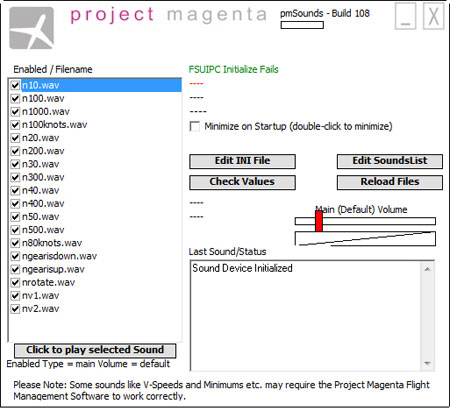
d) When selections are done, exit the program
STEP 3: Activation
To activate the Altitude Callout function, just run pmsounds.exe either before or after you load up FSX, then sit tight and enjoy.
UPDATE:
The sound module is now free, so prepare to expect inconsistent quality payware. Don’t know if the inconsistent quality improved, but it does add fun, though.
 FS Times
do all of these steps still work?
LikeLike
Try for yourself.
LikeLike