

Updated: 2011-1004
Lately, I have replaced my long-time Saitek Yoke with CH Eclipse Yoke after re-tuning my FSX system several weeks ago. Because of that, many controls of my gears have to be reconfigured accordingly.
Followings are the new switch assignments for the TPM.
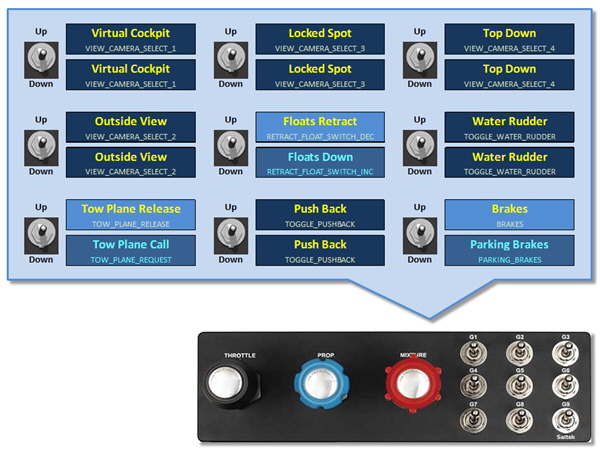
Switch G1 to G4 are so assigned according to my Ultimate Cockpit Views requirement.
Besides, switch G5, G7 and G9 are assigned with two different functions for their UP and DOWN positions as explained earlier in the Double TPM Programmable Switch story.
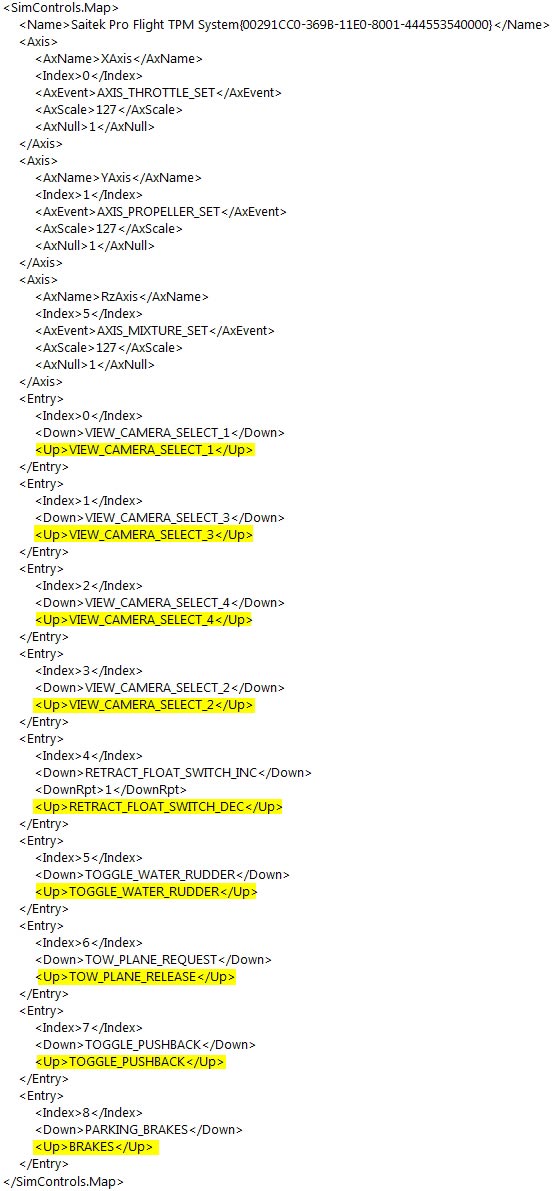
However, assignments for the UP position of these switches could only be made possible by editing the Standard.XML file under C:\Users\Tom\AppData\Roaming\Microsoft\FSX\Controls directory. Following is the full command list of my current TPM setting in the Standard.XML file.
 FS Times
… ps I only show axnull 1 on the mix, none showing under throttle_set or propeller_set …thanks, gary
LikeLike
hi Tom ..I am trying to follow your examples here… I do not seem to be able this standard.XML file… I can read it and scroll thru it but have no edit action. I see under Saitek TPM control that index 7 and index 9 both show gear_toggle …??? I am lost as usual …thanks, gary
LikeLike
How do u get the Standard.XML file?
LikeLike
What do you mean, Austin? Don’t get your question.
LikeLike
how do I get the standard XML file? It was not not in the controle file
LikeLike
If you are running Windows 7, the directory of Standard.XML file should be something similar to mine here: C:\Users\Tom\AppData\Roaming\Microsoft\FSX\Controls
If your Standard.XML file was deleted by whatever reason, it will be created again when you run FSX the next time.
LikeLike