

Received a question yesterday asking how to remove the text of the six programmable buttons on the left hand side of the Flight Instrument Panel (FIP) so that one could make use of the whole 320×240 area on the device.
It is easy to achieve by just removing the content of the Name command inside the LogiFlightSimX.xml file under C:\Program Files (x86)\Logitech\FSX Plugin directory as shown below.
(For systems using the older drivers from Saitek, the file is called SaiFlightSimX.xml and it is located under C:\Program Files (x86)\Saitek.)
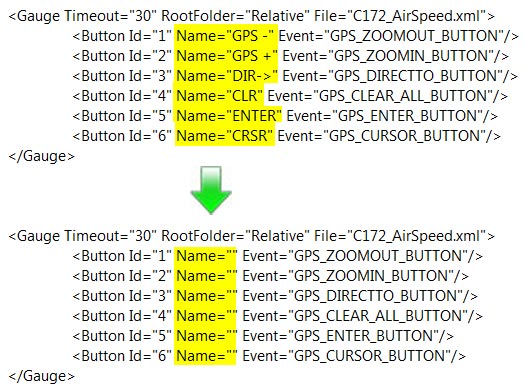
By further removing the Name=”” command itself or everything after the Button Id (as shown below), not only the text but also the LED of the button will turn off. This deactivates the button completely.
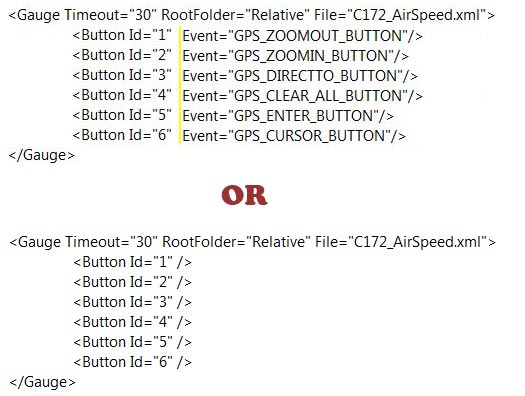
Note that it is not necessary to disable all buttons together as shown in the example above. Just apply the tweak to the button(s) you want to disable. This will give you the freedom to create various button combinations of your choice on the FIPs.
The following table summarizes the 4 conditions one can achieve via the tweak:
| Example | LED | Text | Function |
| <Button Id=”1″ Name=”GPS” Event=”PANEL_3″/> | ON | ON | Enabled |
| <Button Id=”1″ Name=”” Event=”PANEL_3″/> | ON | OFF | Enabled |
| <Button Id=”1″ Name=”” Event=””/> | ON | OFF | Disabled |
| <Button Id=”1″ Event=”PANEL_3″/> or <Button Id=”1″/> |
OFF | OFF | Disabled |
 FS Times
Dear Sir. Can you send my link to download full of your C172 Gauges for FIP? it look very cool and i want to try it. Thank you.
LikeLike
Hi Billydragon,
Do subscribe to this blog first. That’s the basic requirement to get my files.
Tom
LikeLike
Hi Tom, maybe I misunderstand how this works that maybe makes perfect sense to you?
What I’d like to do with *Ten* FIPs so far is use only one of them to use the red led buttons for shortcuts in FSX, while the rest of the nine FIP’s have no red led shortcuts at all, as it stands for me all those vertical rows of FIP led buttons doing nothing is a bit of a distracted show while we should be focusing on instruments.
If its a global script for any number of FIP’s, then fine, but just now I’m not sure?
I dont mind just now we lose the full FIP potential screen area but we could lose the irritating vertical red buttons too if thats possible, but keep it on one for folk of multiples of them.
I hope that makes sense :)
Thanks and I appreciate all your help so far.
Colin
LikeLike
Yes, Colin.
You can turn off the red leds on all 9 FIPs and leaving just one FIPs to remain the ON and functions as usual.
I have added a summary table at the end of the post to clarify what you can achieve by applying the tweak accordingly.
Tom
LikeLike
Thanks for clarification Tom, ten FIP’s so far with just one using the red led buttons is exactly what I’m aiming for.
It would be nice to use the full screen of the FIP’s, or even centre them, but with conventional “round” gauges I’m not sure if thats possible?
I wish Saitek would have kept the width of the FIP and matched it in height too ratio wise.
Before the FIP’s first came out i was lucky enough to blag myself into the beta testing program for them and got one free for helping, the guy whom was in charge was very knowledgeable and helped me a lot in understanding the way USB really works … mostly over my head … but was a very good insight, sadly I think Saitek support is about the worst these days and i appreciate sites like this where we support each other.
I’m not sure if we will see any more new Saitek “cheap and cheerful” aviation hardware any time soon? Most of what they do are solid sellers if you consider second hand value on Ebay and so the market is still there but probably not the investment needed anymore? … it would have been nice to see a Saitek GPS “truly plug and play” unit, but I think someone at top has said “enough” and they want more profitable returns and sadly that is not in the FS market just now.
When Microsoft bailed out of the Flight Simulation market it was just the start, we are now in an era of ancient software (the core sim software) while Saitek who made semi decent affordable hardware seem to have lost interest or profit margins too?
LikeLike
Hi Colin,
True, for conventional round gauges, full screen doesn’t gain much advantages. I am thinking hard these days for integrating more gauge elements in a logical manner. For example, the Announciator with Altimeter; Magnetic Compass with Direction Gyro, etc.
The problem is the beyond par resolution of the FIP. If it’s resolution is doubled, everything would be much easier.
However, I don’t think the company will do it as you already mentioned that the company’s support is one of the worst.
Tom
LikeLike
I can not install the saitek gauges folder .. could you help me?
LikeLike
Hi Heito. Can you be more specific?
LikeLike
…again…thanks, Tom! Much appreciated!
LikeLike
Thanks Tom, been meaning to do this for a while and knew it could be done.
I’ve ten FIP’s just now and would like to keep the red led buttons for functions on one of them and not the others, is that possible?
Thanks.
Colin
LikeLike
Surely of course. You can disable any button of your choice. Just remove the Name=”” of that particular button from the file will do.
Tom
LikeLike
Great hint, thx a lot. In this case the image will spread and will occupy the entire fip screen or it will only hide the left side buttons names?
LikeLike
Hi Niko,
It will only hide the left side button names.
Tom
LikeLike
Got it, thanks.
LikeLike
You’re welcome.
LikeLike
So, the next logical question: how do you center the gauge in the display? I don’t want to stretch is as I believe it will appear distorted, but just realign it in the center. For the sake of learning, I am trying to figure this one out myself. If you want to post the answer, please wait a few days. :)
LikeLike
No problem at all.
LikeLike