
Have tried a few wireless head tracking software, NaturalPoint’s TrackIR + TrackClip Pro is still my choice so far. Following is the method I find very effective when aligning the device at startup. Of course associated software must be activated first.

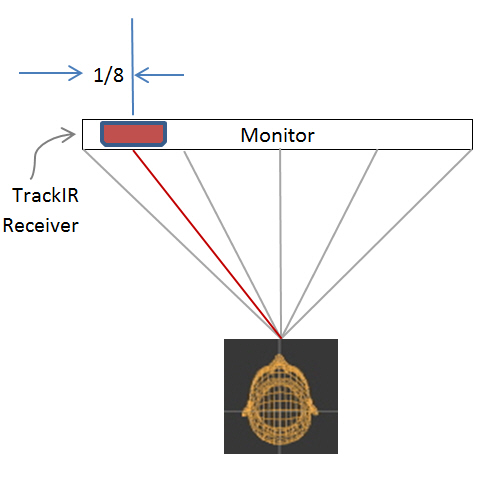
Place the TrackIR receiver on top of the monitor about 1/8 in length from the left edge.
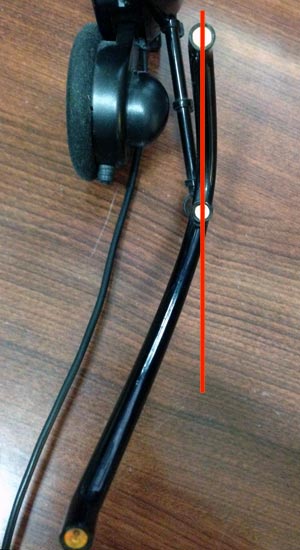
While seated with the TrackClip Pro put on, adjust the angle between the first two nodes so that they are about vertically aligned to each other.
Slightly move the whole body a bit to the left so that the Clip can be directly facing the receiving unit.
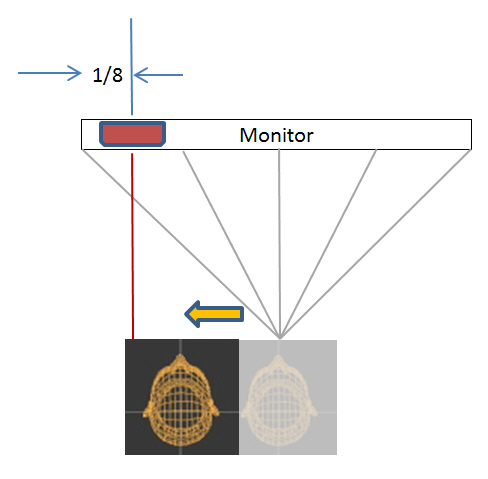
Press the Hot Key (F12) for centering the device. Resume body to the center position and off you go.
==========
Via this method (surely just some guidelines), TrackIR can be quickly set up to respond smoothly and correctly to the movements of the head.
To further enhance the result, leaning the body to the opposite direction of the head could bring forth a positive effect. In particular,
- Lean the body to the RIGHT while your head turns to the LEFT
- Lean the body to the LEFT while your head turns to the RIGHT
 FS Times
I don’t know if this could also help about the zoom and screen adjust but I found this video on Youtube that explain how the visual affect the FSX and he was using the TrackIr.
I learn a good bit from his video. I think there is 5 of them.
Mario
LikeLike
Thanks a lot, Mario.
There are quite some good information on YouTube indeed.
LikeLike