
Installation so far so good but tried for a few hours and still unable to add Saitek’s FIPs to the P3D system. 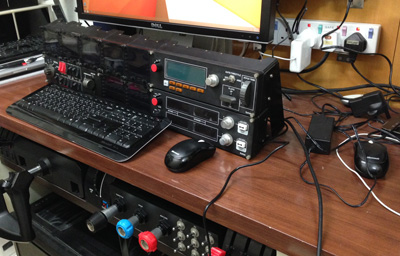
Appreciate suggestions from anyone who has installed FIPs successfully with P3D.
Update 1:
Was wondering where to put those Saitek drivrs. Now I see the exe.xml file doesn’t exist by default and I have to create it or copy it from FSX manually. Big thanks to John, Dave and HBE66 for your quick advices. Will do it and try it later.
Update 2:
Just copied the exe.xml file from FSX and the FIPs now work in P3D.
 FS Times
Hey Tom,
Could you send me a copy of your exe.xml from you controls folder.
that includes the FIP as I only have Prepar3d on my system now.
LikeLike
Hi Dave,
Just sent to you. Check your mailbox.
Tom
LikeLike
Hi Dave, yould you kindly send me your XML.exe? Thanks very much, Christoph
LikeLike
Hi,
Do you have an e mail address?
LikeLike
I did copy the exe.xml file from FSX and FIP’s worked ok, thanks for the info!!!
Mario
LikeLike
No problems using SPAD drivers for radio and switches. Needed to update FSUIPC though as exe.xml made P3D crash.
LikeLike
Thanks for the note, Joseph. Have downloaded the latest version already.
Tom
LikeLike
Hey guys, did you notice any performance drop when using the FIPs?
I don’t know why I have this, in FSX they don’t have any impact on my config.
LikeLike
Hi Niko, not sure yet as I am still installing and reinstalling these few days. But I do see that FIPs running a bit sluggish than in FSX.
Tom
LikeLike
Thanks John, Dave and HBE66. Was wondering where to put those Saitek drivers. Now I see that the exe.xml doesn’t exist by default.
Will add it manually and try again later.
Tom
LikeLike
hi tom
i found the solution in the C:\Users\enigma\AppData\Roaming\Lockheed Martin\ directories
copy the “exe.xml” from the v1.* to the v2 directory and the FIPs work ^^
LikeLike
PS: in case the exe.xml is missing, here is what it contains:
Launch
exe.xml
False
False
ProFlight Plugin
False
C:\Program Files (x86)\Saitek\ProFlightPlugin\ProFlightPlugin.exe
SPAD
False
C:\Program Files (x86)\SPAD\Spad.exe
Saitek DirectOutput RadioStack
False
C:\Program Files (x86)\Saitek\DirectOutput\SaiFlightSimX.exe
-run
LikeLike
Tom, Copy the exe .xml file from your FSX controls folder in to the same folder in Prepar3d v 2 and you should be good to go…Mine are working.
Dave
LikeLike
I left out the xml part (exe.xml).
LikeLike
Hi Tom
The FIP’s are working fine for me. I of course had to add the \Direct Output\SaiFlightSimX.exe to the exe. file for P3D V2.
John
LikeLike