
Perhaps many of you knew about it already, Voice-activated Checklist allows running through checklists via voice command. This interesting stuff I only found recently on a Youtube video by Paul Endersby, who is the author of the utility.
Latest version is v0.5 and it comes by default with the A2A C172 Trainer Checklist. In addition, there are human recorded sound files (also from Paul) corresponding to the commands of the checklist. The utility is free and can be downloaded from here.
Paul has made another Youtube video called Voice Activated Checklists – Walk Through, in which he explains how to set up the utility properly.
Two tips from my experience:
1)
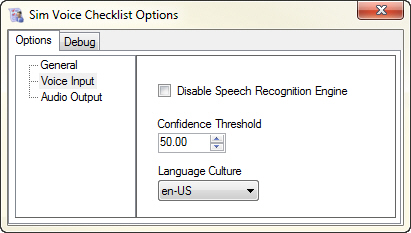
Lowering the Confidence Threshold to 60 or 50 from the utility’s Voice Input Option would allow easier triggering of the checklist commands.
2)
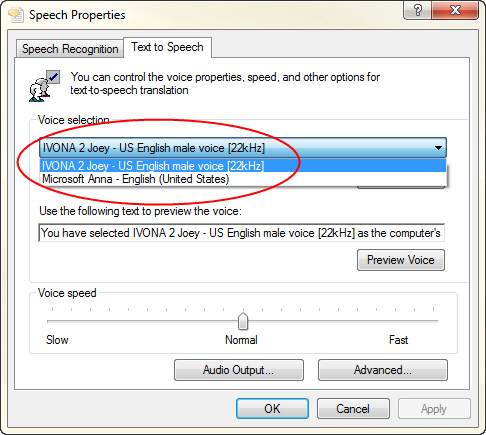
By adding AT&T’s or Ivona’s natural sounding voices to the system, users may no longer need to record human sound files for their custom-made checklists (for example I have created one for my favorite C172SP), unless they don’t mind using the default robotic voice of Anna from Microsoft.
Surely, the convenience brought by such natural voices does come with a price.
 FS Times
cant find the archive to download
LikeLike
Hi Luiz, the link is from the author. I don’t own it.
Anyway, I have sent you a copy I downloaded before. Check you email.
Tom
LikeLike
i love the video :) there are two air planes i’m trying to fly Airbus 320 and the c172.
just 1 question A2A c172 voice check-list dos it come with the a2a c172 ?
i have orbx EGTR Elstree scenery.
LikeLike
It works for the A2A C172 but it doesn’t come with the aircraft. You have to download it yourself.
Tom
LikeLike
Great find Tom!!
I did notice that when in full screen mode FSX minimize to task bar but in window mode it is ok. there is an option to turn off the GUI line works well and it still shows the list on command “Show Check List”
I did get a Ivona voice there very good to replace Anna, so I suppose every sound file as to be recorded with the new voice an make a folder for that voice ?
It would be easy to make a check list for other AC with your own recording voice by adding or removing some items from the original, I think it should work?
Thanks Tom
Mario
LikeLike
Hi Mario,
There’s an option to turn off the GUI line? I didn’t aware of that frankly. Will check it out later. Thanks
The Ivona voice is very good. I got the Joey sound. You don’t have to do the recording. Just set the Ivona voice to be your default voice in Text to Speech in Speech Recognition from Control panel. Then the checklist will be sounded directly from the voice. Surely you need to remove or rename the original “Checklist audio files” to anything like “TEMP Checklist audio files” first so as to avoid the program from reading the pre-recorded files. You will then hear the checklist spell out from the Ivona voice. As simple as that.
Tom
LikeLike
Thanks for that hint, Tom – I didn´t knew that!
LikeLike
You’re welcome. I didn’t know that until recent weeks.
Tom
LikeLike