
What a coincidence of receiving a few emails in the past two weeks asking why the commands (such as the barometric settings — KOHLSMAN_DEC and KOHLSMAN_INC) assigned to the rotation knobs and buttons on the FIPs are not working any more. After checking their SaiFlightSimX.xml files, I found another coincidence that the <X52Pro> section in the beginning of their files was somehow removed.
Yeah. I do remember as they reported that the SaiFlightSimX.xml file worked properly without the <X52Pro> section before. I once was using the file without it as well. Not sure since when (probably after some driver versions updated) the <X52Pro> section became necessary in order to have the knobs and buttons to function correctly.
Anyway, to play safe, just make sure the <X52Pro> section is intact in the SaiFlightSimX.xml file whether you have the game controller or not.
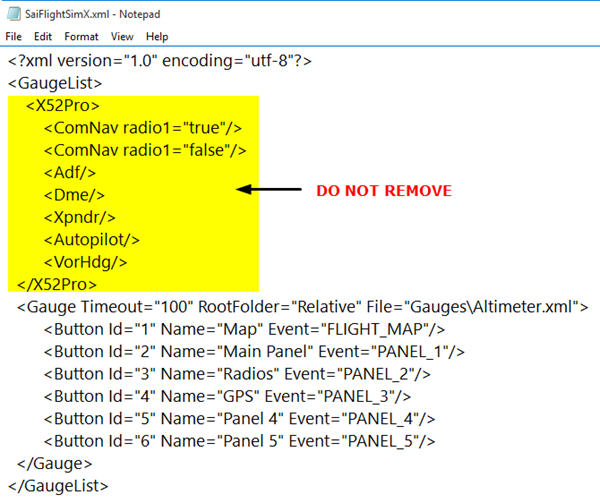
Sure, there could be other causes to the malfunctioning of the knobs and buttons on the FIP.
 FS Times
Hi Tom,
Is there a simple way to change the barometric units from in HG to hPa on the altimeter?
Thanks, SJ
LikeLike
Replace (A:Kohlsman setting hg, inHG) with (A:Kohlsman setting MB, mbar)
Tom
LikeLike
Hi Tom, thank you. But this doesn’t work and I am sorry but do not understand the whole concept. It seems that you need to read the numbers which are displayed from a image to show it on the FIP. also the difference between in HG and hPA is, that hPA is a 4 digit number with standard at 1013, vs. in HG which is 29.92 – actually two digit with two decimals.
I tried for hours but really cannot figure it out. The above mentioned settings are within 3 places in your gauge XML.
Regards,
SJ
LikeLike
Which gauge of mine (name & date) are you referring to?
Tom
LikeLike
Hi Tom,
thank you.
it is the C172_ALT_130815.
I guess this is the part
(A:Kohlsman setting MB,mbar) %
(A:Kohlsman setting MB,mbar) (A:Kohlsman setting MB,mbar) % – 100 * %
So if the display on the altimeter are ABCD (2992) then I guess the first part are the digits AB and the 2nd CD.
But not able to figure it…
SJ
LikeLike
Hi SJ,
I am sorry that there’s no simple way to change between Hg and hPa in this gauge version.
Tom
LikeLike
Tom,
not at all. I did’t expect you to fix it for me. I was just wondering if this is an easy task or not. I will figure it someday.
Regards,
SJ
LikeLike
Hi SJ,
Replied to you by email as well.
Tom
LikeLike
Hey Tom, did clean install of windows, FSX, and latest Saitek Drivers. So far, no issues to report, I do like the fix on the instrument assignments. Stock guages suck, when do you think you will have a mod done?
Sent from Outlook
LikeLike
Hi Bradley,
Sent you the package for manual installation. Check your mailbox.
Tom
LikeLike