
There are times that we may want to find out what Local Variables (LVars) are used on a specific aircraft for many reasons. If the developer doesn’t provide it, here’s a quick and simple way to generate a Local Variable list of the airplane, whether it’s a third-party or default aircraft.
During a flight session, call up FSUIPC from the top menu bar of the screen.
Then under the “Button + Switches” option, assign any button on your joystick or hardware accessories for the function of “List Local Panel Vars”, and click “OK” to save and exit FSUIPC.
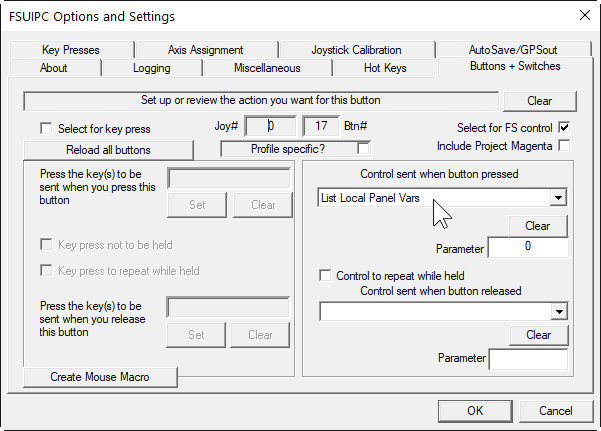
Then from now on, whenever you want to find out what Local Variables are being used on the aircraft you are flying with, just press the button with the associated function. FSUIPC will embed the Local Variables of the aircraft in its log file.
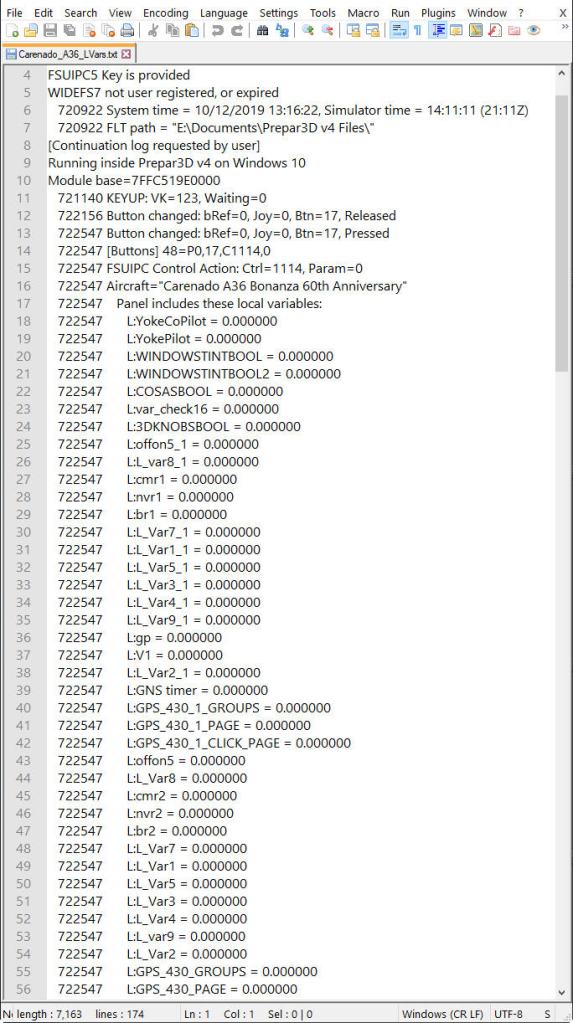
Just in case, the file (“FSUIPC4.log” or “FSUIPC5.log”, depending on the version you use) is stored under the “Modules” folder of your FSX or P3D directory.
Since the file could be big and long, you may click on “New log” under “Logging” option in FSUIPC before creating the list.
Or, it’s even better to assign a Hot Key in FSUIPC to “Starts a new log file” whenever needed.
Some of you might know the trick already.
If you don’t, isn’t the trick pretty handy ?
 FS Times