
My flightsim computer is built on the ASUS X99 Deluxe II motherboard with Intel i7 6850K CPU. Not the top highend nor the latest model but it works nicely.
However, it has an annoying problem that it seldom boots up succcessfully from cold and dark — sorry, no prime function boost here. Most of the time the system goes to Windows only from the second or sometimes the third or fourth startup attempt.
My computer and peripherals all have the latest firmware and drivers. The issue persists whether I overclock the PC or not.
I searched the Internet and found the issue isn’t uncommon especially among systems built on the X99 chipset running Windows 10, regardless of brand.
I tried many suggestions, such as unplugging all USB devices when booting the computer, disabling/enabling certain features in BIOS, etc.
None of them helps until recently I found the following tweak:
1) Go to Power Options under Control Panel.
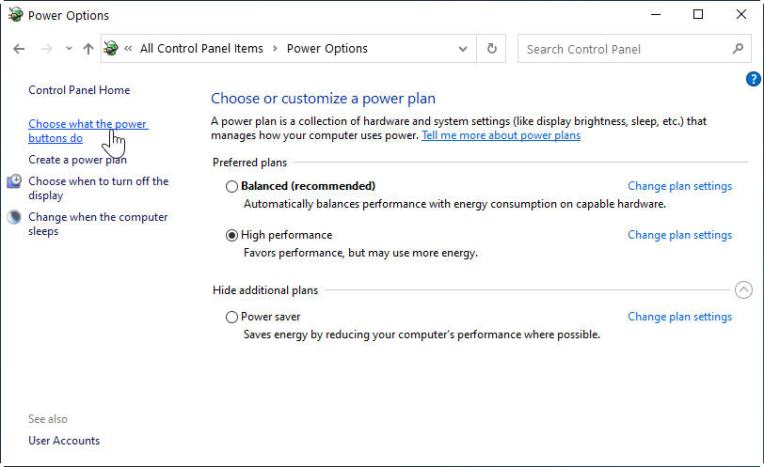
2) Click on “Choose what the power buttons do” on the left hand side.
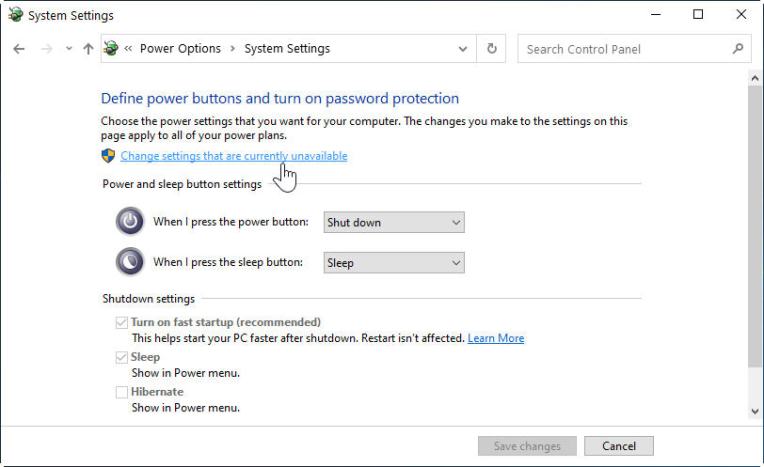
3) Click on “Change settings that are currently unavailable” to allow the changing of settings, if required.
4) Then, uncheck the box of “Turn on fast startup” from the Shutdown settings in the bottom part.
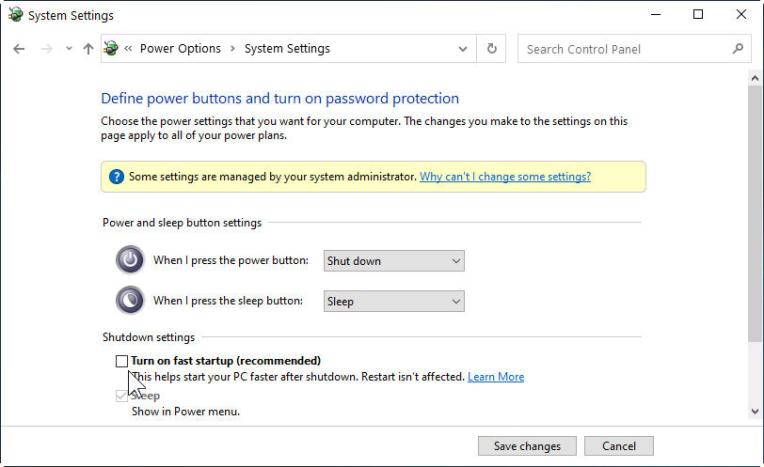
5) Lastly, click on “Save changes” to exit.
That’s all.
Although turning off the “Turn on fast startup” option does prolong the PC startup time a little bit (I guess around 10s), this simple tweak does finally solve the annoying issue for me for good.
 FS Times