
Received some feedbacks for my post yesterday regarding the under-par performance of MSFS on my computer. One of the concerns is the spec of my PC. It is as follows:
Asus Maximus VI Extreme
Intel i7-4770K OD to 4.0GHz
Corsair DDR3-2133 RAM 16GB
7 Samsung SSD Storages with various capacity
MSI GeForce GTX 780 x 2
Windows 10 Home 64-bit 2004
Surely not the latest and very high-end one but it’s still passes the minimum requirement listed by Microsoft. And it runs P3Dv4 satisfactorily in general.
Bad things don’t come alone. Last night I was checking the update status of the game but it was frozen somewhere in the checking process. After I stopped it, everything installed was gone.
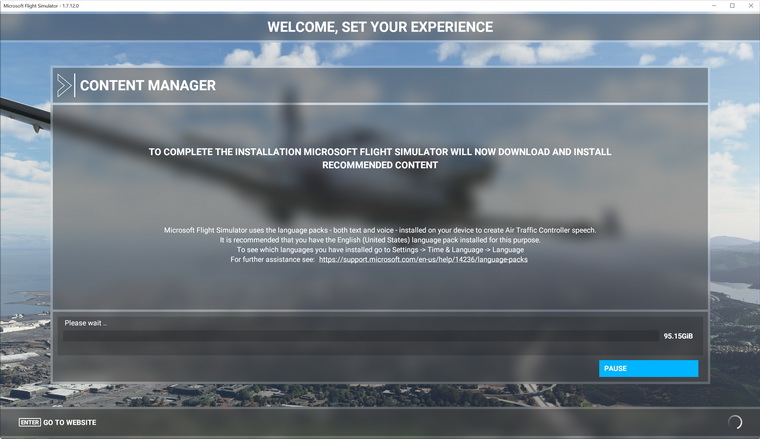
Since I have another better PC, so I decided to install MSFS onto it instead. Sadly, the game won’t proceed during the download stage for recommended content as picture shown below.
And now, it couldn’t be reinstalled onto my first PC again as well. The “Please wait…” message keeps flashing but doesn’t move on.
The spec of my second computer is as follows:
Asus X99-Deluxe II
Intel i7-6850K OD to 4.0GHz
Corsair 2133 RAM 32GB
4 Samsung SSD Storages with various capacity
Asus GeForce GTX 1080Ti
Windows 10 Home 64-bit 2004
The storage I assigned for MSFS has 400GB. All drivers were checked and updated accordingly. All USB devices (except essential ones like keyboard and mouse) are disconnected with Antivirus, Windows Defender and Firewall disabled.
Really has no idea what has gone wrong.
There are people reporting the same issues over the Internet, guessing the issue may be caused by server over load.
I hope so. For now, all I can do is wait and keep trying.
 FS Times
trying to run 2020, I have an i7, with 8 gig of ram, 1tb hard drive no solid state drive and this is the kicker i bought from New Egg what was supposed to be a nvidia gtx 970 but ran the diagnostics on it and it was a counterfeit video card. I trusted New Egg because i tried to get to video cards from e bay and both of them were fake nvidia also
LikeLike
I kind of had the same problem with dowloading 2020. It would get to 30 gig and then bomb out. I went to friend’s house and used his fiber internet connection with my x box account and downloaded all files in about one hour. put them on external drive and moved files to my computer but that did not work.
LikeLike
That’s good, Joseph. At least you have that downloaded at last.
Mine doesn’t start the process from the beginning at all.
LikeLike
Thanks for the article Tom.
I also looked at some review in the past weeks (months), to see if it is worth to buy FS2020.
So I’m realy looking forward in reading from your experiences.
In the comments I’ve read, there were already some items, that put me off, from buying FS2020 for now.
– You need internet connection all the time.
– You need a Microsoft account to use the program (big brother?)
– If you buy the DVD set, your first disk must always be in a DVD drive. This is a problem since my latest PC does not even has a DVD drive anymore. Nor a place to build one in the case. There are alternatives in other simulators : Why not a dongle as X-Plane does?
– The Dvd’s hold only the scenaries and airplanes, but the main program needs to be downloaded during installation. Quid long term support?
I’m still flying FSX with full resolution on 3 HD screens and X-plane 11 on the same configuration.This at 60 fps with most options in highest graphical definition.
My conclusion so far:
Unless FS2020 brings a plus value, and changes some user policies, I will keep enjoying this actual configuration..
;-)
At the price you stated yesterday , there is no harm in trying it out …
Success & happy simming! .
LikeLike
Totally agree. Really no need to go for it if you are happy with what you are having.
The FS2020 is more a game to me as it doesn’t fully compatible with the cockpit I built. At least not in a short time.
LikeLike
Nasty bug Tom, sort of remember that issue downloading some of the Alpha’s and Beta, cant remember how I got round it now to be honest … probably just re-booting and trying again.
Good luck.
LikeLike
Hi Colin, I really hope that you remember how you solved it. But as said in my update 2, the issue seems to be caused by something related to my account, instead of my PC.
LikeLike