
I am excited to inform you guys that FIP gauges under Logitech Drivers can actually be run properly in MSFS without the need of SPAD.neXt or other similar utilities available on the market. In other words, all existing FSX/P3D gauges in my store are MSFS-compatible ready, despite whether Logitech will have updates supporting MSFS or not.
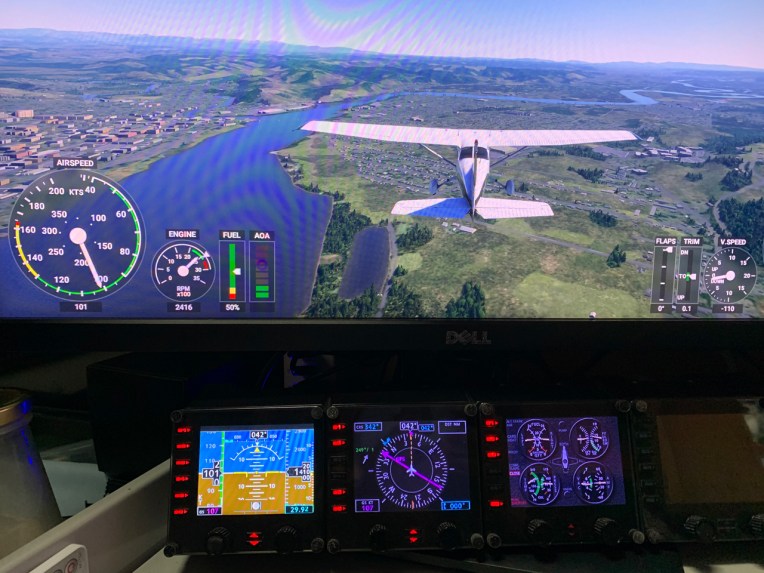
To run the FIP gauges using Logitech Drivers in MSFS, all you need is the new FSUIPC 7, just like you’ll need an FSUIPC to support FIP gauges in FSX or P3D.
The key lies on its feature supporting SimConnect that bridges communications between FIPs and MSFS.
But unlike the earlier versions which require you to include an FSUIPC link in the DLL.XML under fsx.cfg or Prepar3d.cfg directory, the FSUIPC 7 now runs like a regular app alongside MSFS.
Followings are the steps to activate the FIP gauges with FSUIPC 7 in MSFS:
- Run MSFS
- When the MSFS Menu Page is shown, turn on the Power of FIPs
- Run FSUIPC 7
- When FSUIPC 7 is loaded, run LogiFlightSimX.exe (or use GaugeSwitcher.exe to load up a gauge profile)
- Start a Flight Session, and the FIP Gauges will run normally.
- In case the FIP Gauges are not activated, press [ESC] key to the OPTIONS page and select RESTART in the bottom menu to reload the flight session.
- Similarly, if the gauges are not activated after you’ve changed to a new FIP profile via GaugeSwitcher.exe, RESTART the flight session again.
Currently I don’t have other Logitech panels installed in my setup, such as multi-panel, switch panel, etc., so I couldn’t tell if they work properly with FSUIPC 7 or not. Also, I haven’t tried the setup on a network PC yet.
Let me know if you’ve tried it and found it successful.
For those who got SPAD.neXt for running FIPs in MSFS recently, no need to feel regret because SPAD.neXt is still an advanced third-party driver coming with many sophisticated features that the default Logitech drivers don’t support.
To download the FSUIPC 7, you can google it on the Internet. It is free but it is still under beta test. In addition, it only works till the end of October.
 FS Times
Sounds good Tom! Screenshot looks awesome!
Best, Steve
LikeLike
Yeah, the gauges run smoothly without dragging MSFS.
LikeLike
Great news Tom, Thanks
LikeLike
I am glad too.
LikeLike
Been trying to get this to work, I have all my Saitek stuff working on FSX, but still cant after installing the Logitek plug in and tried FSUIPC7 to get them to run MSFS2020, I wondering if I have to migrate everything over from Saitek to Logitek?
LikeLike
I have no idea, Eddie. Whatever, better make a backup of your system first before proceeding to migrate everything to Logitech. Just in case.
Tom
LikeLike