
I pulled out my Logitech Panels from storage earlier today. After a few hours testing, they are successfully communicating with MSFS via FSUIPC 7, like the FIPs.
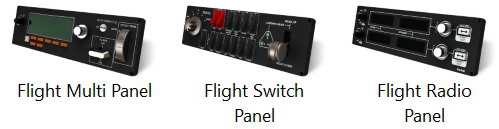
Followings are the steps I found the most effective:
- Run MSFS
- When the MSFS Menu Page is shown, (turn on the Power of FIPs, if you have them)
- Run FSUIPC 7
- When FSUIPC 7 is loaded, run LogiFlightSimX.exe (or use GaugeSwitcher.exe to load up a gauge profile if you have FIPs)
- Start a Flight Session (the FIP Gauges will run normally)
- Now connect the panels to the system, they will communicate with MSFS
I know connecting the panels in the last step seems a bit odd in the process, but it works nicely with least error.
If you are successfully connecting the Panels via a different start up process, please share with us. I appreciate it.
 FS Times
Logitech has now released a MSFS 2020 Plug-in for all Logitech Saitek Pro Flight Panels including the Radio Panel, Multi Panel, Switch Panel, and the Instrument Panel. Apparently now SIMCONNECT, FSUIPC, and other 3rd party plug-ins are no longer required to use the Logitech Panels with MSFS 2020. All of the Logitech panels will now be recognized by MSFS 2020 if you download the Logitech Plug-in from the Logitech Support site. Just search for the Panel that you have and in the downloads section you should find the new plug-in. Go to here for download
https://support.logi.com/hc/en-gb/articles/360024692354–Downloads-Flight-Multi-Panel
LikeLike
That’s great. Thanks very much, David.
Will checkout their web link later.
Tom
LikeLike
I can’t get the latest driver to work with FSS 2020 after Sim update 5 and World update 6. Are you aware of a fix?
LikeLike
No. The drivers work fine on my system and I don’t hear others reporting issue with it.
It couldn’t load or what ?
LikeLike