
Just installed the Logitech’s Plugin for Microsoft Flight Simulator earlier today. The content of it is saved onto the C:\Program Files\Logitech\Microsoft Flight Simulator Plugin folder.
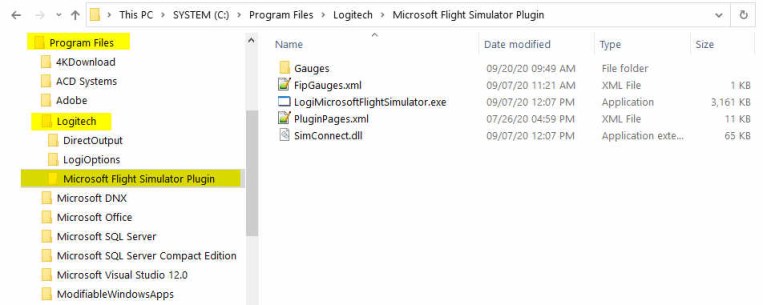
The Plugin works more or less the same as the company’s Plugin for X-Plane — once it is installed, you can forget about it. The plugin will activate automatically with the simulator, allowing panels to communicate with MSFS accordingly.
To use my gauges with this new Plugin, just further copy the 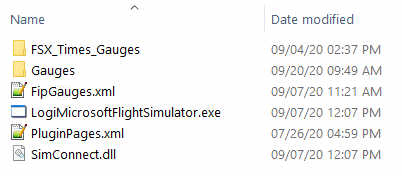 FSX_Times_Gauges folder and the LogiFlightSimX.xml file from C:\Program Files (x86)\Logitech\FSX Plugin to this directory, and rename or copy the LogiFlightSimX.xml to replace the PluginPages.xml file. That will do.
However, although MSFS and the Plugin remember the gauges on each FIP, the information is not saved onto the FipGuages.xml (the spelling is used as such) in the folder.
In other words, unless I don’t change gauges at all, I’ll need to press the up/down buttons on each FIP to load up the correct gauge, every time I change the content in the PluginPages.xml. That’s odd and clumsy.
So far I have yet figured out where the gauge information are saved but I believe the issue will be solved eventually.
For the time being, one temporary solution is to make use of the FSUIPIC 7 mentioned in Post 621 — letting the FSUIPC to control the gauges and the Logitech MSFS Plugin to control the other panels. The combination seems work without any problem.
If anyone knows where the gauge information are saved with the Plugin, please let me know. Appreciate it.
 FS Times
Hi Tom, more a bit of advice needed from you than anything else just now, but feel free to publish if you like. I really don’t mind if it helps others too.
Tried the Logitech’s MSFS 2020 Plugin for my original Saitek panels, 5 of them , 2 x Radios, 1 x Switch, 1 x Multi and 1 x BIP … seems to work OK … still have 12 x FIP’s but not using them any-more, plan to sell them soon .. we all go different routes I guess?
My question really is this, for P3Dv5 + hotfix, can not for the life of me get my above mentioned panels working in P3Dv5.1 with using Logitechs latest P3D FSX plug in download for 64 bit, tried some work around I searched on via comments on Avsim forums, still not working, have now installed P3Dv 4.5 latest version again along side P3Dv5 + hotfix and tried installing the Logitech plug in 64 bit download again, still doesn’t work in either of them?
Any idea’s?
I still maintain and sometimes use FSX Acceleration and Logitech plug in works for this, still have FSW installed and out of interest installed Logitech panel plug in for this old sim too … panels work fine in both sims … I just cant get the Logi plug in working for P3D v 4.5 or V 5 latests versions?
Thanks.
LikeLike
Hi Colin,
will reply you by email.
Tom
LikeLike