
One thing I in particularly dislike in MSFS is the way how it handles Control inputs.
In FSX/P3D and X-Plane, all you need to do is simply pressing the buttons or switches on a controller, the programs will recognize them for the functions you want to assign them to immediately. On the contrary in MSFS, you’ll have to find out the mappings of the buttons and switches on a controller or accessory first before you really know which buttons or switches are which to assign them to the intended functions.
That’s not just user-unfriendly, it’s pretty awkward. Hope that it’s going to change in future update.
Anyway, here’s the location where user configured control data are stored on my computer — “C:\Program Files (x86)\Steam\userdata\270793180\1250410\remote“.
My Steam Library and MSFS are on F:\ drive. It took me awhile to find out that the input data are stored on C:\ drive instead.
Nevertheless, your location might be different from mine, too. But they should still be somewhere a few levels below the userdata directory under your Steam install.
Via these input files, you could manually edit the buttons or the switches or the functions for a controller or an accessory.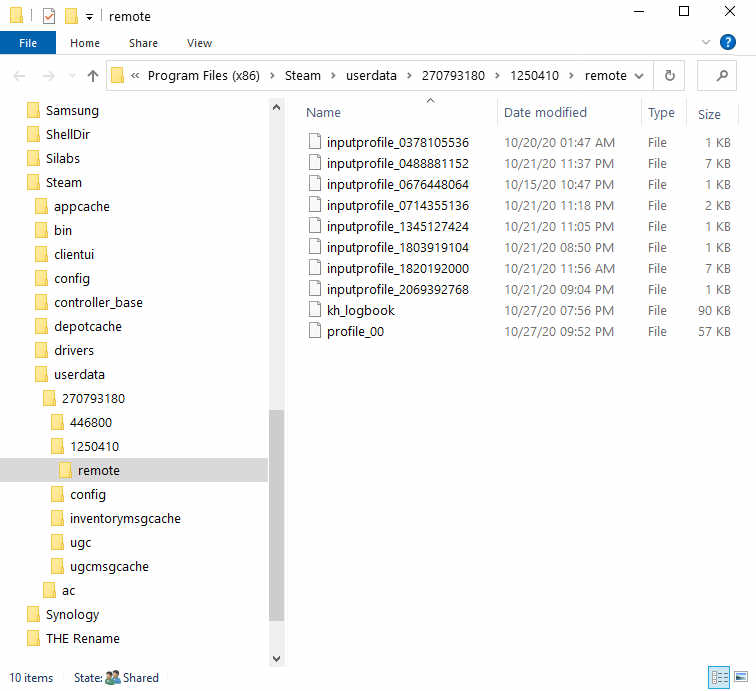
This applies to MSFS under Steam in my case. Not sure if it is the same for MSFS under Xbox or Microsoft Store.
If it is not, try searching for “inputprofile” on your computer. That should be the keyword to find out where the locations of your control data files are, if they do exist under Xbox or Microsoft Store structure.
Edit: a comment from David reported that he couldn’t find the files in his Windows Store install. Not sure if others are the same.
 FS Times
Did a search for “inputprofile” on my PC and did not find any files. Windows store install
LikeLike
Hm…seem like things shouldn’t be taken for granted.
Thanks for the note, David.
Tom
LikeLike