
When I installed the Logitech’s MSFS Plugin onto my two computers (one new, one rebuilt) a couple of weeks ago, I got puzzled because all my Logitech’s Pro Flight Panels worked nicely with MSFS, except the Flight Instrument Panels (FIPs).
There were nothing on the displays — no serial numbers, no product images. All screens were blank. And the most frustrated was Windows recognized them all and said they worked normally.
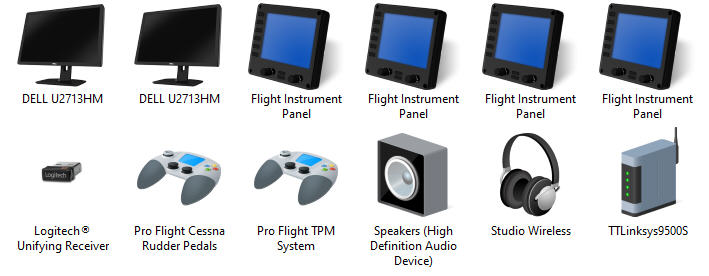
On my last computer I just replaced, the MSFS Plugin works seamless without any issue. I just have the Plugin installed and off it goes.
It took me nearly a day to figure out that I simply needed to install the earlier FIP driver from the company as well.
There are no mentioning in the description of the MSFS Plugin nor in the information about the FIP Drivers. How confusing !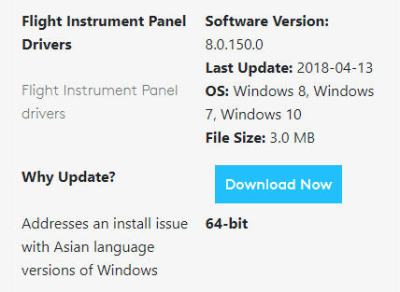
The same thing baffled a friend who asked me why the FIPs on his new computer didn’t show anything at all.
Obviously we both got misled by the name of the Plugin — assuming that it would handle everything including the FIPs by itself.
So, if your system is already having the Logitech’s FSX/P3D plugin or driver installed, further adding the MSFS Plugin would allow you to continue using FIPs in MSFS environment with no problem.
However, if you are building a new system for MSFS, remember to include the earlier FIP driver, i.e. the Flight_Instrument_Panel_x64_Drivers_8.0.150.0, since the Logitech’s MSFS Plugin won’t work with FIPs alone.
 FS Times
I have re-installed the MSFS Plugin, de-installed the FIP’s, unplugged them, dowonloaded the drivers, plugged the FIPS back in. Nothing changed, so I have still blackout FIP’s
LikeLike
Hi Nick,
Open “Programs and Features” under Control Panel, check if DirectOutput and Microsoft Flight Simulator Plugin from Logitech are installed
If yes, what are the versions of them?
If not, install them again.
Please reply to the email I have just sent to you.
Tom
LikeLike
I have exactly the same problem
LikeLike
Sorry to hear that. I bet you have that solved.
Tom
LikeLike
I have not found a solution yet. Is there one ?
LikeLike
Have you installed the FIP driver besides the MSFS Plug-in ?
LikeLike
I tried to download drivers from the Logitech site.
On the PC hardware configuration , I van see the FIP’s and they show yellow triangels.
LikeLike
I just discovered this yesterday. Thinking the same that the MSFS Plugin was all I needed, I uninstalled the FSX plugin etc and broke the FIP’s, plus the Logitech/Saitek Flight Switch Panel and the Radio Panel.
After re-installing the Flight_Instrument_Panel_x64_Drivers_8.0.150.0 as above and in my case also the Flight_Panels_x64_Software_8.0.150.0.exe all is well again.
LikeLike
Glad you have that solved. It’s really confusing, isn’t it?
LikeLike