
I got some pretty nice missions downloaded for MSFS. But unfortunately they are not good to my eyes since the legs are scheduled to start in early morning when environment and surrounding lights are dark, especially in rural areas.
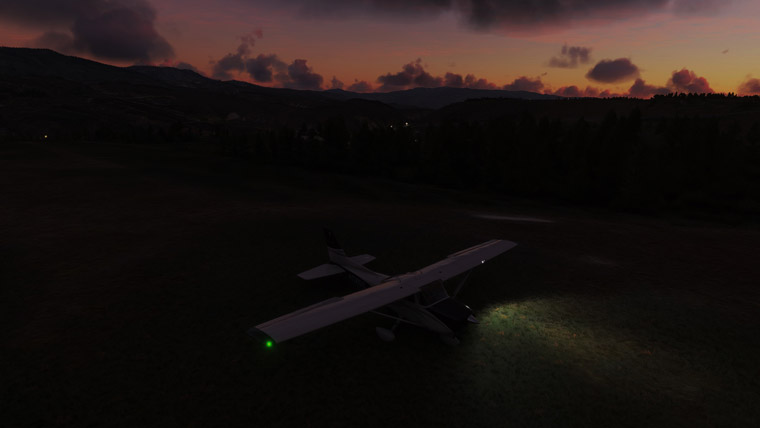
I’ve been suffering these bittersweet scenarios for months until it occurs to me that I could actually brighten up the view by altering the time of day in an easy way, instead of tampering the original files of the missions.
All I need is simply changing the “Local time” under “Options” in Developer 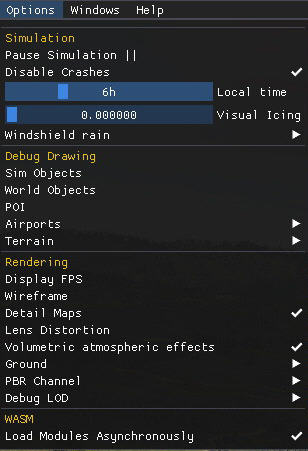 Mode.
Mode.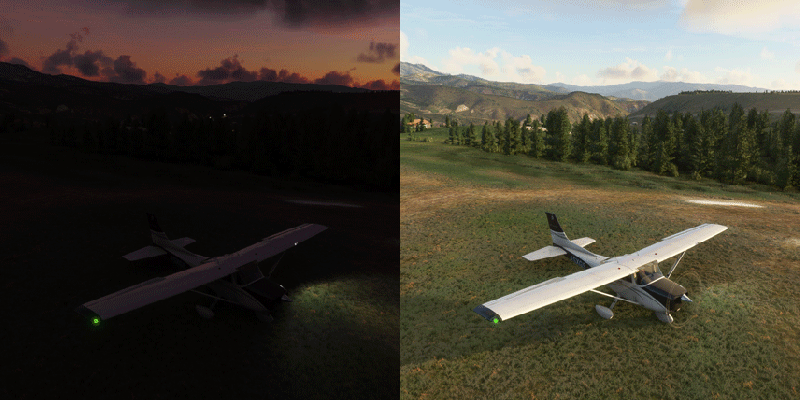
The tweak is also good for official Activities in MSFS in general. With the help of the Developer Mode, one can even change the aircraft being used as well.
If you are stuck in similar dead ends, it’s really not that difficult to get out of box.
 FS Times
euh sorry, is this a tweak?
you can always change the time of the day under the weather settings on the control bar.
it’s the same as changing under options.
LikeLike
It’s a tip, rather than a tweak indeed. But do note that most missions disable the weather settings on the control bar, meaning you can’t simply change the time and weather as you like. Under such circumstances, the developer mode is the only option.
LikeLike
Hi Tom…a little off-topic but I could not figure out how to otherwise
contact you…
Have you seen the first helicopter for MSFS?…a Airbus/Eurocopter
H135…see link below…at a pretty early stag, but the developers are
progressing fast with new versions often…worth a look…flies decent…
https://flightsim.to/file/8970/airbus-h135-helicopter-project
Cheers, John H.
LikeLike
Thanks John.
The helicopter looks good. Hope there will be R22, my favorite, soon.
You can contact me to my email tom.fsxtimes@gmail.com, if needed.
Tom
LikeLike
Hi Tom…they are making progress on Heli’s for MSFS…
your email address noted…thanks, John H.
LikeLike
Looking forward to them. Thanks
LikeLike