
While I was cleaning up and finalizing my work PC with new components yesterday, I discovered an effective way to increase FPS and smoothness of MSFS instantly.
The trick simply involves the changing of a few options in the game.
In the beginning of the video, the FPS gained from my previous settings is about 50. It wasn’t bad really. MSFS general performs decently on my i9-1080Ti system.
But after I set the FRAME RATE LIMIT to 30 and turn the V-SYNC OFF, the FPS instantly jumps to around 59. It further goes up to 63 when the RENDER SCALING is lowered to 90.
That’s a 13-FPS improvement by simply adjusting these three parameters. And the result is seeable.
Since V-SYNC is off, I set DISPLAY MODE to WINDOWED so as to minimize the screen-sheering impact. I also enable the auto-hide taskbar feature and choose a dark grey color for the window title bars to mimic a full-screen appearance.
I dare not say my system is superb and faultless now. But all these changes give me a good new balance between quality and performance.
And I am really smiling after all the wrestlings with MSFS over the months.
Followings are the other settings under GRAPHICS category I am using currently. Note that they do impact the final FPS and performance of MSFS.
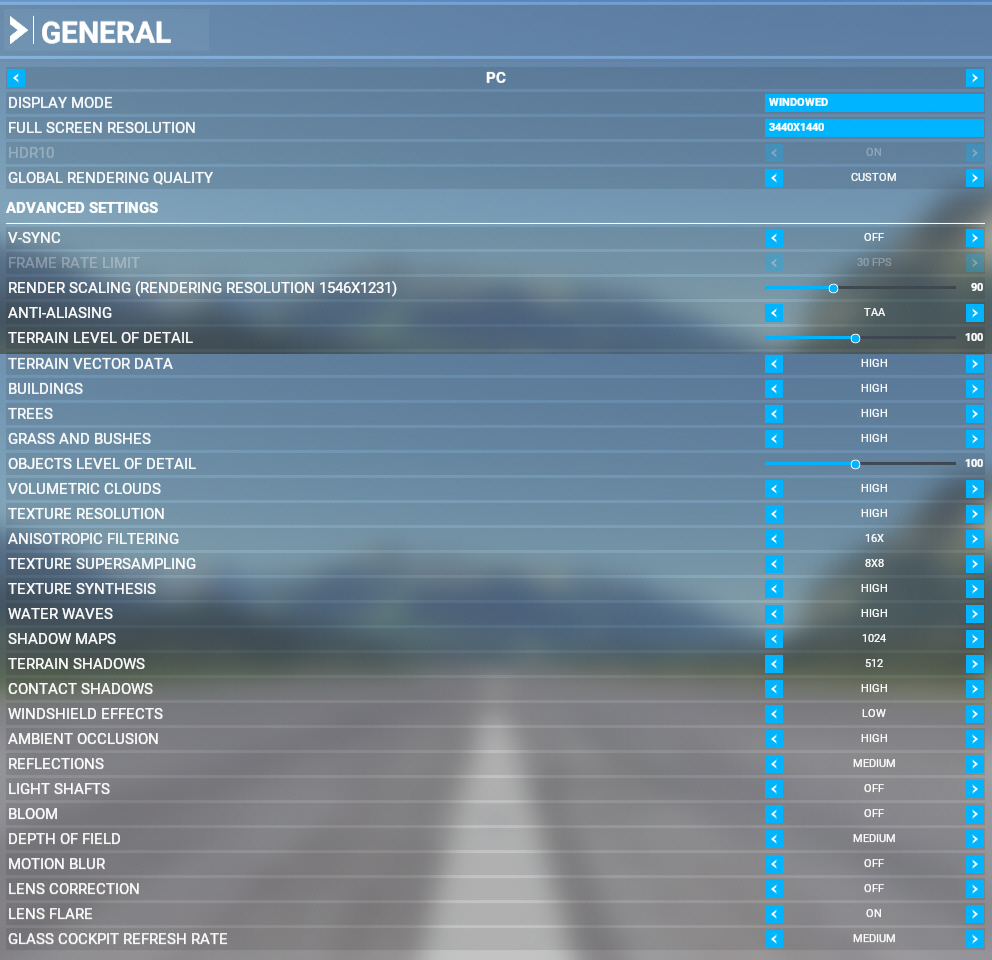
Again, here are the keys:
- FRAME RATE LIMIT = 30 FPS
- V-SYNC = OFF
- RENDER SCALING = 90
- DISPLAY MODE = WINDOWED
They work similarly well on my another PC with three big TV screens. Hope they work for you as well.
Specs of my PC are as follows:
- Motherboard: Asus ROG STRIX Z590-E Gaming Wifi
- CPU: Intel i9-11900K
- CPU Cooler: ThermalTake Floe DX RGB 360 TT Premium
- RAM: Kingston 64GB 3200MHz DDR4
- Graphics Card: Asus ROG Strix GTX 1080Ti
- SSD: Samsung 970 EVO Plus 500GB M.2 for Windows System
- Power Supply: Seasonic Prime 1000PD PSU Platinum
- OS: Windows 10 Professional
- Case: Be Quiet! Pure Base 500DX White
 FS Times
Hi Tom, Thanks for these performance tips. Will see how they perform on my system. Could you tell me about the information readout at the top right of your screen. Is it a separate program and what information does it provide?
Many thanks for all the work you put into making flight simulation an immersive and continuously expanding hobby.
Regards William.
LikeLike
Sure, You press ESC to go to general and then choose to activate developer mode. You’ll find the FPS option there
LikeLike
Hi Tom
Thanks for these FS2020 performance tips, its great you provided screen shots too. I’ll use these and compare with mine very soon.
As regards your PC spec Tom, looks awesome, but am sure I read you had bought an RTX 3090 and your rig spec says an NV 1080Ti now? I must have missed an update I guess? sorry. Did manage to get an RTX3090 24GB here , not on release day … but not too long after, its a stock clock Zotac one, but perfectly happy with it and 5 year warranty, really had to keep my ear to the ground to find one, but did before Christmas UK, awesome card and at 4K resolutions.
Upgraded everything pretty much for new build Tom, was always an Intel fan too, but decided to try new high end AMD Ryzen CPU this time and got a Ryzen 5950X 16 core 32 thread CPU … not on release day … because they all sold out very fast, but was trying hard and was not too far down the queue on hardware order, and new rig inc the RTX 3090 was built before Christmas, 64 GB DDR 4 3600 Mhz ram too, even tried two motherboards, an MSI one first and then a good Asus board, all is moved into a new full tower case and I’m very happy.
Thanks again for providing FSX Times for us Tom, always find useful tips here.
LikeLike
You’re welcome, Colin.
Yes, I got the RTX 3909 card and it is on my other PC mainly for flightsim only. I mentioned in the first sentence in the story that the PC is my work station and mentioned the other PC with the three TV screens as well. It’s not clear…I know…haha.
Except the graphics card and the monitors, both systems are in similar spec and configuration.
The AMD CPU sounds excellent too. I thought about it before but just to play safe with the Intel one which I am more comfortable with.
Regarding the settings, hope it works good on your system as well. If not, share yours with us. We’re all looking ways to improve our rig, and flight simulation is always a demanding beast not easy to tame.
LikeLike