
Yesterday, I got the Trim Wheel Pro from Flight Velocity, which I am planning to replace the Saitek Cessna Trim Wheel which has been in service for many years.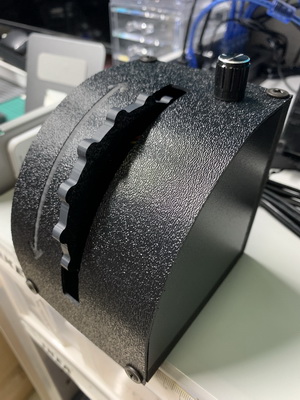
A unique feature that distincts it from the Saitek one is an adjustable control knob on the unit, thru which users can vary and finetune the elevator trimming pitch during a flight.
After Logitech chopped the production of Saitek Cessna Trim Wheel since its acquisition, there aren’t similar trim wheels on the market one can find for a long time.
Is this Trim Wheel Pro a good replacement ?
How does it perform ?
Is the adjustable knob useful ?
Stay tuned. I will write a review of it in the coming week or the week after when I get familiar with it.
–
 FS Times
I bought the original FV trim wheel about a month before the new one was introduced (DANG IT!!!!!). I’m very happy with it and after some research and playing around, it works pretty well for me. I will admit I never had a physical trim wheel prior to this, so have no reference to the Saitek (always just used the keyboard shortcuts for trim). Interested in hearing your experience with this trim wheel.
LikeLike
Hi Jenny, I saw that too. Since the new one was coming and I got the Saitek one, I just waited for the new one, hoping that it works better for me. Will see how it goes.
LikeLike
I have both trim wheels, and do prefer the Saitek. To me, it has a better feel. (It was more expensive, and sadly discontinued.)
The sensitivity knob on the Trim Wheel Pro does work, but I found after finding the “sweet spot” that worked best for me, I didn’t touch it again — just put a piece of tape to mark that position. (In your testing, please check if you can forego the control dial and adjust the sensitivity settings on the simulators you are using. I found I had to do a little tweaking of both to make the trim responsive yet smooth.)
That said, one common problem I have…
For those of us with G1000 hardware cockpits, part of the pre-flight is the setting of the trim wheel to sync up with the simulator. This is a pain since we have to switch to the cockpit view, sync up the trim, then return to the non-instrument view. For my C172 “steam” gauges, you have a trim readout on the tachometer FIP gauge, and is easy to do in pre-flight. But for my C172 G1000 cockpit I only have “backup” auxiliary FIPs for airspeed, attitude, altitude and wet compass. (If you have a G1000 setup, try putting your trim readout on the C172 altitude FIP and see if you like it.)
LikeLike
Thanks Jim. You are right that the Saitek one is more robust. Anyway, will see how it goes.
LikeLike