
Perhaps you have encountered similar situations before: the performance of the simulator deterioriates as time goes by. In the end, you’ll have to tune it again. I just did about a week ago.
Followings are what I set at present:
| nVidia Drivers | Reinstalled – As Clean GeForce Experience – Removed |
| nVidia Settings | Power Management Mode – Prefer Maximum Performance Others – Default |
| Windows Settings | Game Mode – ON Xbox Game Bar & Captures – OFF Hardware-accelerated GPU scheduling – OFF |
| CPU Priority | FlightSimulator.exe – High via Prio (Post 714) |
And the Graphics Settings in MSFS for my two computers:
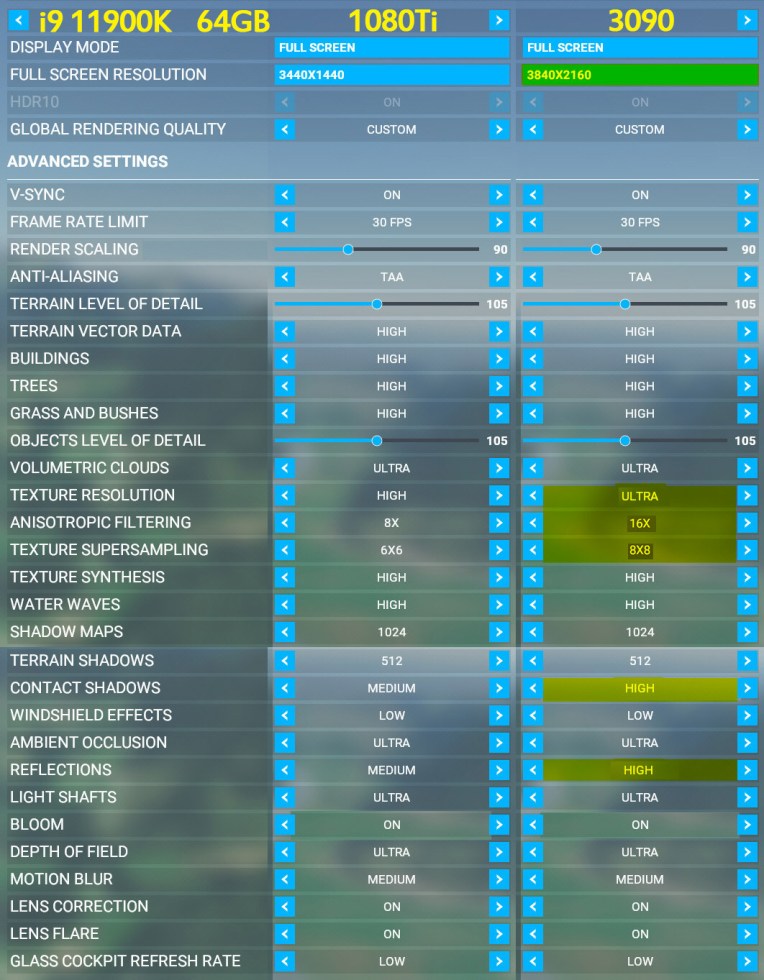
Besides the Hardware-accelerated GPU scheduling is now turned OFF, I also toggled V-SYNC to ON again, which is the opposite I suggested in my Post 679 in April.
In addition, my Frame Rate is kept limited at 30 FPS, which out-performs 60 FPS significantly.
Since there were many updates in Windows, Steam and MSFS since April, it’s possible that somethings in these updates degrade the performance of my last settings.
Anyway, my two computers are now generally stutter-free except in some extremely dense regions, like the areas around Los Angeles airports (KLAX).
Not sure if I have to tune my systems again after the next World Update next month.
 FS Times