
No idea where to fly to today? Here’s the flightspots I ran into this morning which offers suggestions to many scenic places around the world in MSFS.
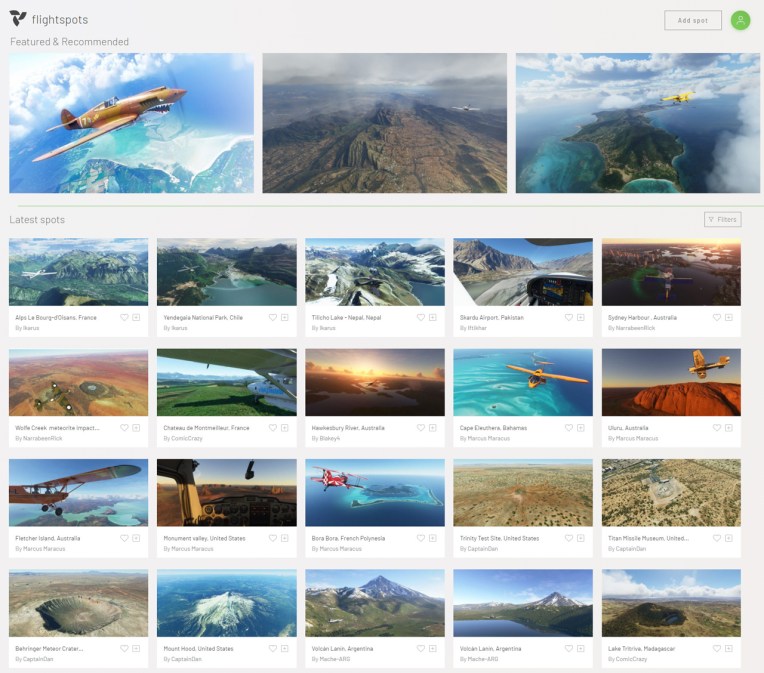
All you need to do is select the location of your interest, and then copy and paste its coordinates into MSFS. That’s all.
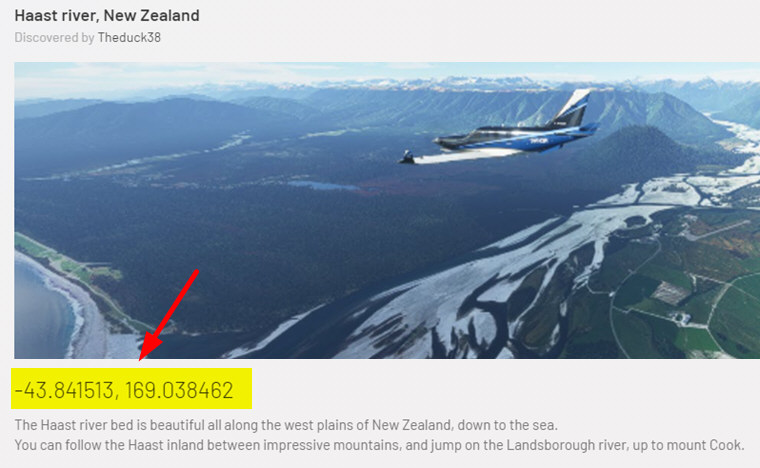
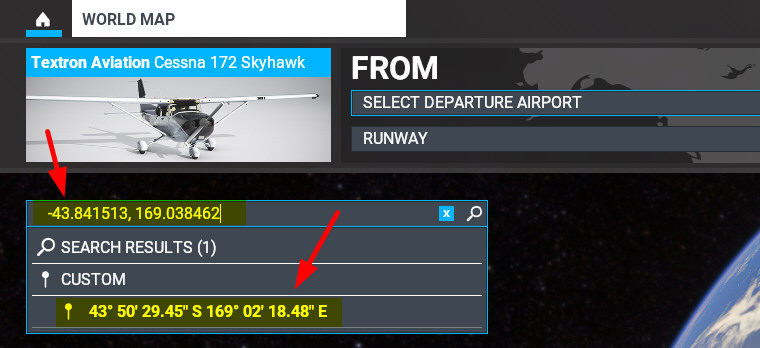
EDIT: The mouse’s right click doesn’t work in the search bar in MSFS. Use [Ctrl-V] to paste the coordinates instead. Use [Ctrl-C] to copy, just in case.
The coordinates should work fine in FSX, P3D and X-Plane, too.
Happy Flying
 FS Times
Just back from a few days of holidays and found this. That’s a really cool finding, just bookmarked it.
Thanks and kind regards, Michael
LikeLike
Welcome back.
It’s nice to get away and take a break.
LikeLike
Hi Tom…dove into FlightSpots yesterday…unfortunately, I found several instances
of: inaccurate location co-ordinates (many visible to the naked eye); and
location coordinates that are not near the intended scenery making it very
difficult to find the intended scenery…I have contacted the developer and
I hope he will look into it and fix things…I’m not sure he has been verifying
that the submitted co-ordinates are accurate before posting…still, a great site
which I hope will only get better….
John H.
LikeLike
Yeah, I found the same on some locations as well.
But as you said, it is still a great site to find exciting locations.
Glad that you report it to the developer.
Tom
LikeLike
Maybe that’s intended, like in a hide and seek game. ;)
LikeLike
I hope not…not much fun for me….ha ha….
LikeLike
[Control-C] for copy?
LikeLike
Yes, you’re right. A Typo.
Ctrl-C for copy. Ctrl-V for paste.
Thanks John
LikeLike
Great work educating us about the finer points of our Sims!
LikeLike
You’re welcome, John
LikeLike
Hi Tom…trying to use FlightSpots…I can copy their coordinates
off their website but, for some reason, cannot paste them into
MSFS…I looked online a bit but not help…any thoughts?…I am running
MSFS store bought on a powerful gaming computer under W-10 fully
updated, in windowed mode and using Developer mode…a mystery
Any help will be appreciated…
Thanks, John H., Houston, TX, USA
LikeLike
Hi John, the mouse right click doesn’t work. Use [Ctrl-V] to paste instead, and
[Ctrl-A][Ctrl-C] to copy, just in case.Tom
LikeLike
Hi Tom…you are right again!…thanks so much and
please excuse the tardy reply…appreciate your help,
as usual…
John H.
LikeLike
You’re welcome. John
Tom
LikeLike
Great find! Thx.
LikeLike
Happy Flying
LikeLike