
With the improvements brought by the MSFS Sim Update 5 (SU5), I can push many graphics rendering options further to the higher ends.
However, I decided to make changes to only four of them in the end because I don’t see any noticeable benefits of changing the others as well. Therefore, I’d rather keep them as they were so as to grasp more power leveage on hand for the running of the simulator as a whole.
Following are the Graphics Setting updates for my 1080Ti computer (3090 to come later) with the SU5. 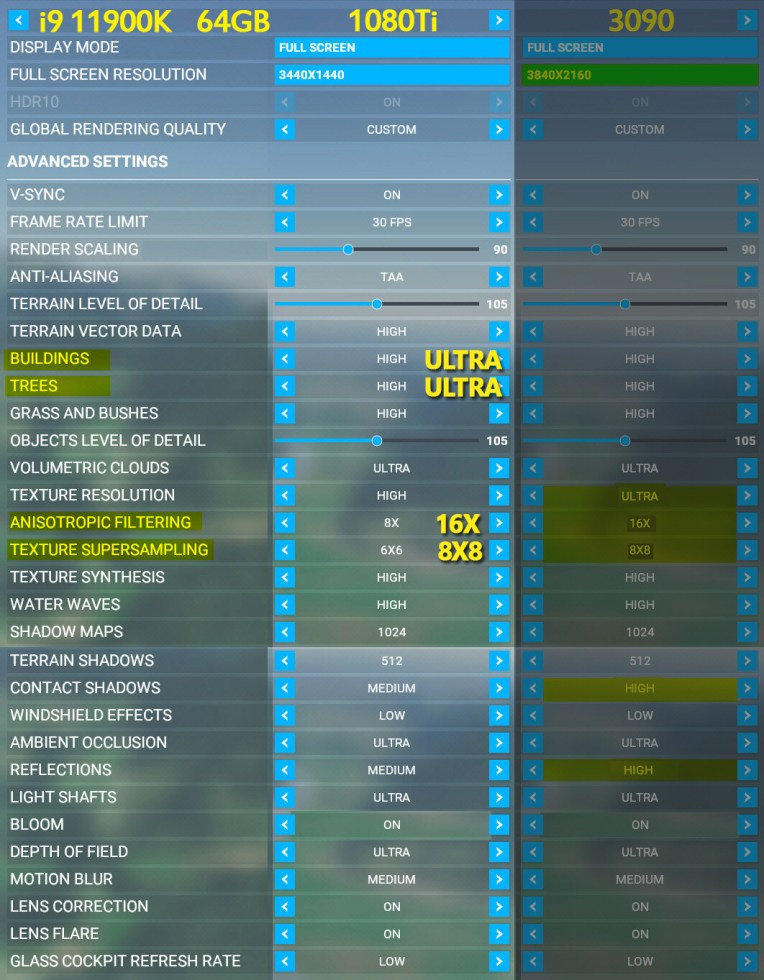 Note that I found by increasing the Anisotropic Filtering and Texture Supersampling alone here won’t get rid much of the aliasing come with the SU5.
I will need to take associated antialiasing adjuments in nVidia Control as mentioned in last post for the best result.
For my 3090 system, I believe I will take the same approach as well, rather than maxing out everything, I’ll keep the most as long as they are appropriate.
 FS Times