

Setting CPU priority for MSFS to High does improve the performance of the Simulator. Instead of using third-party utilities, such as “Prio-Process Priority Saver” and “Process Hacker” to change the CPU priority as reported in Post 714 and 726, Nicolas Bouesnard in France sent me a registry tweak that achieves the same result.
Here are the steps:
- Start RegEdit.exe
- Go to => HKEY_LOCAL_MACHINE\SOFTWARE\Microsoft\Windows NT\CurrentVersion\Image File Execution Options\
- Create a subkey => FlightSimulator.exe
- Create another subkey under it => PerfOptions
- Create a REG_DWORD named => CpuPriorityClass => set to 3
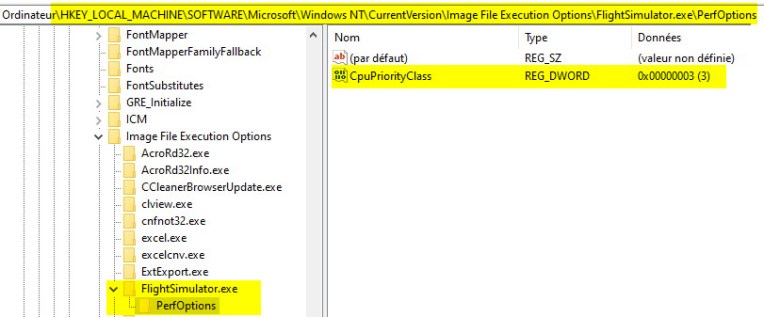
Nicolas said the tweak works like a charm on his Store version.
I tried it earlier and it works similarly well on my Steam version.
BUT NOTE that since the tweak involves changing system registries, don’t do it if you are not comfortable with it. It’s on your own risk.
Thanks Nicolas.
–
 FS Times
It works! Thank you!
LikeLike
Glad that it helps
LikeLike