
I’ve been using My ReShade Settings for over 18 months satisfactorily. However, after the recent New Zealand update, I found the monitor display a bit more pale than before. I am not sure if the update was the cause. The display looks normal while running other apps.
To counter the paleness, I adjusted my ReShape Settings accordingly as follows:
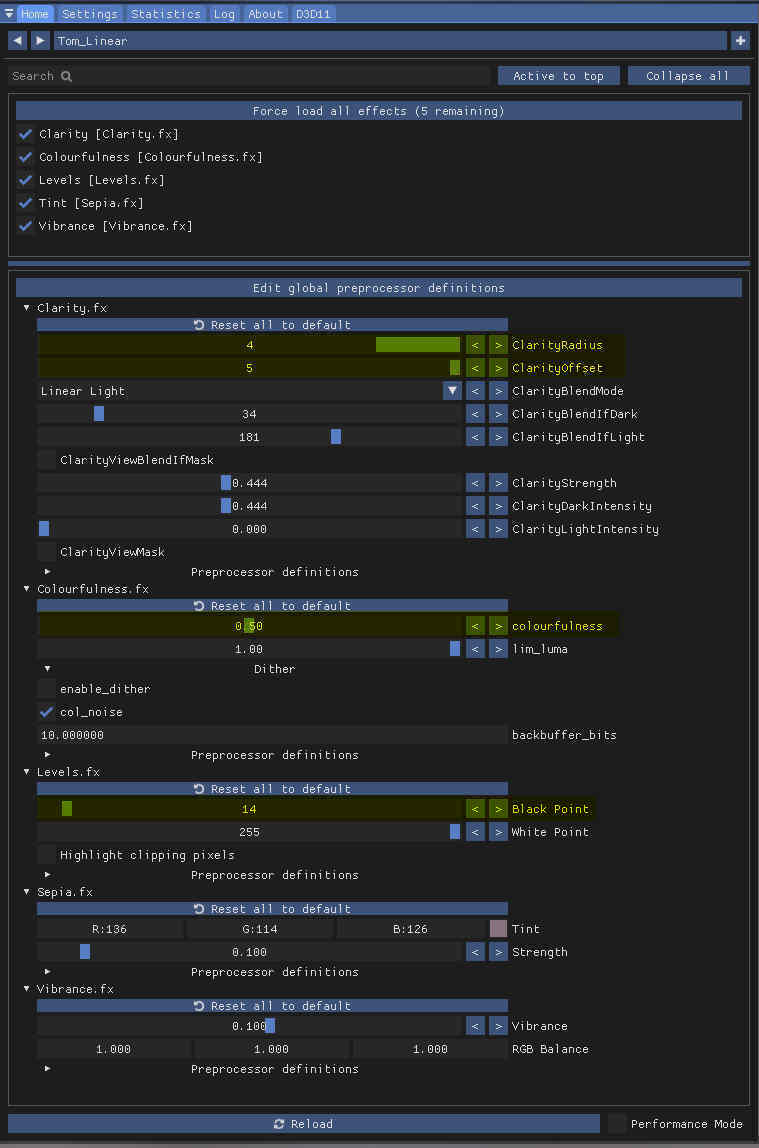
The changes are basically increases to some of the original settings to make it more stand out:
- ClarityRadius from 3 to 4;
- ClarityOffset from 4 to 5;
- Colourfulness from 0.44 to 5; and
- Black Point from 7 to 14
BTW, I am still using the older ReShade version 4.9.1 as the newest version crashes the display when it is activated.
==========
—
—
 FS Times