
After the recent Sim Update 12, some of my nVidia Control settings have been modified a little accordingly.
The Shader Cache Size in the Global 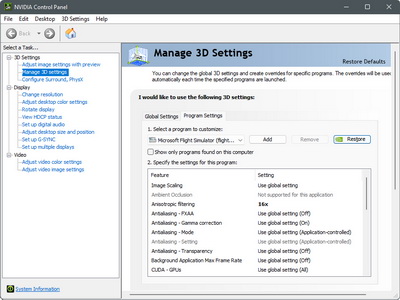 Settings, for one, has been changed to 10GB from the “Driver Default” which is set to 1GB.
The increase is based on an assumption to avoid slow startups, performance issues and stuttering once the cache size is reached.
And second, the Monitor Technology options in both the Global Settings and Program Settings have been changed to “Fixed Refresh“.
As from the description in the nVidia Control panel states, the “G-SYNC Compatible” option is best for demanding games with highly variable FPS. Since MSFS is the only game in my system and I don’t see its FPS fluctuating greatly, I therefore set it to “Fixed”.
The results from both changes seem to bring additional enhancements in smoothness.
You can find the details of my nVidia Settings in full here.
By the way, I found some people on the Internet who suggest MSFS users should delete the nVidia DXCache and GLCache completely after each MSFS update.
I dare not say their judgements are wrong. But if your system works normally as usual after the update, my advice is: DON’T DO IT !
I had a bad experience after deleting these Caches and it took me weeks to recover my system back to normal from the “deletion”.
However, it may worth a try if you encounter unknown issues after the update.
Of course, your mileage may vary. And I am afraid “Don’t Think Twice, It’s Alright” may not be a good idea here.
==========
- See My MSFS Graphics Settings
- See My ReShade Settings
—
—
 FS Times