
In the past, I’d been deciding my Graphics Settings based on trial and error. To be honest, I was quite happy with the results of what I achieved in general.
Last month, I decided to give the Nvidia App a shot to see how far my flight simulation system performance it can take. I was glad to find out the optimized recommendations by the App, both for the FS2020 and FS2024, were not far off from what I anticipated.
Followings are the latest upates of my FS2020 and FS2024 Graphics Settings after repeating adjustments for optimum results from my rigs. They are put side-by-side for quick comparisons:
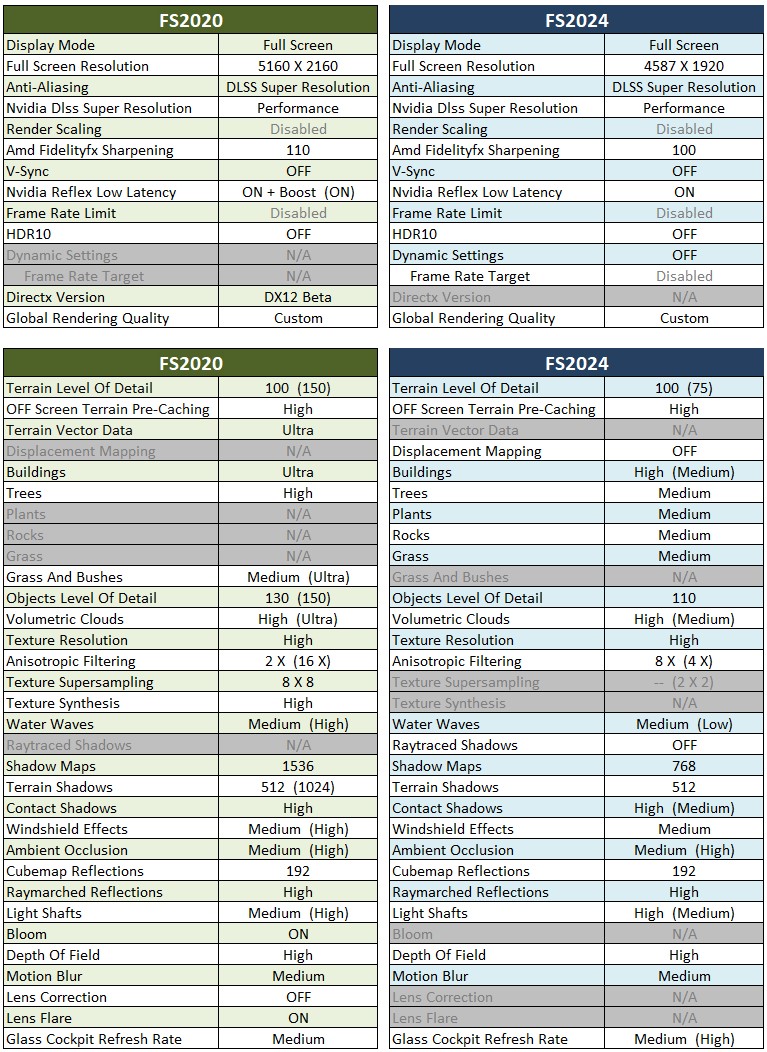
The values in brackets are the optimized values recommended by the App. Those values without brackets mean that they are using the same values suggested by the App.
Hardware of my system are: i9-11900K system with GeForce RTX 3080Ti card and 34-inch (3440 x 1440) Mi monitor.
Nvidia driver running is 572.83; FS2020 is 1.38.2.0 with SU15; and FS2024 is 1.3.23.0 with SU1.
==========
- See My nVidia Settings
- See My ReShade Settings
- See My AimxyZ Settings
—
—
 FS Times