
Here’s an update of my current Graphics Settings for FS2020 and FS2024 SU4 Beta (1.6.16.0). Since I basically don’t run FS2024 SU3 anymore, its settings have been and will be excluded from this and future updates.
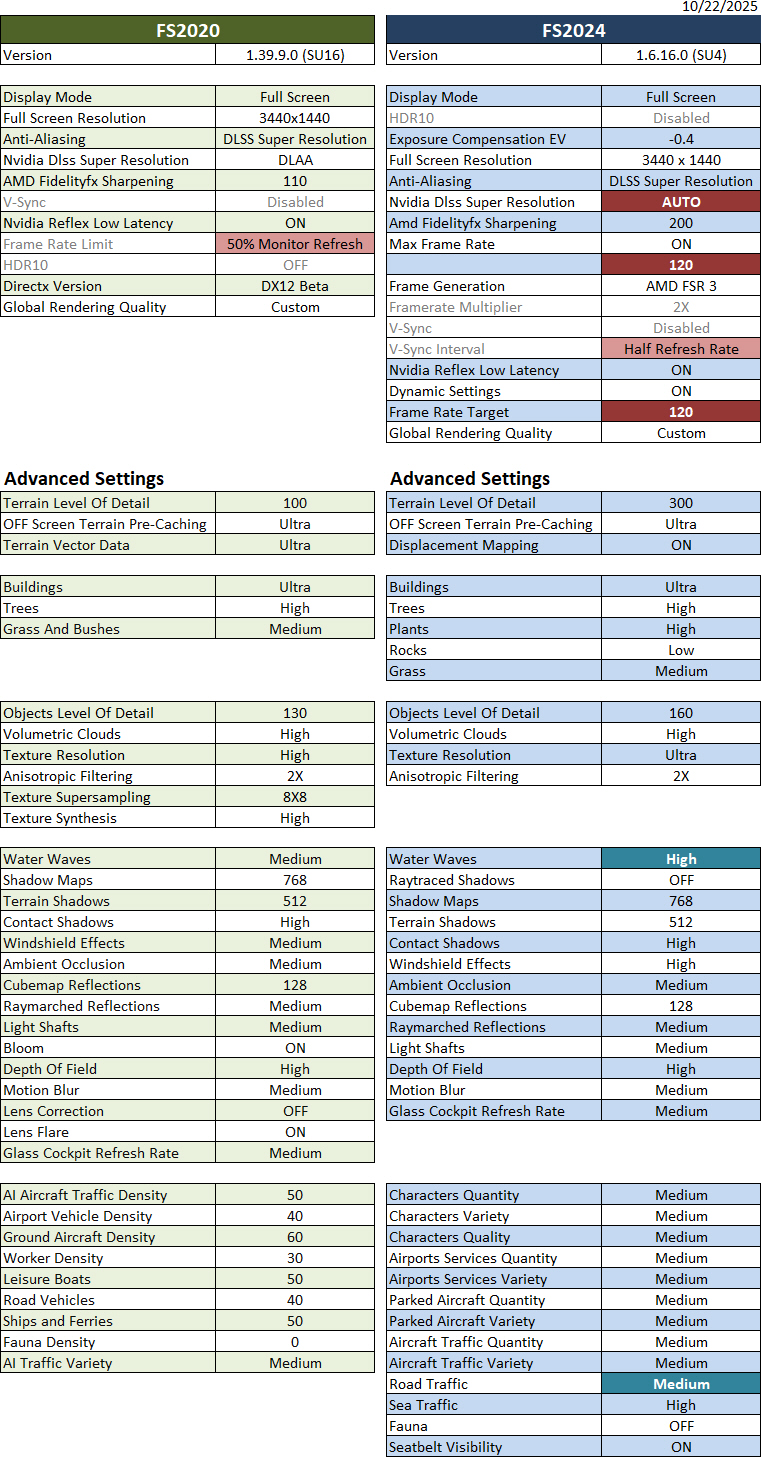
Crucial to this update:
1)
To keep the “Limited by Main Thread” status green as much as possible, Frame Rate Limit in FS2020 and V-Sync Interval in FS2024 were set to 50% Monitor Refresh Rate and Half Refresh Rate respectively.
2)
To further boost FS2024 performance, Max Frame Rate in my NVIDIA Control was set to OFF, along with the following changes in FS2024:
- NVIDIA DLSS Super Resolution from DLAA to AUTO,
- Max Frame Rate from 90 to 120, and
- Frame Rate Target from 90 to 120.
With all these changes, my FS2024 FPS now pushes up to 150, though it can vary down to 80 at large airports, while FS2020 remains more or less the same, with FPS ranging from 40 to 60 something.
Hardware of my system are: i9-11900K CPU with GeForce RTX 3080Ti and 34-inch 144Hz Mi monitor (3440 x 1440).
Nvidia driver running is 581.15; FS2020 is SU16 (1.39.9.0); FS2024 is SU4 Beta (1.6.16.0).
Here’s a reference to “My Previous MSFS Graphics Settings“.
==========
- See My NVIDIA Settings
- See My ReShade Settings
- See My AimxyZ Settings
- See My MSFS Yoke Settings
–
 FS Times