309: When can the Simulator Pit be Filled

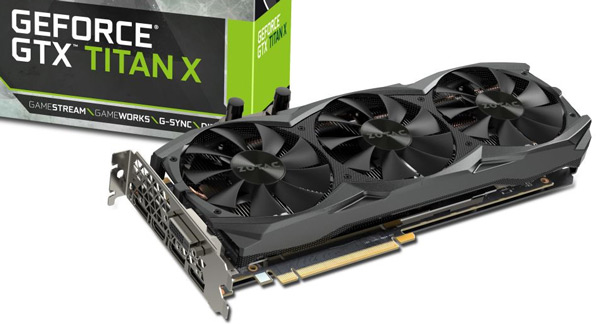
Fantasized for months to get myself a Nvidia GTX Titan card after reading reports and youtubes about the phenomenal boost in FSX/P3D performance with it.   The past weekend, I finally made to get an over-clocked Titan X seated in my system.

Zotac-Titan-XMy first impression about the card out of the box — Continue reading
308: Switching Between inHg and mBar

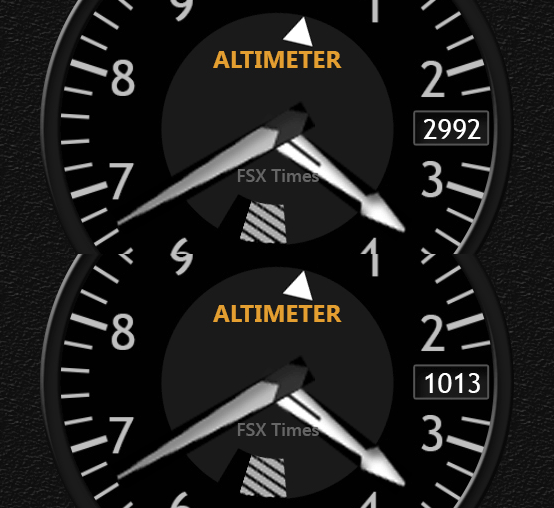
A friend recently asked if there is a simple way to change the barometric units from inHg to mBar on the Altimeter.   Unfortunately, no, it is NOT possible on the earlier free gauges.   But YES, it is possible on the paid gauges as their codings and image designs have been rewritten.

This automatic barometric unit switching feature should have been implemented earlier.   Anyway, here it comes at last.

C172_ALT_inHg-mBar

Users of  the current Continue reading

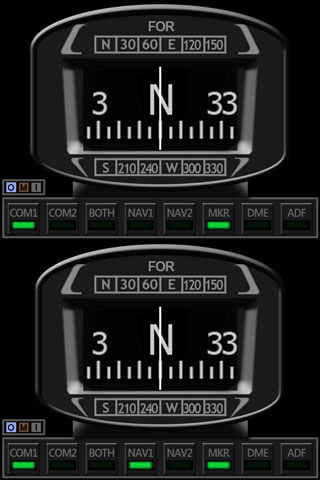
307: Wet Compass Got a Face-Lift

Received some comments from friends who said the faceplate of the current Standalone Wet C172_CMP_150710C_NarrowedCompass is a bit wide.    Well, it very much depends on personal preferences.
Anyway, here’ the face-lift version.   Current users should have the new faceplate in their mailbox now.

If not, let know me in the Comment section below.

306: The New Saitek Drivers – Part 2: SaiFlightFip.xml

The ability of starting up multiple FIPs in specific order everytime has been a feature requested by almost all FIP users for a long long time.   Saitek has finally implemented it onto its new drivers.   However, this feature may need another tweak in order to function.

After the installation of the new drivers, a file called “SaiFlightFip.xml” containing the current setup information of the FIPs and the gauges should be created accordingly.

Via this “SaiFlightFip.xml”, the start-up order of the multiple gauges can be specified as desired.

The file is supposed to be stored under: Continue reading

305: The New Saitek Drivers – Part 1: Installation

Normally, driver installation should be no more than pointing-and-clicking on the mouse.   Saitek’s new ProFlight drivers, “ProFlight_FSX_Plugin_7_0_40_9_x64_Software” and “Saitek_Pro_Flight_Instrument_Panel_7_0_40_9_x64_Full_pfw”, however, might need a little tweak.

Some friends said to me that the installation of these two drivers was as easy as snapping fingers.   However, there were others telling me the opposite.  To be more exact, their FIPs wouldn’t start up after the installation, even though all the other Saitek gears work as usual.

To me, both statements are true since I experienced both extremes myself over the last few days. Continue reading

304: FIP Customizer Still Functions

Just installed the new Saitek drivers two days ago as its latest capability of displaying FIPs in desired order at start-up every time is a killer feature which has been longed for by almost all FIP users.

However, the installation or the upgrading of it could be a bit tricky.  I will write up another post later.

A good news, the FIP Customizer by Alexey still work perfectly with the new driver.   His other utility — the FIP Toolkit — has yet been checked, however.

303: Enhance Orbx Product Report Readability

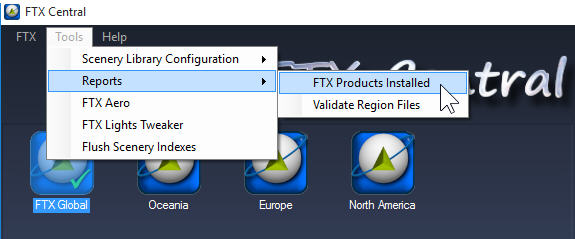
The Product Report generated via FTX Central is getting harder and harder to read when the list of the installed scenery is building up.  Installed-Central

To enhance readability, Continue reading

302: Commands Assigned to FIP Not Working

What a coincidence of receiving a few emails in the past two weeks asking why the commands (such as the barometric settings — KOHLSMAN_DEC and KOHLSMAN_INC) assigned to the rotation knobs and buttons on the FIPs are not working any more.   After checking their SaiFlightSimX.xml files, I found another coincidence that the <X52Pro> section in the beginning of their files was somehow removed.

Yeah.  I do remember as they reported that the SaiFlightSimX.xml file worked properly without the <X52Pro> section before.   Continue reading

301: Mouse Not Responding after Hot Unplugged

So far, the only problem I have with Windows 10 is: the mouse will stop responding to mouse clicks if any of the Saitek game controllers (yoke, rudder pedals, trim wheel, etc) is hot unplugged from the computer after use.

There are many similar reports on the Internet, and it is generally agreed that the issue is caused by the Saitek driver.   So far, no solution has been found.

The quickest way to put the mouse back to normal is to press the Reset button on the computer.   The soft reset switch via Ctrl-Alt-Del doesn’t work.

Edit:
Some friends, like Philip M, suggest to open the Devices and Printers in Control Panel and right-click to “Remove” the Saitek devices in question prior to unplugging them.  That’s another easiest cure of the problem as well.