911: My MSFS Graphics Settings 25-1210

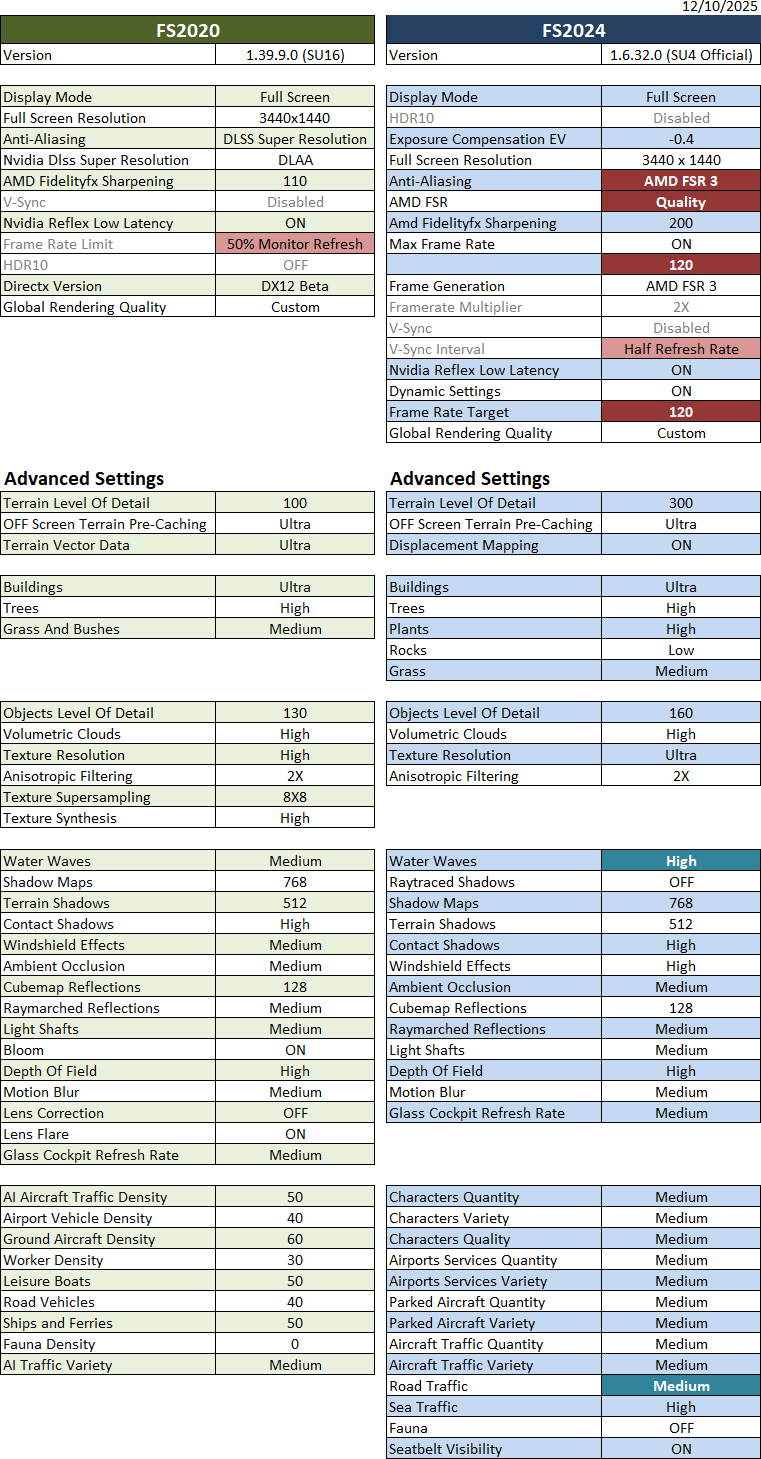
The official FS2024 SU4 has been released.   I must say that it is superb and excellent and even better than the Beta I’ve been running over the last few months.

Here’s the minor update of my Graphics Settings for FS2024 SU4 (1.6.32.0).  Actually, I seldom run FS2020 these days, but I am still keeping it in my system because there are addons compatible with and can be ported to FS2024.

Crucial to this update: Continue reading

909: My ReShade & AimxyZ Update 25-1025

Following my earlier Graphics and NVIDIA adjustments, my ReShade and AimxyZ settings for FS2024 were tuned accordingly as follows.

908: My MSFS Graphics Settings 25-1022

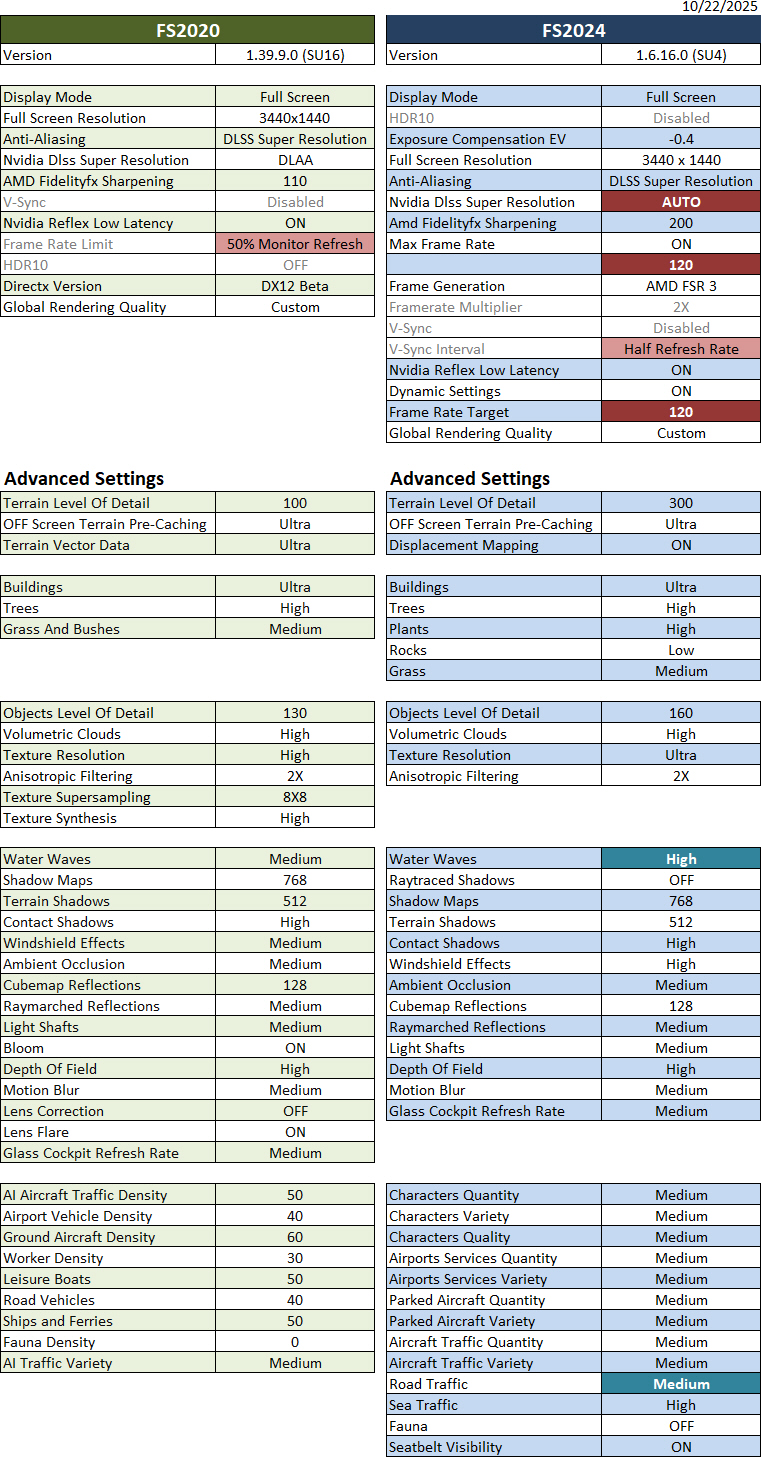
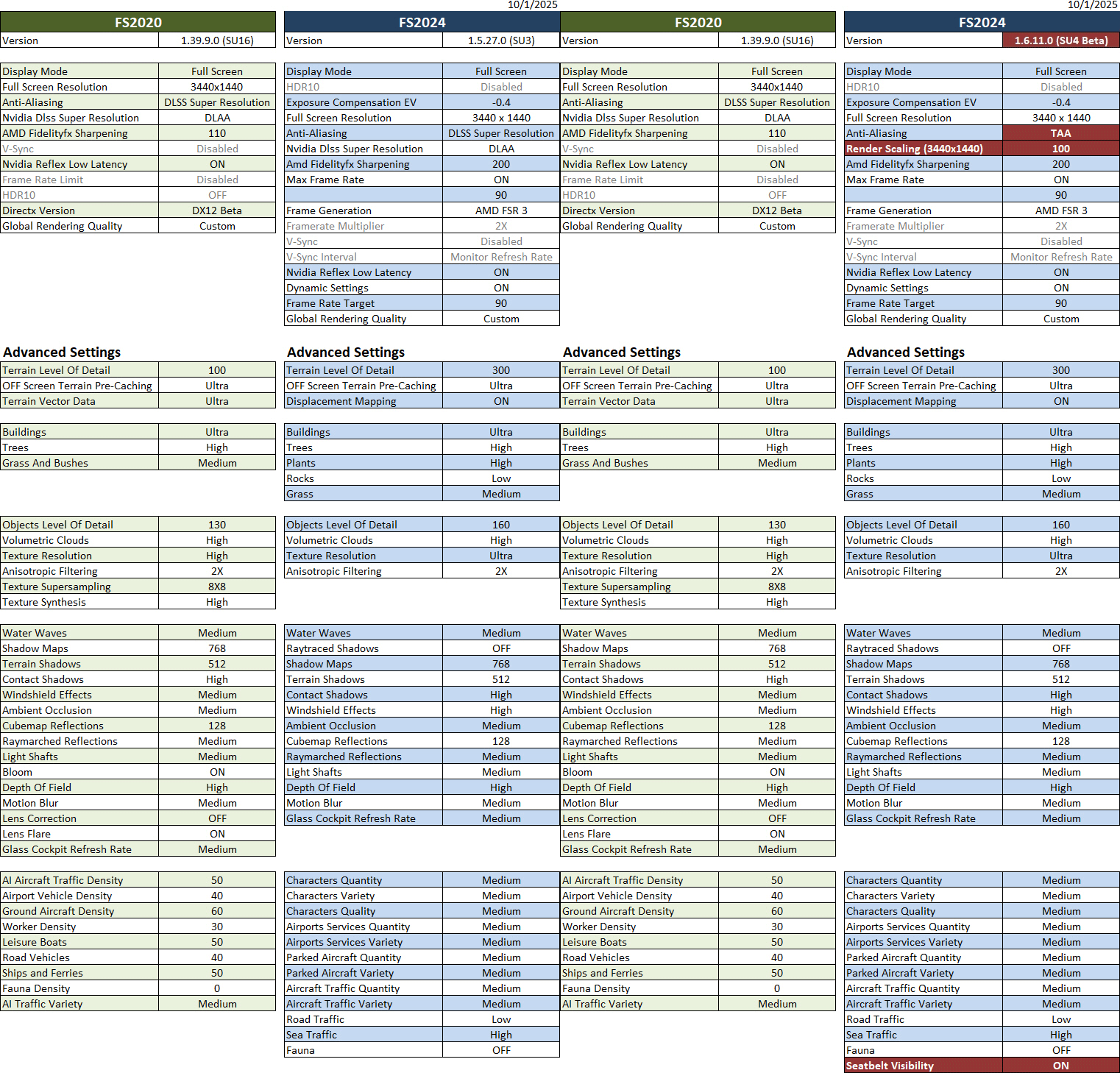
Here’s an update of my current Graphics Settings for FS2020 and FS2024 SU4 Beta (1.6.16.0).   Since I basically don’t run FS2024 SU3 anymore, its settings have been and will be excluded from this and future updates.

Crucial to this update: Continue reading

907: My “Limited by Main Thread” Fix – Part II

Another friend, Ty, commented on my Post 905, saying that despite having a fairly powerful machine, he hadn’t had luck with Lossless Scaling either.  However, he was able to run MSFS at all-ultra settings using NVIDIA Frame Generation.  He also sent me a YouTube video that he said had helped him a lot.
What a coincidence!  The video actually talks about a trick that I had stumbled upon two years ago, which I already reported in my Post 836: My “Limited by Main Thread” Fix.

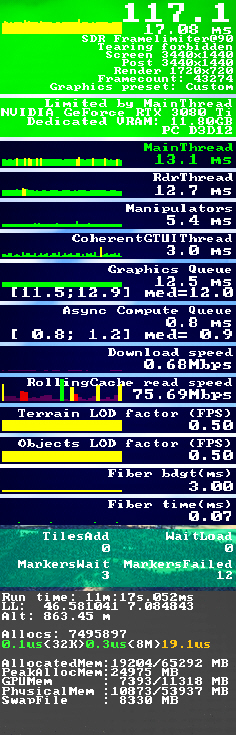
The key of the trick was to keep the “Limited by Main Thread” status green as much as possible by setting the “Frame Rate Limit” option to 50%.

I had been using this trick ever since, but I gradually forgot about it and, at some point, turned it off.

Reminded by Ty’s note, I immediately checked my MSFS settings, only to discover that there was no “Frame Rate Limit” anymore in the SU4 Beta. Continue reading

906: Here’s MSFS2024 with my Settings

Here are three video clips showing how MSFS2024 SU4 Beta (1.6.16.0) performs with the graphics settings I listed in Post 900.


Due to post-production needs, I used Steam’s built-in feature for video recordings. However, once the function was enabled, system performance was immediately affected, dropping by at least 10 fps and very often causing the fps info panel to change from green to red. Continue reading

900: My MSFS Graphics Settings 25-1001

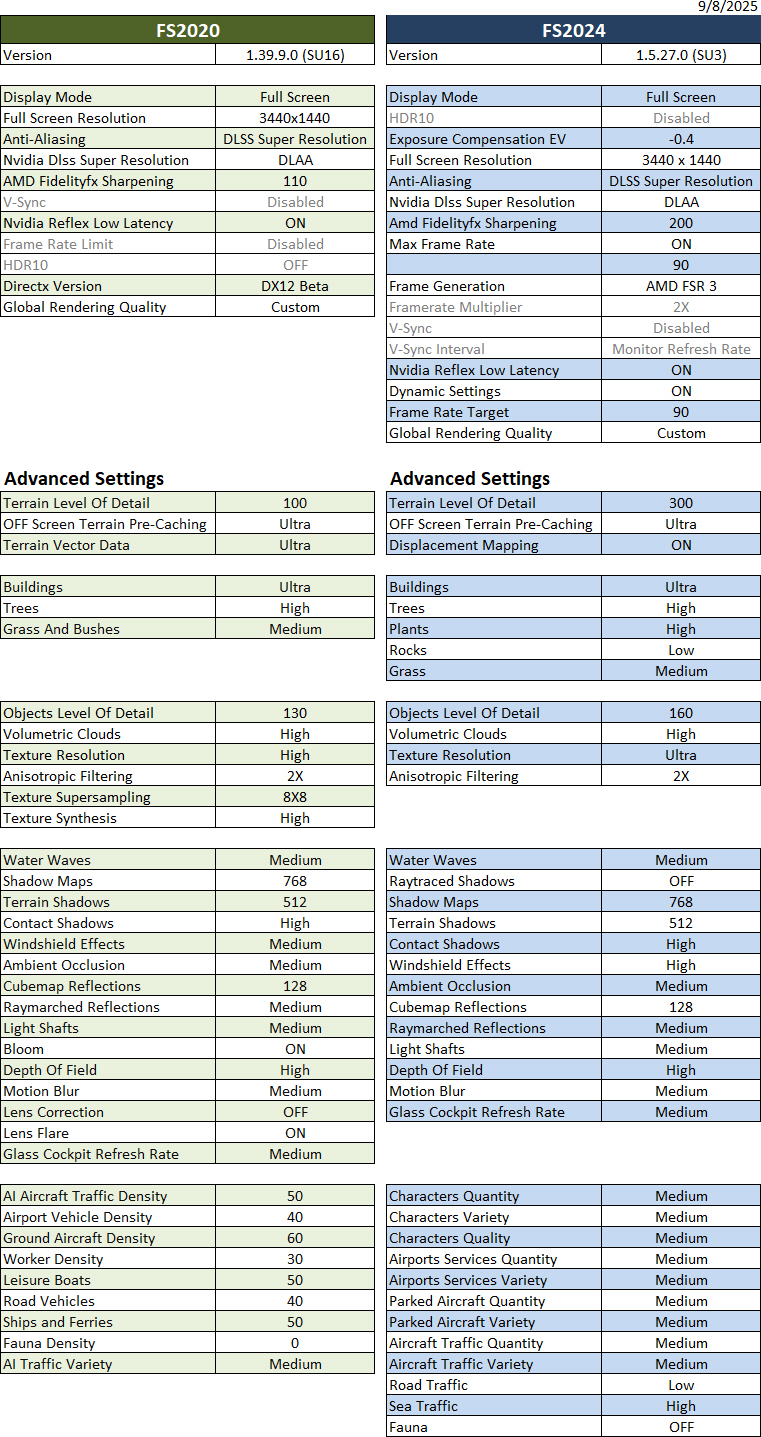
A little update to the Graphics Settings mainly for the FS2024 SU4 Beta.   Since the AMD and Nvidia options still cannot be mixed, the Anti-Aliasing and Render Scaling are used instead to avoid screen flickering in the Beta version.   Except that, all other settings remain the same.

Update: Since the SU4 1.6.13.0 released on Oct-8, the reported screen flickering issues that occurred when Nvidia and AMD options for Anti-aliasing and Frame Generation were used together have been fixed. I can now either choose to continue to use the TAA+Render Scaling settings highlighted in the table below or revert to use the DLSS+DLAA combos in SU3 for SU4 Beta. 

Both are generating good results in general but the DLSS+DLAA yeilds a little better in sharpness and framerate under the same settings.

Hardware of my system Continue reading

898: My MSFS Yoke Settings 25-0925

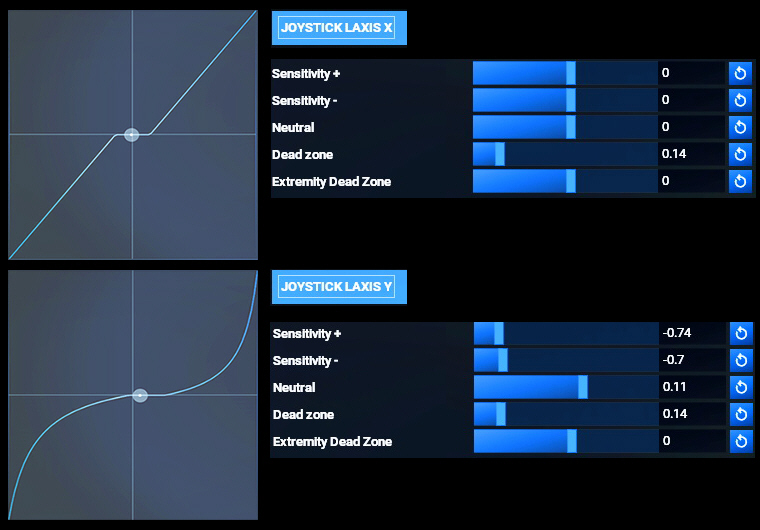
Ever since I started playing MSFS, I’ve found the simulator to be a bit too responsive to vertical movements.  Especially in the new MSFS2024, many aircraft even take off on their own without needing me to pull the stick at all.

Below are my Yoke settings in which I reduced the sensitivity of Y axis accordingly to offset this lightness in MSFS2024 and MSFS2020.

MSFS2024
Continue reading

895: My MSFS Graphics Settings 25-0908

I have to admit that the latest SU3 (1.5.27.0) has pushed me closer to FS2024 from FS2020 a lot more than ever before.

Followings are my current FS2020 and FS2024 Graphics Settings after days of fine-tunings for optimum results. They give me a general stutter-free performance with FPS varying from 40 to 60 and 80 to 110 in FS2020 and FS2024 respectively.

Hardware of my system Continue reading