897: MSFS2024 SU4 – The Future to Look for

After flightsimming the SU4 Beta for several hours, I am convinced that I’ll be ditching MSFS2020 for MSFS2024 once the update is complete (possibly sooner).

What it impressed me most is its stunning graphics rendering capability with no noticeable impact on smoothness and performance (yet).
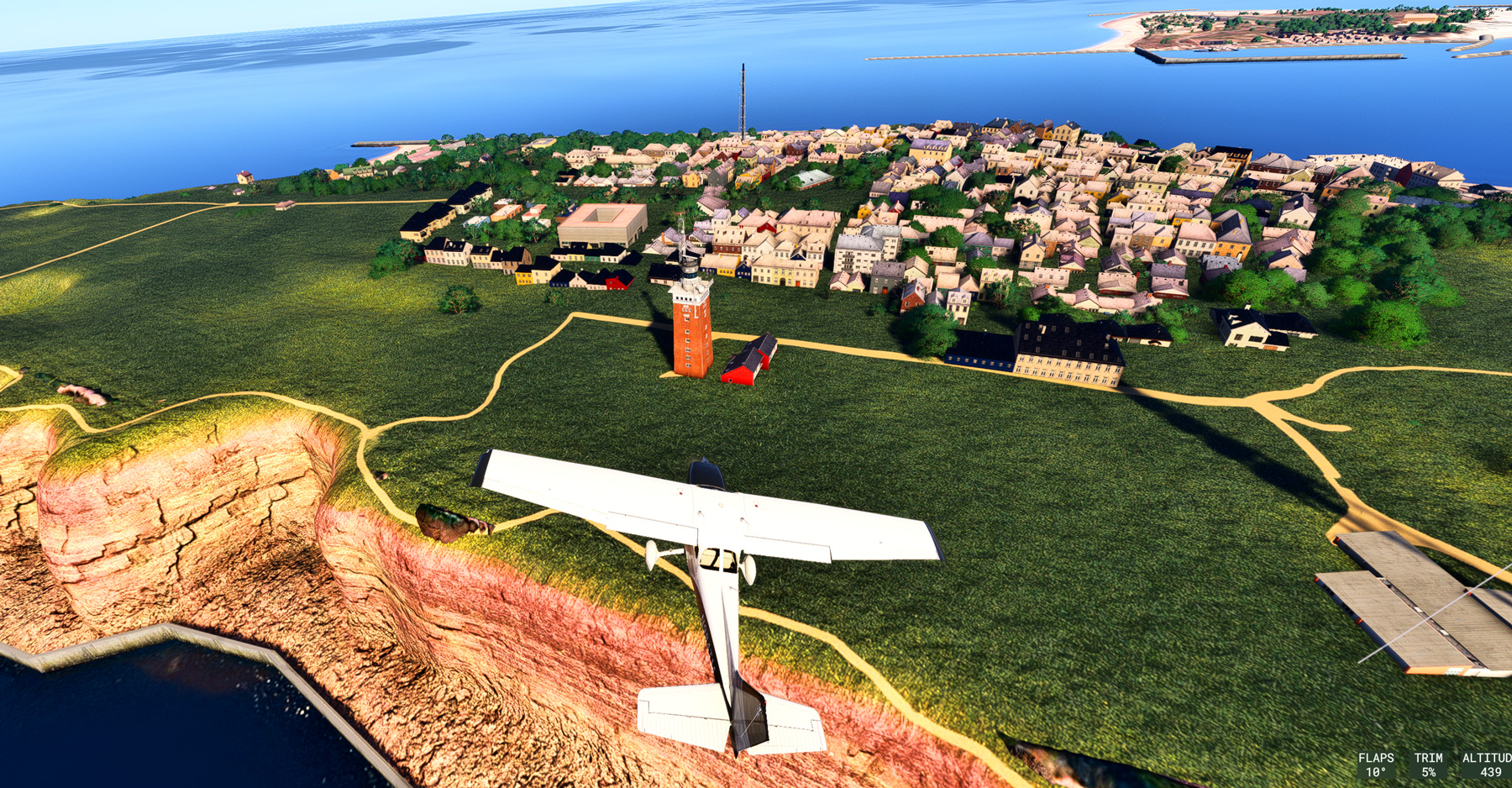
The terrain and objects (or basically everything) are so sharp and clear, and exceptionally rich in details.  I am talking about the default scenery without any enhancement by third-party addons. Coastline rendering has also been significantly improved (click image to enlarge the picture).

Frankly, I’ve never seen such an amazing result from any previous flight simulator, including the MSFS2024 SU3.  The SU4 feels like a new simulator to my eyes. Continue reading
896: Screen Flickering Fix for MSFS2024 SU4 Beta

I don’t know if you encounter the same situation: my monitor starts flickering after loading the MSFS2024 SU4 Beta.

A quick solution is to either set:

1) “Nvidia DLSS Super Resolution” for Anti-aliasing and “NO” Frame Generation, or

2) “AMD FSR3” for both Anti-aliasing and Frame Generation.

The TAA can be used.  Just don’t mix the Nvidia and AMD together.

Not sure if the conflict is a temporary one or not.  Continue reading

895: My MSFS Graphics Settings 25-0908

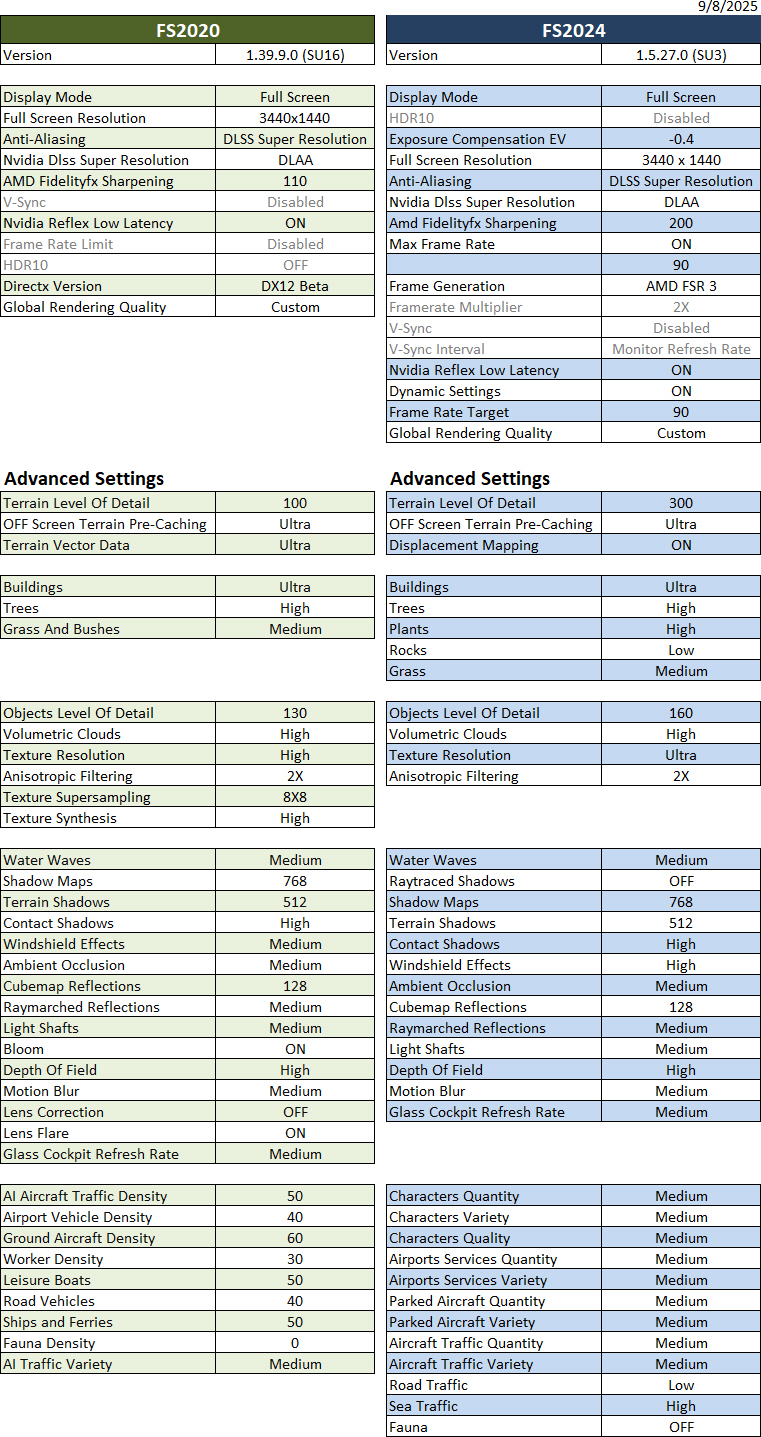
I have to admit that the latest SU3 (1.5.27.0) has pushed me closer to FS2024 from FS2020 a lot more than ever before.

Followings are my current FS2020 and FS2024 Graphics Settings after days of fine-tunings for optimum results. They give me a general stutter-free performance with FPS varying from 40 to 60 and 80 to 110 in FS2020 and FS2024 respectively.

Hardware of my system Continue reading

893: Bluetooth No-Sound Fix for MSFS

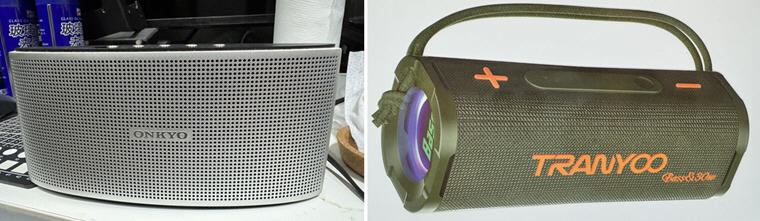
My Onkyo X3 Bluetooth Speaker recently broke down after nearly a decade’s service. I replaced it with a Tranyoo 30W speaker with bass enhancement. The speaker sounds very nice and well-fit to the small area under my monitor.

Oddly, while MSFS2024 is running, the speaker has no sound output from the simulator at all. The worst, the whole computer is muted with dead silent until MSFS2024 is quit. The speaker with MSFS2020 and other apps works perfectly without any issue.

After searching on the internet, the problem is said to be caused by a bug in MSFS that doesn’t compatible with the handsfree function on newer bluetooth devices.

Followings are the two fixes I applied to solve the no-sound issue: Continue reading

892: You may need reinstalling MSFS2024

Many of you might have heard me complaining how MSFS2024 was buggy and not good to play since it launched last November.

Two weeks ago, I had it removed completely because neither its latest SU2 (official) nor SU3 (beta) were able to run at all. After the “Asobo Studio” logo showing up on the screen for a few seconds, the simulator crashed to desktop immediately.

It’s so maddening !

After trying various suggestions on the internet to no avail, I had no choice but to trash it. Continue reading

891: VOR2 Bug on XP12 C172SP

In addition to the EGT data handling differences on the INTFG (ENG) of my C172SP gauges in XP12, I found the VOR2 for C172SP stops functioning as well after the recent 12.2.0-r1 update. Thankfully, the VOR2 keeps working properly in XP11.

After investigation, I discovered the cause of the issue is due to the dataref codes used for VOR2 on the C172SP in XP12 have all been changed from pilot mode to copilot mode, making the necessary VOR2 data no longer fed to the gauge.
I was baffled by the issue in the beginning because I didn’t spot any anomaly from the virtual cockpit on the monitor screen Continue reading

890: FIPs stop working after SU3 Beta

After installing the MSFS 2024 SU3 Beta 1.5.10.0 update, all my Logitech Flight Instrument Panels (FIPs) stop working.

The displays are frozen and buttons and knobs are not responding at all neither to the Logitech MSFS FIP Plugins nor SPAD.neXt.

Going back to the MSFS 2024 official 1.4.20.0 version, all FIPs resume working normally.

Have reported the bug to Asobo.

Let me know if you encountered the same issue with the latest Beta Continue reading

884: My nVidia Settings 25-0417

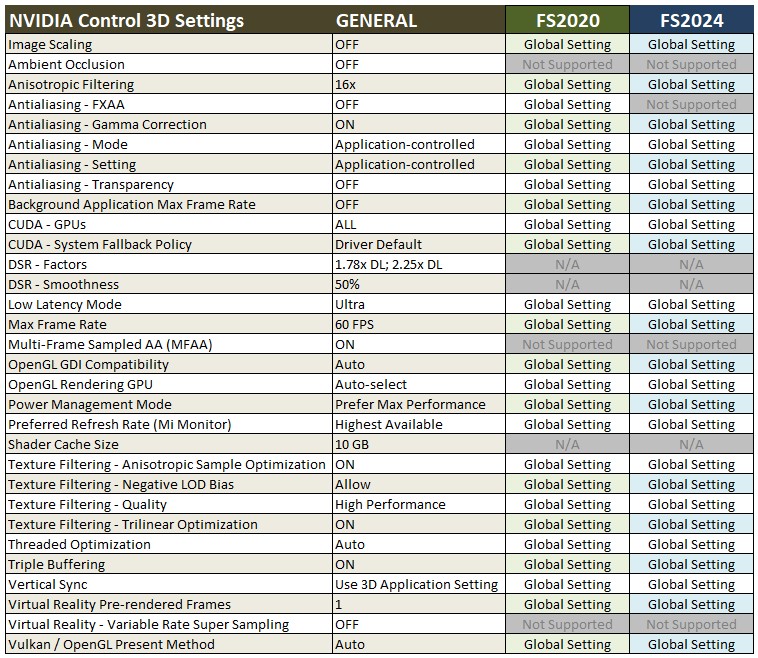
Followings are my latest nVidia Control Settings, which have been slightly modified to cope with the changes in Graphics Settings of FS2020 and FS2024 I made earlier this month.

The Shader Cache Size in the Global Settings Continue reading

883: My MSFS Graphics Settings 25-0409

In the past, I’d been deciding my Graphics Settings based on trial and error.  To be honest, I was quite happy with the results of what I achieved in general.

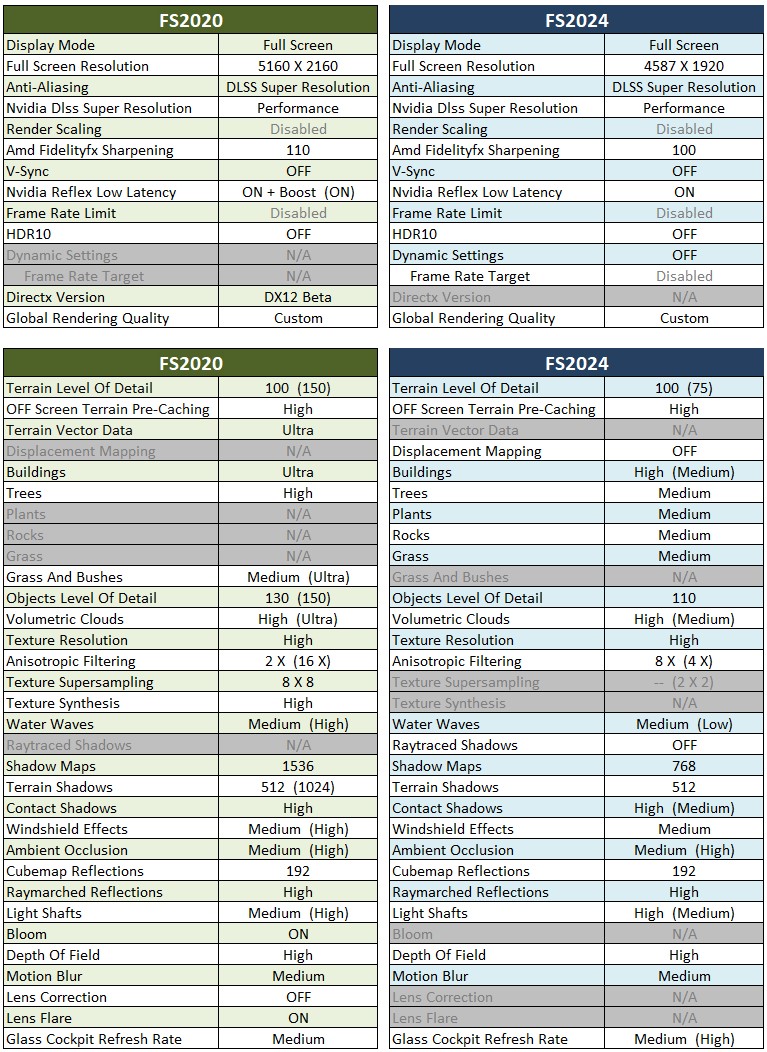
Last month, I decided to give the Nvidia App a shot to see how far my flight simulation system performance it can take.  I was glad to find out the optimized recommendations by the App, both for the FS2020 and FS2024, were not far off from what I anticipated.

Followings are the latest upates of my FS2020 and FS2024 Graphics Settings after repeating adjustments for optimum results from my rigs.  They are put side-by-side for quick comparisons:

The values in brackets Continue reading