

Updated: Nov-26, 2011
My Attitude Gauge has been updated as follows:
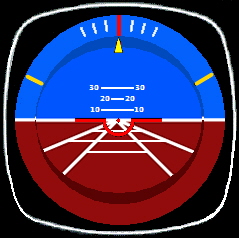
A copy of this update has been sent to those friends who asked for my FIP Gauge set below. If not, please email me.
Updated: Nov-26, 2011
My Attitude Gauge has been updated as follows:
A copy of this update has been sent to those friends who asked for my FIP Gauge set below. If not, please email me.
I normally pay extra attention when adding addons to my system because the performance of FSX sometimes is so allergic to tinny tiny stuff added to it.
No matter the addon is a scenery or an airplane, we mostly don’t have sufficient prior informantion about what will be added to, and in particular what will be overwritten from the system.
To minimize the risk of uncertainty, I normally take the dummyproof approach described below to “quarantine” the content of the new addon in the first place.
The logic behind is: Continue reading
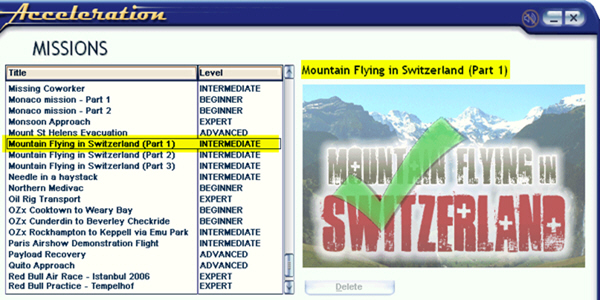
In addition to prioritizing missions as described in last post, names of missions can also be changed easily. For example, the three Mountain Flying in Switzerland missions from vertical studios were originally shown in small captial letters. Through following steps explained below, they are now capitalized.
The earlier post Remove Unwanted Views talks about getting rid of some views (cameras) that one doesn’t need. This one talks about adding new views (cameras).
My system has a few Pro Flight Instrument Panels (FIPs); therefore, I want a full scenery monitor display without showing the 2D or 3D cockpit.
Although this can simply be achieved by pressing W to turn off associated panels in 2D cockpit view, the cockpit will appear again when eyepoints are panning to the right or to the left.
To address the issue, a number of options can be considered.
In FSX, there are many views one can choose from and cycle through by pressing S (next category) and A (next view in category) on the keyboard, including Cockpit (2D), Virtual Cockpit (3D), Locked Spot, FlyBy, Top-Down, etc. Often there are views that we seldom or never use, however.
Steps below will get rid some of them for good.
Option 1:
1) Locate Cameras.cfg (x:\Users\<user>\AppData\Roaming\Microsoft\FSX) and make a backup of it
2) Open the file and you will find 11 Camera Definition sectons inside
3) Just delete the Camera Definition section(s) you don’t need
4) Save and Exit
 FS Times