289: Automate Shader Cleaning

TechLevel01W

Rebuilding the shader cache of the simulator helps fix problems suddenly coming up without a proper cause.   The reasons explained in my Post 58: Rebuild FSX Shader Cache for FSX.  It is applicable to P3D as well.

There are friends asking if it is possible to automate the deletion process right before the running of FSX or P3D, when needed.

Surely it is possible.   Continue reading

260: C172 Sound Enhancement

TechLevel01W

Sounds of my default C172 SP have just been replaced by some more realistic alternatives I recently found on FlightSim.com. C172-Sound

Although the Soundpack by Christoffer Petersen of Turbine Sound Studios/TSS was created for FS2004 in 2007 and there’s a dedicated payware version for FSX, the freeware still works great on my C172 both in FSX and P3D environments.

As files in the soundpack are called differently, they must be renamed accordingly (basically taking out “TSS” from the filename) before they can be used to replace the default sound files.   Continue reading

243: Lost and Found

TechLevel01W
Switching to P3D could also mean losing many handy features added to FSX previously.  FSDiscover is definitely one of them.  Until Flight1 launches a P3D compatible version, command TOGGLE_AIRPORT_NAME_DISPLAY is my temporary measure when I am lost in the sky.

Just open the Standard.XML file inside the Controls folder where Prepar3D.cfg is located.   Then add the command to any key or key combination and save it.   That’s all.   Names of airports around current location will be shown when the key or key combination is pressed.

Continue reading

224: Turning Off the FIP – Black Friday

TechLevel01W
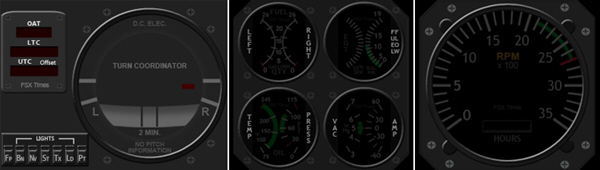
Due to various unexpected situations, the Turning Off the FIP series were stopped for over a month.   To compensate for the interruption, I have put the OFF Masks for the remaining RPM, Integrated Fuel Gauges, and even the new Turn Coordinator into a single RAR file on this Black Friday for existing users to download by clicking the image below.  The OFF masks for the earlier Altimeter, Vertical Indicator and Airspeed Indicator are also included.  Just put the files in corresponding folders will do.

TurnOFF_FIP_MISC

Continue reading

220: Turning Off the FIP#3 – AS Indicator

TechLevel01W
(Updated on: 24 October 2013)  This is part three of the Turning Off the FIP series. This time is the AirSpeed Indicator.

C172_AS_OFF.bmp==========
AAA
Similarly, save the image on the right to the \1024 folder where you keep the VS indicator (e.g. C:\Program Files (x86)\Saitek\DirectOutput\Gauges\1024) via the link below:  https://dl.dropboxusercontent.com/u/25018674/Gauges-C172/C172_Gauges_130815_OFF/C172_AS_OFF.bmp

==========
AAA
Remember that the image must be saved as it is in BMP format — C172_ALT_OFF.bmp Continue reading

219: Turning Off the FIP#2 – Altimeter

TechLevel01W
(Updated on: 24 October 2013)  This is part two of the Turning Off the FIP series.   This time is the Altimeter.

C172_ALT_OFF.bmp==========
AAA
Similarly, save the image on the right to the \1024 folder where you keep the VS indicator (e.g. C:\Program Files (x86)\Saitek\DirectOutput\Gauges\1024) via the link below: https://dl.dropboxusercontent.com/u/25018674/Gauges-C172/C172_Gauges_130815_OFF/C172_ALT_OFF.bmp

==========
AAA
Remember that the image must be saved as it is in BMP format — C172_ALT_OFF.bmp Continue reading

218: Turning Off the FIP#1 – VS Indicator

TechLevel01W
(Updated on: 24 October 2013 Just recalled reading a question somewhere before — “Is turning off the Fligth Instrument Panel (FIP) possible?”

Yes, it’s possible by unplugging it from the USB socket.

I know it is not what the question really asks for.   But truly, when the FIP is connected with electricity powered, there isn’t “A Switch” that one can turn off the FIP, unfortunately.

Well, for those who are using my C172 gauges, here’s an alternative:

Continue reading

206: Cut The Flows

TechLevel01W
ObjectFlow (for grasses, trees, animals) is a promoted feature in Orbx’s many airport ObjectFlowproducts.  Although it adds interesting stuffs to airport surroundings, it kills performance, too.
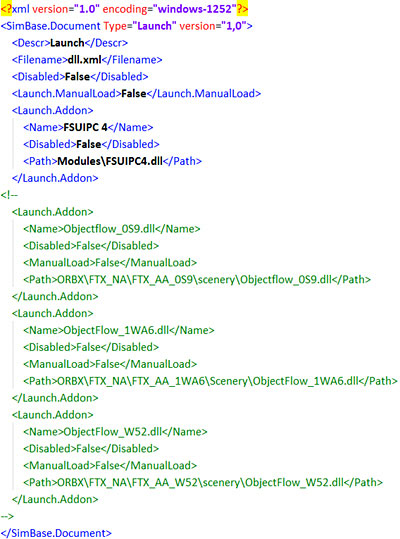
If you mostly fly your aircraft in the air rather than manuever it around airports, try cutting all or most of the ObjectFlow.dll in the DLL.XML file under the directory of fsx.CFG (C:\Users\<user name>\AppData\Roaming\Microsoft\FSX).

You could simply use the <!– –> notation pair for quick removal in case you want them back.

Try and see for yourself.  You could be amazed.

Continue reading

197: Tidy Up FIP Gauges

TechLevel01W

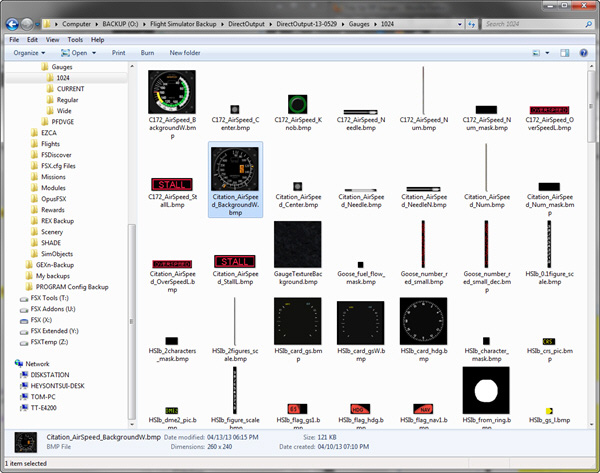
By default, FIP gauges files are put under the DirectOutput folder.   However, when more and more gauges are added to the system, the gauge files accumulated under the folder and its subfolders, especially the 1024 folder where bitmaps are stored, are getting harder and harder to identify.

FIP Folder 06

To tidy them up in a logical manner, Continue reading