574: FIP Broken Knob Fix


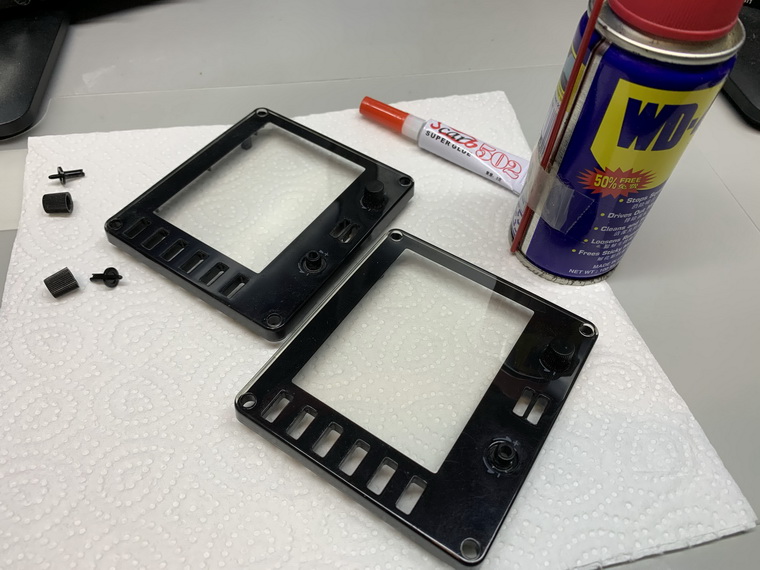
In my Post 574, I mentioned that the two knobs on the face-plate of the FIP, if broken, are simply unrepairable, but Oz Flyer (David) in the Comment suggested two possible solutions to repair them.  Here’s the first one I just tried since I don’t have a 3D printer as required in his second suggestion.

Stuffs needed are just some super glue and WD40, and I put everything on a piece of paper to avoid either the glue or the WD40 spilling over onto the table.
Continue reading

571: FIP Gauge Lights on Automatically

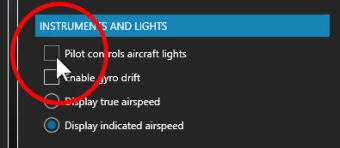
Some of my FIP Gauges developed for FSX/P3D come with the backlight feature.  By disabling the “Pilot controls aircraft lights” in Realism setting, the backlight will turn on automatically when night falls.  I wasn’t aware of that before since I always have this option enabled.
Considering applying lights automatically really adds fun, probably I should spend some time updating more of my other gauges with backlights accordingly.


566: Assign HoneyComb Alpha Yoke to P3Dv5 Manually

Since Aerosoft hasn’t updated the driver utility for its HoneyComb Alpha Yoke for P3Dv5 yet (by the time of this post), here’s how to assign the device’s Bridge Module manually for the simulator.

Open the add-on.cfg in “C:\ProgramData\Lockheed Martin\Prepar3D v5” folder, which is where the scenery.cfg is located.

Then add the following to the file:

[Package.0]
PATH=X:\Aerosoft\Honeycomb
TITLE=Alpha Flight Control Bridge Module
ACTIVE=true
REQUIRED=false

I tend to put this script to the beginning of the file above all other sceneries.  Continue reading

565: FSUIPC5 Works on P3Dv5

While waiting to purchase the FSUIPC6 as mentioned in last post, I popped up an idea: “Why not test the existing FSUIPC5 with the new P3D first?”

So I copied the DLL.XML from the configuration directory of P3Dv4 to the directory of P3Dv5.

Bingo!

They work together nicely.   I don’t even need to modify the file at all.   Just copy and paste the DLL.XML from the v4 directory to the new v5 directory and then all is set.

The two folders involved are as follows: Continue reading

562: Turn Off FIP Button Light the Hard Way


Many friends asked if it is possible to turn off the light of the buttons on the Flight Instrument Panels (FIPs) and continue to keep their functions active at the same time.  The answer is NO under the Logitech driver as described in Post 215.

However, from the teardown of the broken FIP reported in last post, I came up a hard(ware) way to do it. Continue reading

557: Access Aircraft Reference Quickly

Airspeed limitations are some of the most visited references to flightsimmers or even real pilots.   I normally seek for them in the aircraft’s manual or via Internet.  For sure, the process doesn’t take a lot of work but it can be hardly called handy, especially when you need these information during a flight session.

Last week, I found out that there’s actually a quick way of locating these information in FSX and P3D quickly.   I don’t know if you know it or not, but I was not aware of it in my 15+ years of flightsimming.  How hilariously.

All we need is Continue reading

551: Finding Aircraft Local Variables

There are times that we may want to find out what Local Variables (LVars) are used on a specific aircraft for many reasons.  If the developer doesn’t provide it, here’s a quick and simple way to generate a Local Variable list of the airplane, whether it’s a third-party or default aircraft.

During a flight session, Continue reading

531: XPlane Startup Time with FIPs

While working FIP Gauges for X-Plane these days, I find the time reaching the main menu at sim launch takes much longer while FIPs are powered on as well.

Not a big deal, probably.  But if one can shorten the load up time of X-Plane significantly by simply turning on the FIPs ONLY AFTER the main menu is shown, why not ?   Additionally, I find the act eliminates the occasional crash of FIP Gauges in X-Plane as well.

528: FS Button Command Trick in X-Plane

In last post, I mentioned that some of the commands I used to assign to buttons and knobs on the FIP are not functioning or matching when using the valuetranscribing feature to run FSX/P3D gauges in X-Plane.

A friend, Rodrigo in Brazil, says the trick is Continue reading