304: FIP Customizer Still Functions

Just installed the new Saitek drivers two days ago as its latest capability of displaying FIPs in desired order at start-up every time is a killer feature which has been longed for by almost all FIP users.

However, the installation or the upgrading of it could be a bit tricky.  I will write up another post later.

A good news, the FIP Customizer by Alexey still work perfectly with the new driver.   His other utility — the FIP Toolkit — has yet been checked, however.

265: FIP Customizer Update

FIP Customizer version 1.02 has just been uploaded.  Details are in the file’s Changelog.

Alexey added his work was done through patching the DLL file that is part of the device’s DirectOuput service.

Also, maximum custom message size is 11 characters in the x64 bit version and 9 characters in the x86 version.  For font names, similar limitations to allow 7 and 5 characters respectively due to the amount of space available in the DLL file.


264: Complete Removal of the FIP Serial Page

On and off I received queries about the possibility of removing the serial page on the Flight Instrument Panel (FIP).  The concern was not just purely an aesthetic preference FIPC01because the LCD of the FIP could easily get burnt if any image is left on for a long period of time (See my Post 144).  This is in particularly true to users who seldom switched off FIPs in their cockpits. Unfortunately, there is no easy solution since the page is hard-wired to the driver of the device by the manufacturer. In response to these concerns, Continue reading

259: Scenery Renumbering Utility

I always want my scenery addons to be arranged in the proper order I prefer.   So I wrote this SceneryRenum utility to carry out the job efficiently.
For example as shown below that I want to move the Hong Kong Kai Tak addon entries from Area 219 and Area 220 to Continue reading

198: Cast the Saitek Panel Driver Out

Earlier this month, I was trying to associate a customized EZdok camera view (as shown in picture) to the gear lever on my Saitek’s Switch Panel, so that whenever I extend or retract the gear, the view changes to the bottom of the aircraft automatically.

SPAD01

After numerous attempts, I found there was no way out.   Saitek’s original driver is so “dumb” that except the default control functions, nothing more it offers to the users.

As a last resort, Continue reading

191: ShadeShifter 3.01a Released

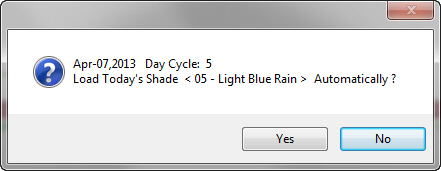
ShadeShifter 3.01a  is ready for download.  (No idea what ShadeShifter is? Read here.)

In addition to minor code enhancements to the last version, it also comes with two versions:-

When ShadeShifter is run:

a)
Version 1 will display today’s Shade Preset info as the previous version does.

ShadeShifter with Preset Shown

Continue reading

186: FlyZone Switcher with Orbx EU

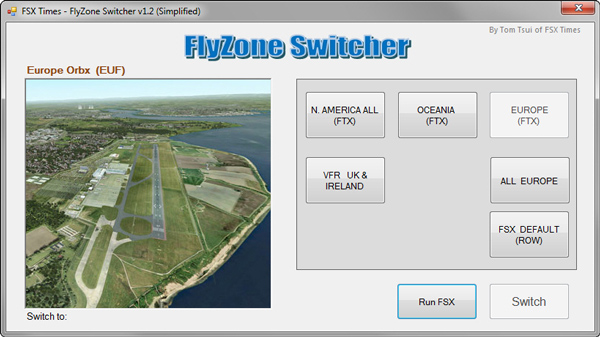
The FlyZone Switcher has been updated with Orbx EU area with an assigned code of EUF.   However, only simplified version will now be available.

Be reminded that proper preparations are required to ensure the cores files are in-sync with the new region as mentioned in my Post 155 to 159 and 161.

No new user request will be accepted for now.   ALL existing FlyZone Switcher users could notify me for the download link in the comment section below.   If you are using the version with France region, please mention it as well.

162: FlyZone Switcher Summing Up & Simplified

It’s really a relief that the FlyZone Switcher first version has been finally released and completed as planned even though there are still many rooms for improvement.

For example, there are subscribers reported that the pre-assigned 14 FlyZones are too many for them.   Some said that they don’t use Orbx’s addons.   So those FTX regions are meaningless.

Also, there are comments saying that the preparation and verification processes for the FlyZone Switcher are far too complicated and tedious.

For the first two feedbacks, it is probably true since the first version is generally simplified from what I am using, which is highly customized according to my own system configuration.   So it is what it is.

But for the third comment, my suggestion is: Take It or Leave It !

Continue reading

161: Adding Scenery Under FlyZone Switcher

For those subscribers who has completed the system preparation and verification processes for the FlyZone Switcher, followings are the procedures for adding new scenery addons under FlyZones.   Though it may look long and complicated, it is simply just a variation to the FlyZone preparation steps you have gone through.

Essentially, the installation procedures ensure that the core files and their corresponding base files required by the Switcher are in-sync at all time.

  1. autogen files
  2. scenery.CFG
  3. DLL.XML
  4. fsx.CFG

Below, I will use the installation of my recently purchased Jackson Hole (KJAC) scenery as an example to illustrate the procedures required to ensure the FlyZone Switcher continues to function properly.

Continue reading