145: Shade Shifter Version 2

Version 2 of my Shade Shifter program will be released in the next few days.   The code has been rewritten completely for better efficiency.   Other changes include:

1.  Improved program interface;
2.  All presets now grouped under a specific sub-directory; and
3.  All buttons could be renamed by users.
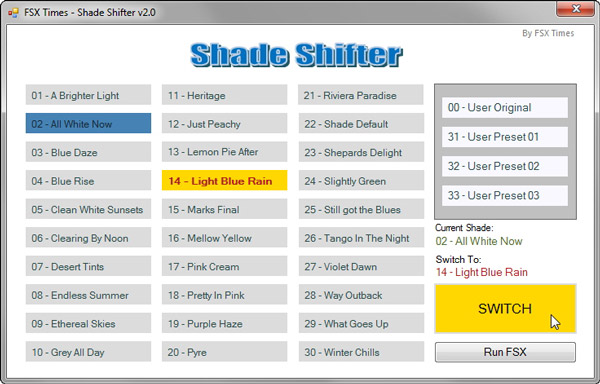
However, I am not going to send this update out to all subscribers as I did for the first version because obviously not all simmers have Shade for FSX.    So any subscriber who has Shade for FSX and would like to get a copy of this update, please jot a note in the Comments section below.    Download link will be emailed later once the testing of the new version is completed.

Again, only subscriber requests will be entertained.

142: The Shade Shifter

UPDATE (21-JAN-2012):
Download link for this ShadeShifter has just been sent out to all subscribers.  If you are a subscriber but didn’t get my email, plesae let me know.   Hope you all like it.

=====
Haven’t written any post these days since I am still deeply submerged in holiday mood as Chinese New Year is coming the next Monday.   Even my FlyZone Switcher project which is waiting for refinements and there are zones to complete, I put them aside as well.

Anyway, I have just created another utility for the SHADE for FSX — seems like I should claim for some commissions from the developer for all the assisting utilities I have developed……just kidding.

Back to the utility.  I call it the Shade Shifter — the name is inspired by the shape-shifter, a goblin in the TV drama series, Supernatural.   I found the name quite amusing.


From Post 124: Break the 10 Day Shade Cycle Limit, I wrote a utility to call up a Shade Preset according to 1) the day within the Shade cycle and 2) the actually date within a calendar month, so as to allocate a different Shade for each day in any month, and in particular, to create a randomized effect.

Continue reading

141: FlyZone Switcher Update

As mentioned in Post 137,   I’ve been working on an exe program that aims to integrate all my flying zones, which used to be run by separate batch files in BASIC, together.    Over the holidays,  I have completed:

  • The Core programming;
  • Redesigning the layout of the interface;  and
  • Restructuring all fsx.CFG, scenery.CFG, DLL.XML, and other related files.

At present, the program, I call it FlyZone Switcher, is now fully functional, and six areas have been implemented with no errors.   Followings are the images capturing the flow of switching from Orbx’s North America to FSX’s Default Central America: Continue reading

137: Flying Zone Switcher Preview

Updated: Dec-22,2011
Lately, I have been working on an enhanced user interface for my Flying Zones approach.   Its preliminary design is shown at the end of this post.

In addition to switching flying zones, targeted features will also include the loading of corresponding missions and FSDiscover data.  And in particular, it will eliminate the need of FTX Central when switching to Orbx’s scenery areas.

The heart of the project includes quite some customizations to my FSX setup.   When it is completed, I will think of a way to share the concept with others.

Until 2012, this probably is the last post of the year.

Wish you all a Merry Christmas and a Happy New Year !
Continue reading

129: The Moon and The Stars

For anyone who likes to fly at twilight or in the night, the following two enhancement tools shouldn’t be missed.

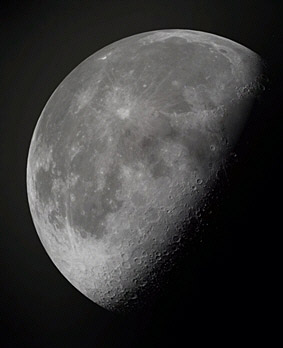
The HD Moon Texture by Marco Fischbach can replace the default FSX moon texture (64×64) with one of its higher resolution moon texture sets — 2048×2048, 1024×1024 and 512×512.

My recommended choice is the 1024×1024 set, which is good enough to render a pretty and realistic lunar terrain effect, without sacrificing FSX performance.

The latest version 3 can be downloaded from FlightSim.com here.

Continue reading

124: Break the 10-Day Shade Cycle Limit

SHADE for FSX is built on the 10-day cycle of FSX.   Therefore, up to 10 different SHADE presets can be saved via the program’s GUI utility (Shade_gui.exe).

Actually, it is possible to crack the 10-day limit and extend the cycle to cover all days in a month.    And theoretically, it is even possible to use a different preset every day throughout the year and beyond, despite of the impracticality of the idea.

The concept of this tweak is pretty simple — when SHADE for FSX is executed, it will load the presets from the settings.ini created by Shade-gui.exe.   Therefore, if one can:

  • Prepare three different settings.ini each containing 10 different presets (totalling 30 presets)
  • Load them one after the other in every 10 days

Then, each day in a month can associate with a unique preset stored on these three settings.ini.

The tricky part is how to fully automate the swapping process of these three ini files according to a predefined condition without human intervention.

Here’s what I did:

Continue reading

122: Day Cycle Calculator goes Mobile

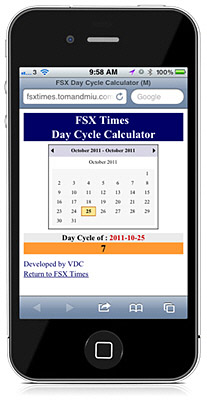
Here’s the mobile versionof the FSX Day Cycle Calculator customized for iPhones and smart phones.

When started, SHADE/Day cycle of today will be shown.    Still, users can effortlessly select another day or month as with the desktop version.

From now on, one can find out the SHADE/Day cycle of today in FSX, anytime, anywhere, even without a computer.    Just bookmark the following link in the browser of the phone.

http://fsxtimes.tomandmiu.com/fsx_daycycle_mobile.aspx

116: FSX Day Cycle Calculator

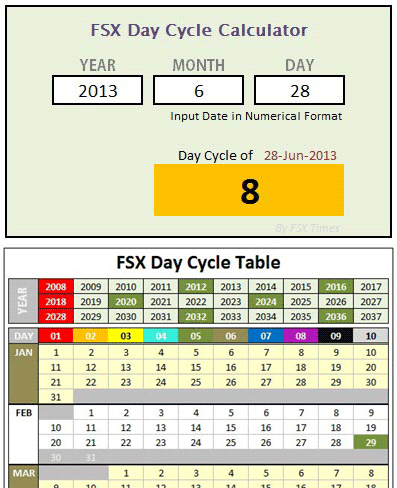
Here’s the FSX Day Cycle Calculator mentioned in Post 112 about Finding the Day of Shade.

Compared to the previously created Day Cycle Table, this calculator is much more handy and it has been further revised to simplify input operations.   Continue reading

115: Less is Still More – the Game Booster

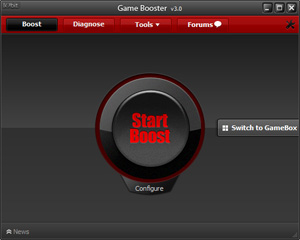
Game Booster from IObit definitely isn’t something new.   It is a small application that can temporarily stop unnecessary computer background processes and services, in order to give more computer resources and power to “boost” the performance of a game.

Before the current version, I never liked the program because I encountered tiny bits of problems many times during the restore process.

The new version 3 is a great improvement in terms of stability and user-friendliness.   Also, it is now completely free — in version 2, I had to purchase a license for its premium features. Continue reading