
781: New Wet Compass for MSFS C172

I have a wet compass with Audio Panel and Annunciator made for the C172SP in FSX/P3D.  However, it cannot be simply converted for MSFS because the Audio Panel on the MSFS C172, not only layouts but also programming codes, are different.

Thanks to a US friend Ross’s sponsorship, a new Wet Compass custom-made for the MSFS C172 has been developed accordingly.

The first video below shows the button operations for the Audio Panel, and the second video demonstrates the popping up of the Annunciator Panel when fuel is low and magneto is off.
Continue reading

779: Skipping the Ready-to-Fly Button

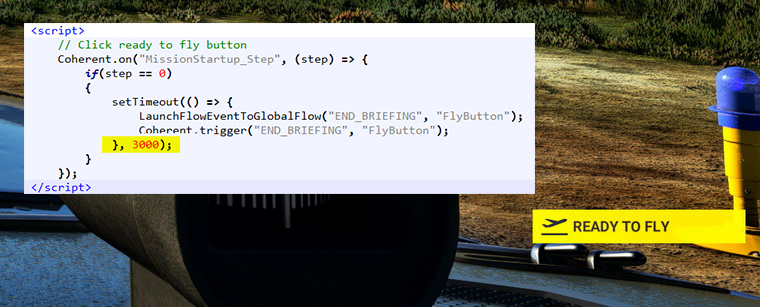
Just found a new addon called Ready to Fly Button Skipper on Flightsim.to which allows any flight to start automatically without the need of mouse-clicking the “READY TO FLY” button.

What’s more, the trigger time can be shortened or lengthened by altering the value as shown in the highlighted script in the MissionStartup.html of the addon.
Ready-to-Fly_Skipper Continue reading

773: MSFS Multi-Monitor Setup

One of the features I missed the most after moving to MSFS from P3d is the 3-monitor setup.  I believe many friends feel the same.

A friend, KaseLite, who told me in an earlier email saying that he is running MSFS on three PCs with Wideview and the result is very good.  But he admitted that the approach isn’t economical.  Besides the hardware cost, you need to buy the same flight simulator, aircrafts and addons for all machines.

Nevertheless, KaseLite says that the graphics are the best this way.  You can run all machines at maximum solution.

Here’s a demonstration video of his 3-monitor MSFS setup KaseLite took upon my request to share with other friends here.   Thank you.

Builder: KaseLite
Aircraft: N333ZS
Home Airport: KSBA, Santa Barbara Municipal Airport

Project Notes: Continue reading

771: Scrolling FUN with DHC-6 Altimeter

The hybrid-style altimeter which has analog needles and digit display are always my favorite.  While flying the Aerosoft DHC-6 lately, I noticed that the “thousand” and “10-thousand” digits on the altimeter are not simply linear scrolling according to height.  The numbers start to scroll up or down to the next value only from the last “50” and “500” at every hundred and thousand segment respectively.

I then thought it would be fun to add this little effect to the DHC-6 altimeter as such, although I tend to prefer the flipping style as it is more precise and easier to read. 


So here’s the updated DHC-6 altimeter.  The Clean Version with the new scrolling effect is on the left, and the Extended Version with the digit flipping on the right.  Continue reading

764: MSFS GaugeSwitcher Special Edition

Due to the latest Generic G5 PFD v4 coming with anAirspeed Switcher” utility to allow users to quickly switch among different Airspeed Scales for the aircraft being flown, a special MSFS GaugeSwitcher v11A, which embedded the Airspeed Switcher function, has been created for those Generic G5 PFD users who are using the GaugeSwitcher as well.


Except the extra PFD Airspeed Switcher function, the new v11A version works exactly the same as the current v11 in essence.

So, if you don’t have the Generic G5 PFD v4 in your setup, or you don’t run the Generic G5 PFD v4 in MSFS, you don’t really need this special edition. Continue reading

763: RedBird Alloy RD1 Review Part 2

…continued from Part 1

SettingS in MSFS

Since Redbird isn’t an affliated partner with Asobo, users have to configure the Alloy RD1 in MSFS by themselves.  The assignment process can’t be said complicated.  But it was not straightforward either.

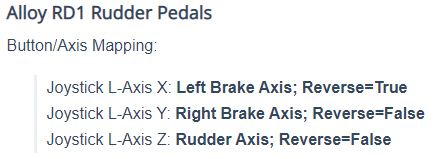
Also, the MSFS setting information RD1_30provided by the company is NOT fully CORRECT.   For example, in the mapping suggestion, Redbird states that the Right Brake Axis doesn’t need to be Reversed.

But it is incorrect as I have to enable the REVERSE to use the Right Brake properly. Continue reading

759: GENERIC G5 PFD R4 Major Update

The GENERIC G5 PFD R4 is ready at last.  This major update includes a lot of enhancements and revisions with many bug fixes and new features.

For instance, besides its appearance nows resembles more to the latest Garmin G5, Vrefs info (reference speeds) based on real aircraft are added as an option to the Airspeed Scales as well.

Here’s a quick video showing both single-cue and dual-cue PFD running with the HSI on the C172 Skyhawk in MSFS.

Furthermore, a new utility called “G5 Airspeed Switcher” is also included to the instrument pack so that users can quickly switch among different Airspeed Scales to match with the aircraft being flown with the G5 PFD.

However, similar to the G5 HSI R4, this new PFD R4 Continue reading

754: GENERIC G5 HSI R4 Major Update

The GENERIC G5 HSI has been updated to Revision 4.

One of the major improvements in the update is the addition of a new VOR2 version, so as to better match with the operations on the aircraft equipped with the G1000 in MSFS 2020.

In addition, virtually all images of the new HSI are recreated with enhanced graphics rendering.  The results are positive, which are especially beneficial to all users who runs their Flight Instrument Panels (FIPs) with the default Logitech MSFS plugins.

Here’s a short video showing the new GENERIC G5 HSI switching between VOR1, VOR2 and GPS modes:

Users of the G5 HSI please be noted that the new R4 Continue reading

746: Landing Gear, Landing Gear

Have been revising many of my gauges lately.  Here’s another two of them which now come with enhanced landing gear indicators.

The first is the RPM of the Just Flight PA28R Arrow III and Turbo III/IV.  The new landing gear indicators on the left now take the comprehensive Gear Unsafe & Gear N-L-R style from the aircraft, rather than the simple one used on the right in the last version released in September, which took from the M20R.

The landing gear indicators on the Carenado M20R Engine Cluster also updated to simulate the up-down movements of the indicators on the aircraft as well.

In addition, Continue reading