
——————————————————————————————————————
The G5 PFD Airspeed Switcher (or Airspeed Switcher in short) is a simple utility to allow users to select specific Airspeed Scales for different aircraft running with the Generic G5 PFD on the Logitech Flight Instrument Panel (FIP).
Therefore, the Generic G5 PFD, either dual-cue or single-cue or both, is necessary prior to installing the Airspeed Switcher. Otherwise, errors will occur.
INSTALLATION
Installing the Airspeed Switcher is easy.
In the zip package “GENERIC_G5_PFD_AirSpeed_Switcher.zip“, it contains an executable program and a file folder as shown below:
- G5_AirSpeed_Switcher.exe
- GENERIC_G5_PFD-AirSpeed
===============================================================
A)
If you are running your FIPs with Logitech Plugins for MSFS or P3D
1)
Place the “G5_AirSpeed_Switcher.exe” to the directory where the Generic G5 PFD is installed. (It is “OUTSIDE” the FSX_Times_Gauges directory.)
For MSFS
“C:\Program Files\Logitech\Microsoft Flight Simulator Plugin”
For P3Dv4 / P3Dv5
“C:\Program Files\Logitech\Prepar3D V4 Plugin”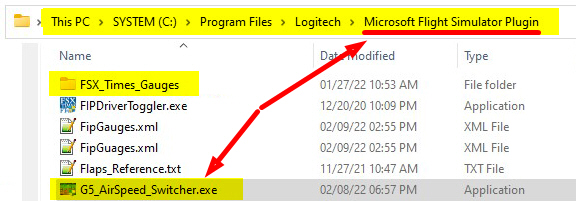
2)
Then place the “GENERIC_G5_PFD-AirSpeed” folder under (“INSIDE”) the
“FSX_Times_Gauges” directory.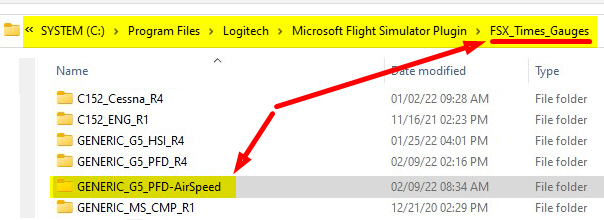
============================
B)
If you are running your FIPs with SPAD.neXt
1)
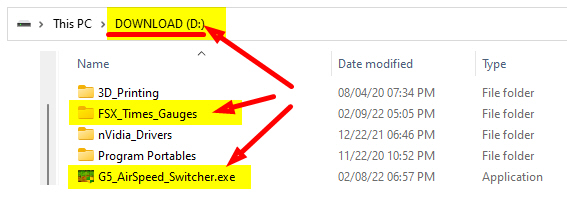
Place the “G5_AirSpeed_Switcher.exe” to the location where you save the Generic G5 PFD during installation, for example, D:\
Note that the Generic G5 PFD is installed under (“INSIDE”) the FSX_Times_Gauges directory. And the AirSpeed Switcher MUST BE PUT “OUTSIDE” the FSX_Times_Gauges directory.
2)
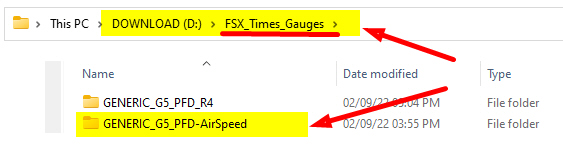
Then place the “GENERIC_G5_PFD-AirSpeed” folder in the
“FSX_Times_Gauges” directory.
===============================================================
USING THE AIRSPEED SWITCHER
Using the G5 AirSpeed Switcher is straightforward.
Just run the utility to choose the Airspeed Scale that matches the aircraft you are flying with the G5 Generic PFD from the list.
Then click [CONFIRM] to switch. 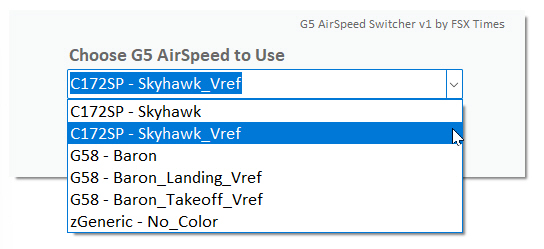
A)
If you are using Logitech Plugins
That’s all.
The FIP Gauges will refresh and load up the new AirSpeed Scale on the Generic G5 PFD automatically after you press the [CONFIRM] button.
B)
If you are using SPAD.neXt
1) If SPAD.neXt is NOT running
That’s all. The G5 PFD will load up the IAS Scale you choose the next time you run MSFS.
2) If SPAD.neXt is RUNNING
You’ll need to reload the FIP with the Generic G5 PFD via SPAD.neXt again in order to activate the new AirSpeed Scale you just choose to use.
============================
You can run the utility at any time, EVEN WHEN YOU ARE IN AN ACTIVE FLIGHT.
TIPS 1
– For quick access, you are recommended to create ONE or TWO Shortcuts of
the G5_AirSpeed_Switcher.exe on the “Start” and “Taskbar” for easy access.
TIPS 2
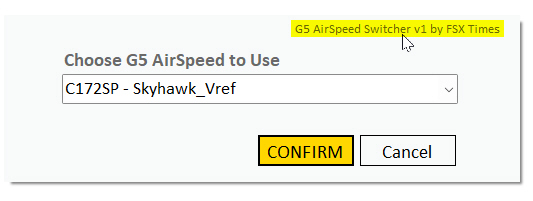
– You can click on the Header of the AirSpeed Switcher to call up this User Guide.
===============================================================
The standard GENERIC G5 PFD (both Dual-cue and Single-cue) comes with four (4) sets of AirSpeed Scale in nine (9) files:
- C172SP – Skyhawk (clean, no Vref)
- C172SP – Skyhawk_Vref (with Vref)
- G58 – Baron (clean)
- G58 – Baron_Takeoff_Vref (with Vref for Take Off)
- G58 – Baon_Landing_Vref (with Vref for Landing)
- SR22 – Cirrus (clean)
- SR22 – Cirrus_Takeoff_Vref (with Vref for Take Off)
- SR22 – Cirrus_Landing_Vref (with Vref for Landing)
- zGeneric – No_Color (just marks only without speeds in color)
The Vrefs info (reference speeds) are based on the researched findings from real aircraft.
============================
At the moment, optional AirSpeed Scales are being developed for the other default and third-party aircraft, including:
- C208B – Grand Caravan EX
- CT182T – Skylane
- DHC6 – Twin Otter
- G36 – Bonanza
- M20R – Ovation
- PA28-JF – Warrior
- PA28R-JF – Arrow III
- PA28R-JF – Turbo Arrow III-IV
- SW121 – Virus
And more will be added to the list.
Also, customized AirSpeed Scale requests are welcome.
Please note that optional AirSpeed Scales are PAID upgrade.
===============================================================
That’s all for now.
Via the G5 AirSpeed Switcher, you can access up to eighty (80) different AirSpeed Scales to match with the different aircraft you are flying with the Generic G5 PFD.
Stay Safe and Happy Flying.
Tom Tsui
FSX Times
Updated on March-2022
 FS Times