
Updated: 2025-Dec-10
Followings are my current Graphics Settings for FS2020 and FS2024 SU4 (1.6.32.0). Actually, I seldom run FS2020 these days. But I am keeping it in my system because there are addons compatible with and can be ported to FS2024.
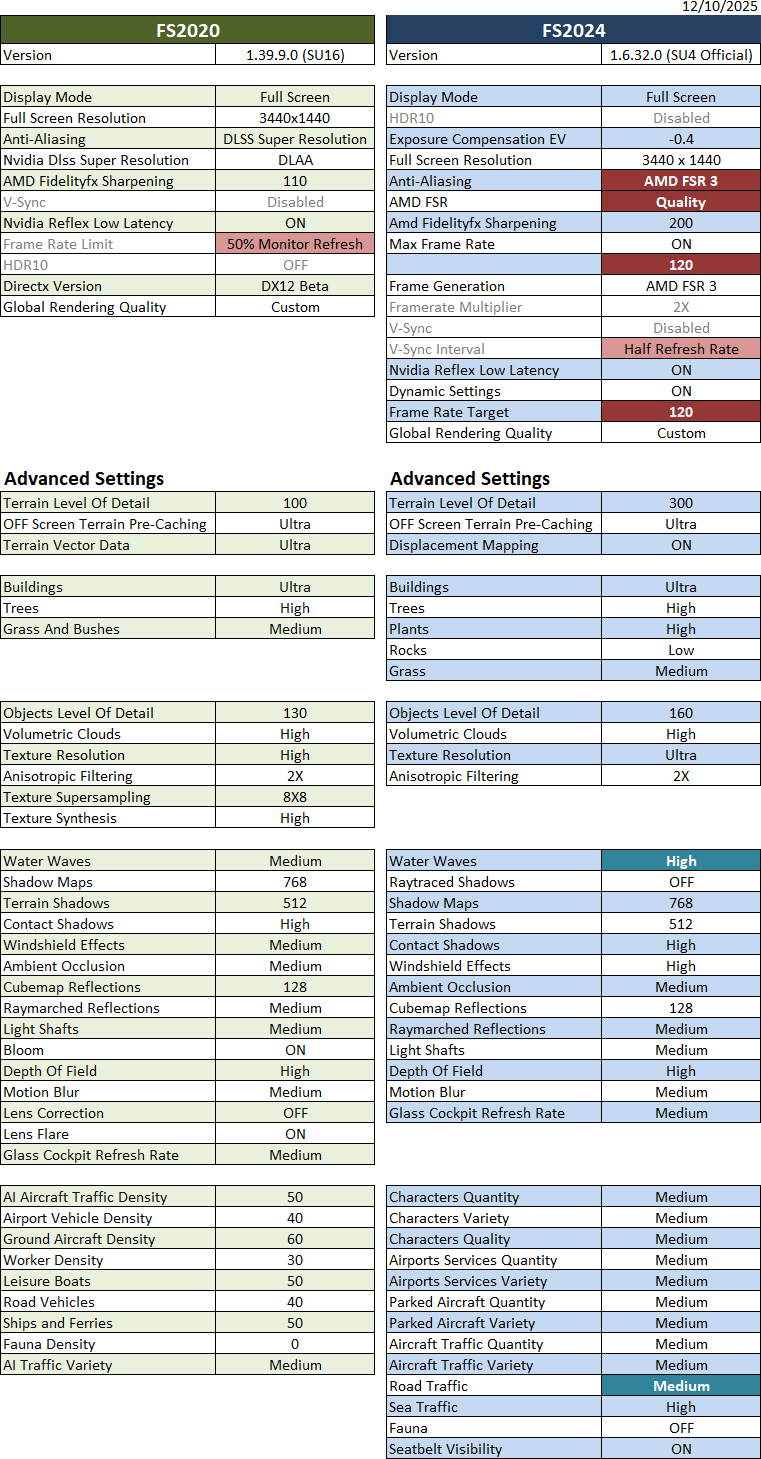
Crucial to this update:
“Anti-Aliasing” has been changed to “AMD FSR3” from “DLSS Super Resolution” because AMD FSR3 in my system offers clearer landscape quality without sacrificing performance. Result of my last selected DLSS Super Resolution was a bit blurred in general.
With this settings, my FS2024 FPS now pushes up to 150, though it can vary down to 80 at large airports, while FS2020 remains more or less the same, with FPS ranging from 40 to 60 something.
Hardware of my system are: i9-11900K CPU with GeForce RTX 3080Ti and 34-inch 144Hz Mi monitor (3440 x 1440).
Nvidia driver running is 591.44;
FS2020 is SU16 (1.39.9.0);
FS2024 is SU4 (1.6.32.0)
For those who are interested, here’s the list to “My Previous MSFS Graphics Settings“.
==========
- See My NVIDIA Settings
- See My ReShade Settings
- See My AimxyZ Settings
- See My MSFS Yoke Settings
–
 FS Times