91: fsx.CFG – TERRAIN_MAX_AUTOGEN

The default quantities of trees and buildings auto-generated in FSX are 4,500 and 3,000 respectively.

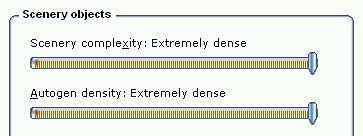
When one sets the IMAGE_COMPLEXITY and AUTOGEN_DENSITY to the maximum, reducing either or both of these two quantities for trees and buildings could bring a significant performance improvement while maintaining a good level of image complexity and density.
Continue reading

45: Configuration Fits for ALL #5 – Back to BASIC

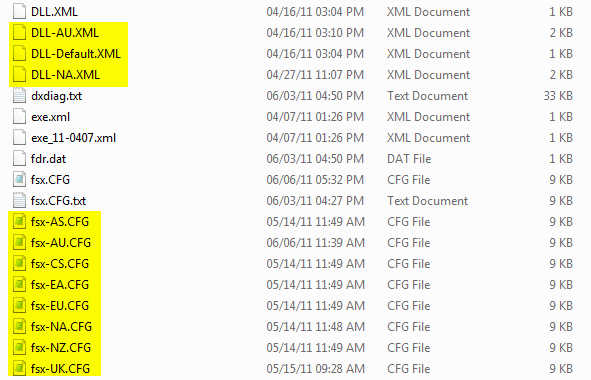
With all the files prepared from previous steps, here’s the BASIC programming part to load corresponding files automatically when a flying zone is selected.

C:\Users\Tom\AppData\Roaming\Microsoft\FSX

Continue reading

42: Configuration Fits for ALL #2 – The Files

The more addons we install, the longer time FSX is needed to load up, no matter if SSDs or 1,000rpm HDDs are used.   My system has nearly 400GB of third-party sceneries, not to mention additional aircrafts.   FSX load-up time, imaginable, is intolerably long.  Deactivating sceneries through Scenery Library under Setting will not help.

The main purpose of this flying zone approach is to trim down FSX system size and speed up loading and execution performance, without deleting any addons.  At present, I splitted my system into 8 Flying zones according to specific Landclass and Scenery installed.  They are: Continue reading

41: Configuration Fits for ALL #1 – The Concept

I usually flightsim only in areas with third-party sceneries installed.  FSX, however, performs vastly different due to scenery’s complexity and technology used.

Like many others, I’ve been searching for and experimenting tweaks and suggestions, aiming to get the best FSX result.

Unfortunately, One Setting that Fits for All simply doesn’t exist.    My Best FSX Setup may not apply to others at all, for example.

Inspired by Orbx’s FTX scenery approach, I started reconfiguring my FSX system into different flying zones about a year ago.  Tweaks and settings, therefore, are specifically customized to target the best result for a particular scenery or flying zone under the same hardware setup.

Nevertheless, the concept is pretty simple: Continue reading

24: Reduce Autogen File Size

Autogen objects are defined by default.xml under FSX’s Autogen folder.   Many third-party sceneries during installation will add new objects to the file, making it bigger and bigger.

Here’s a quick and easy way to reduce the size of it and bring some improvements, especially to low- to mid-end computers.

1) Locate default.xml in the Autogen folder of the Microsoft Flight Simulator X directory (x:\Microsoft Flight Simulator X\Autogen)

2) Backup the file first for safety sake

3) Open the file with Notepad

Continue reading