91: fsx.CFG – TERRAIN_MAX_AUTOGEN

The default quantities of trees and buildings auto-generated in FSX are 4,500 and 3,000 respectively.

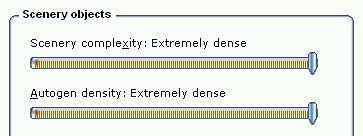
When one sets the IMAGE_COMPLEXITY and AUTOGEN_DENSITY to the maximum, reducing either or both of these two quantities for trees and buildings could bring a significant performance improvement while maintaining a good level of image complexity and density.
Continue reading

90: fsx.CFG – BufferPools

Autogen has a default texture buffer of 4 millions.  Properly increasing or decreasing this buffer can effectively reduce stutters, especially while the aircraft is in turning.

This function is not by default present in fsx.CFG.    To alter the value, one can add the following lines in fsx.CFG; and commonly used values range from 1 million to 15 million (or even higher) in 1 million increment.

[BufferPools]
PoolSize=15000000

Continue reading

89: My FSX Tuning Part 3 – First Run

My First Run took place in Concrete Mun 3W5 with framerate locks at 39, after the initial tunings from Part 1 and Part 2.

Before the actual flight, a few more adjustments were made directly in the fsx.CFG as follows: Continue reading

87: My FSX Tuning Part 1 – Back to Basic

As stated in my last post regarding AMD 11.8 setting, due to the discrepancy to what I’ve been using for a long time, I’ve been re-tuning my whole system as if it was just newly installed.   This is the first of a series of posts regarding my tuning process, and the objective of the first step to reset most of my system back to the state as if they were just installed.

STEP 1: Preparation

a)     Backup fsx.CFG to fsx-Backup.CFG  (c:\Users\<username>\AppData\Roaming\Microsoft\FSX)

b)    Backup or capture images of the 3D Application Settings of the display card Continue reading

84: fsx.CFG – DisablePreload

When FSX is started, the default flight is also starting to load simultaneously in the background by default.   It is designed to speed up the loading process subsequently.

However, if an FSX system has installed a lot of sceneries or the sceneries installed are large and demand a lot of resources (such as Orbx’s sceneries), it is very likely that one will encounter short hang-ups while changing airports and/or aircrafts or adjusting settings, due to the preloading process taken place in the background.

To get rid of this irritating short hang-up, one can include the following line in the [Main] section of fsx.CFG to suppress the preloading: Continue reading

73: fsx.CFG – Vertical Sync

When vertical synchronization (refresh) of display is not set properly, it is very likely that some sorts of screen-shearing problem will be introduced in FSX.

This screen-shearing issue can be easily identified when the view is turning to the left or turning to the right quickly, especially in the virtual cockpit view.  It seems that the upper half or the lower half of the screen is lagging behind to the other.

Continue reading

69: My Best FSX Setup (2011-0808)

Due to the latest changes I made in the AMD Radeon 11.7 setting, my fsx.CFG has realized a significant modification by removing the AffinityMask entry completely.

This means that all 4 cores of my i7 CPU are now available to FSX, rather than just limited to 2 cores through the AffinityMask=13 command as set before.

Continue reading

67: fsx.CFG – LOD_RADIUS

LOD_RADIUS under [TERRAIN] determines the size of the coverage area to be refreshed around the aircraft.   It has a default value of 4.5.

[TERRAIN]
LOD_RADIUS=4.500000

However, a number of other aspects are also influenced by this value in addition to refreshing the coverage: Continue reading

62: fsx.CFG – Load a Flight Immediately

By changing the following line under [STARTUP] section to false (0), FSX will load the default flight immediately after starting up without going to the opening screen.

[STARTUP]
SHOW_OPENING_SCREEN=0     (No opening screen)
–     or     –
[STARTUP]
SHOW_OPENING_SCREEN=1     (Default: with opening screen)