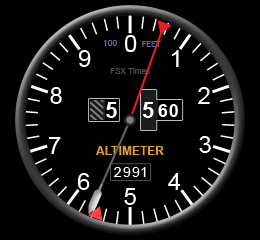
215: Turn Off FIP Buttons

TechLevel01W
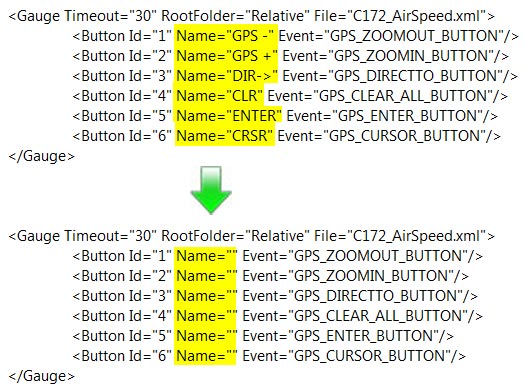
Received a question yesterday asking how to remove the text of the six programmable buttons on the left hand side of the Flight Instrument Panel (FIP) so that one could make use of the whole 320×240 area on the device.

It is easy to achieve by just removing the content of the Name command inside the LogiFlightSimX.xml file under C:\Program Files (x86)\Logitech\FSX Plugin directory as shown below.
(For systems using the older drivers from Saitek, the file is called SaiFlightSimX.xml and it is located under C:\Program Files (x86)\Saitek.)
FIP Botton 01

Continue reading

209: Improve FIP Smoothnesses

The default Gauge Timeout value that controls the refresh rate of Saitek’s Flight Instrument Panels (FIPs) inside SaiFlightSimX.xml file is 100.   Lowering the value could bring some improvements to the smoothness of the display on the device.

However, setting the value too low or at 0 could inversely impact not only the FIPs but also the performance of FSX.

<Gauge Timeout=”20” RootFolder=”Relative” File=”Gauges\AirSpeed.xml”>

I found 50 a good start and 20 a good balance.   Your mileage may vary, of course.

197: Tidy Up FIP Gauges

TechLevel01W

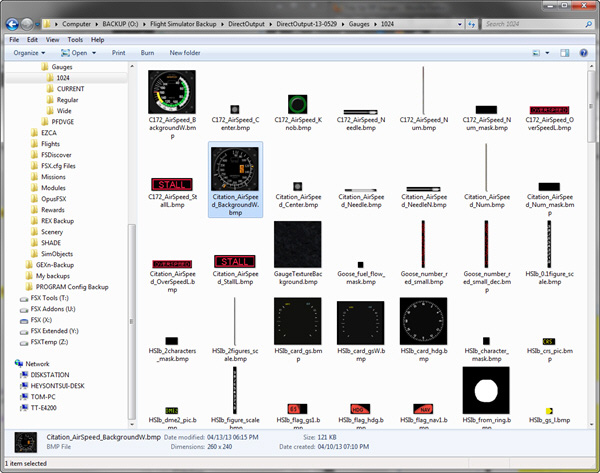
By default, FIP gauges files are put under the DirectOutput folder.   However, when more and more gauges are added to the system, the gauge files accumulated under the folder and its subfolders, especially the 1024 folder where bitmaps are stored, are getting harder and harder to identify.

FIP Folder 06

To tidy them up in a logical manner, Continue reading

194: An FIP Display Order Setup Guide

TechLevel02W

I keep receiving questions from friends asking why the display order of FIPs are different every time when they start up FSX.  Followings are two of the most recent examples:

I have built a Saitek cockpit with 6 FIP’s so far.  It works great until I reboot.  It seems the USB ports start in a different sequence on each boot up.

When I added additional FIPs [using a single 10 port USB hub], they no longer would come up in the SaiFlightSimX.xml order.

Evidently, Saitek’s customer support is still lousy even after the product has been marketed for many years.   Anyway, here’s the revised FIP Display Order Setup Guide based on my Posts 28: Flight Instrument Panel Tweak – Part 1 and 118: Loading FIPs in Desired Order, and many replies I gave in various Comments.

Continue reading

187: Adding New Gauges to FIP

TechLevel02WT210_AltimeterW

Although my previous Post 28, Post 29 and Post 30 already talk about the basics, installation and tweaks for Saitek’s Flight Instrument Panel (FIP), there are still many friends asking for direct instruction on how my Centurion T210 gauges be installed.

So, here is a step-by-by tutorial in which I am using my Altimeter Gauge wide version as an example:

AAA
Download the T210 AlimeterW.rar from the link you received  —  Note that only subscribers of FSX Times are eligible to get my files (Edit: No More Available)

Continue reading

An Update – The Company DOESN’T Care


Probably anyone could tell from all the flightsim gears I bought from Saitek and the many custom gauges I developed for its FIPs that I am really a big fan to the company’s Pro Flight products.   That’s no doubt about it, but that’s also the reason why I was so upset when I got the unreasoning answer from the company’s supporting team regarding my help request on the format for the masking bmp files.

Beyond expectation, the company then followed my grievance promptly and positively.   Despite the misunderstanding involved, I have to admit that I am impressed by the care the company pays onto a customer’s concern.

I never regard myself more special than other customers to the company.   So, there’s no reason why I cannot clear out all my discontent and look to the future.

Even though I’ve tried to put myself in the company’s perspective to look into the service the company promised to deliver, it turns out to be that the company only talks and talks.   I have no more fancy that company really cares about their customers — no matter how beautifully they present themselves.

After all, I am still a big fan to the company’s flightsim products.

Comments

Confidentiality — Nonsense !


With the help from Bill Leaming, Tom Gibson and Vololiberista at FSDeveloper.com who answered my question about “How to create BMP files for masking purposes” for FIP gauges, I have finally figured out how to create such *.bmp files in the first place.

It is so simple that I just need to:

  • Fill the image file (to be used as a mask) with RGB color=1,1,1 or web color=010101;  then
  • Save the file in either 1, 24, or 32-bit format.

That’s it!    I tried various methods and it turns out that I was just a step behind the door.   Sometimes you just need a twist to get you there.

Regarding my complaint against Saitek — Yes, that is the information I would expect from the company.

What a shame that the Saitek EU technical guy, Gabriel Constantinescu, replies and claims such information as “privileged and confidential to the company” and cannot release it to a loyal customer who asks for a little support.   And irresponsibly says that “we are unable to provide instruction on creating gauges to customers.”

Either he is totally ignorance or the department has rotten by bureaucracy !

Case Closed !

Comments

What’s the Point of Confidentiality ?

Although I’ve created quite some gauges for Saitek’s FIP, I still can’t figure out completely the correct format for the bmp files used as masks for the gauges.

Besides researching the answer from the internet and exploring the result through different programs, I also wrote to Saitek for help.    I wish that I hadn’t done so because the reply from the company’s UK technical support team is a total disappointment:

We are unable to offer this information as it is privileged and confidential.  We are unable to provide instruction on creating gauges to customers.

Frankly, even without this information, we users are still able to create our own gauges.   It may take a bit more time and need some alternative methods to deal with the masking files.

So really I can’t understand the point of such confidential information to the company !

Do they know that the more custom gauges we create, the more potential (new and old) customers we help attract for them ?

Are they afraid that by releasing such information to customers will make us their competitors ?

Darn !

Comments

170: Gauge Obsession

Have been obsessed in creating and modifying gauges for my Saitek Flight Instrument Panels (FIPs) lately.    Just couldn’t help doing it one by one again.

Here’s the Attitude and Vertical Speed meters for Centurion T210 again.   Actually they were modified not too long ago.   Moreover, even they are tagged for Centurion T210, the gauges can be used on other aircrafts as well.

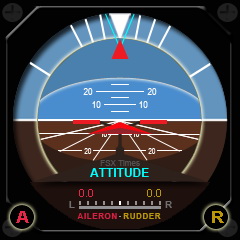
Enhancement to the new Attitude Indicator is the inclusion of the Aileron and Rubber Trim functions.   Users can use the two knobs of the FIP to ajust the trim values as desired.

By modifying the FIP buttons as follows, users can reset both trim values quickly, when needed.
Continue reading