
In FSX, only the Extra300, FA-18 and P51 aircrafts are pre-installed with an exhaust smoke system which can be activated by pressing the “I” key on the keyboard.
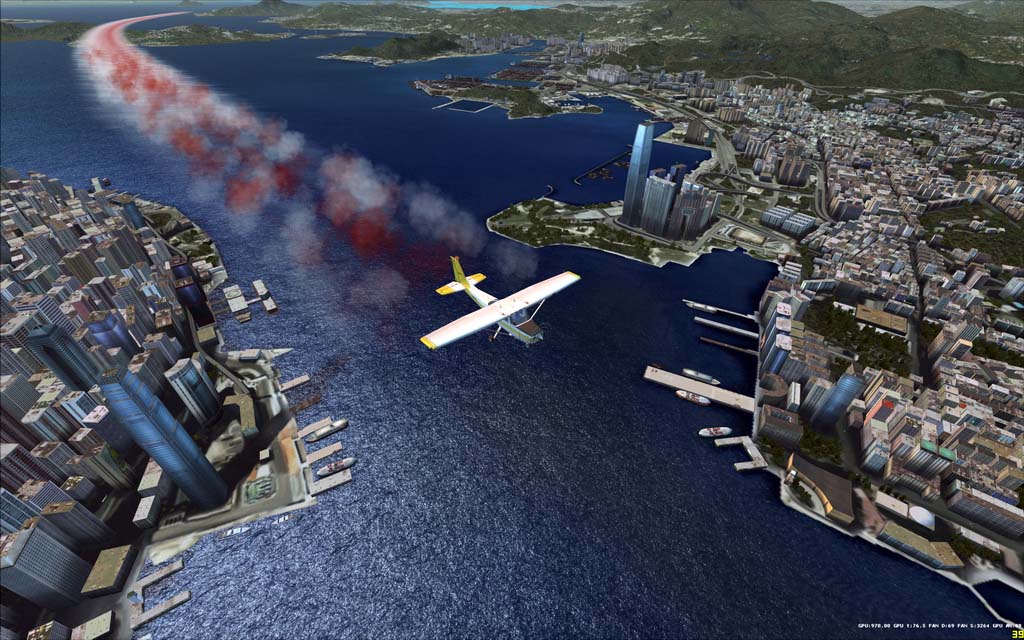
To add the smoke effect to other aircrafts, insert the following lines at the end of the aircraft.cfg of your choice under SimObjects folder:
[SMOKESYSTEM]
smoke.0 = -10.0, 0.0, -1.0, fx_smoke_w
where
-10.0 = before or after the cockpit in feet
0 = left or right position from the center of the aircraft
-1.0 = above or below the midpoint of the aircraft
fx_smoke_w = white smoke
fx_smoke_r = red smoke
Followings are what I did to the Cessna 172 to create the mixing red-white effect in the picture.
[SMOKESYSTEM]
smoke.0 = -1.29, 23.77, -1.5, fx_smoke_w
smoke.1 = -1.66, 19.7, -1.5, fx_smoke_w
smoke.2 = -1.79, 15.66, -1.5, fx_smoke_r
smoke.3 = -1.86, 11.49, -1.5, fx_smoke_w
smoke.4 = -2.37, 7.38, -1.5, fx_smoke_w
smoke.5 = -2.56, 2.63, -1.5, fx_smoke_r
smoke.6 = -2.63, -2.56, -1.5, fx_smoke_r
smoke.7 = -2.43, -7.38, -1.5, fx_smoke_w
smoke.8 = -1.92, -11.49, -1.5, fx_smoke_w
smoke.9 = -1.66, -15.59, -1.5, fx_smoke_r
smoke.10 = -1.6, -19.64, -1.5, fx_smoke_w
smoke.11 = -1.15,-23.75, -1.5, fx_smoke_w
 FS Times
Hi Tom,
I know this is an old post but , any idea how to increase the time the smoke stays before evaporating ? I have serched “smokesystem” but with no luck.
Thanks in advance.
Dave.
LikeLike
Hi Dave, look for fx_smoke_r.fx and fx_smoke_w.fx files in Effects under FSX. It should be possible by modifying the values in the files even though I didn’t try it myself.
Tom
LikeLike
Thanks Tom. Now I know where to start looking I will have a play around and let you know if I get a result.
Dave.
LikeLike
You’re welcome. Yes, please let me know your result. I am interested to know as well.
Tom
LikeLike