

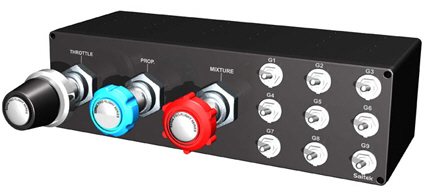
Saitek’s TPM Control Unit comes with 9 programmable toggle switches. However, FSX’s SETTINGS only recognizes their downward actions during BUTTONS/KEYS assignments. In other words, only 50% of TPM’s programmability are used.
To fully utilize the TPM:
1)
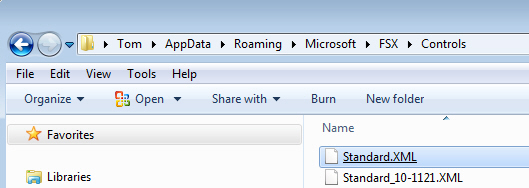
Open Standard.XML under C:\Users\user name\AppData\Roaming\Microsoft\FSX\Controls
2)
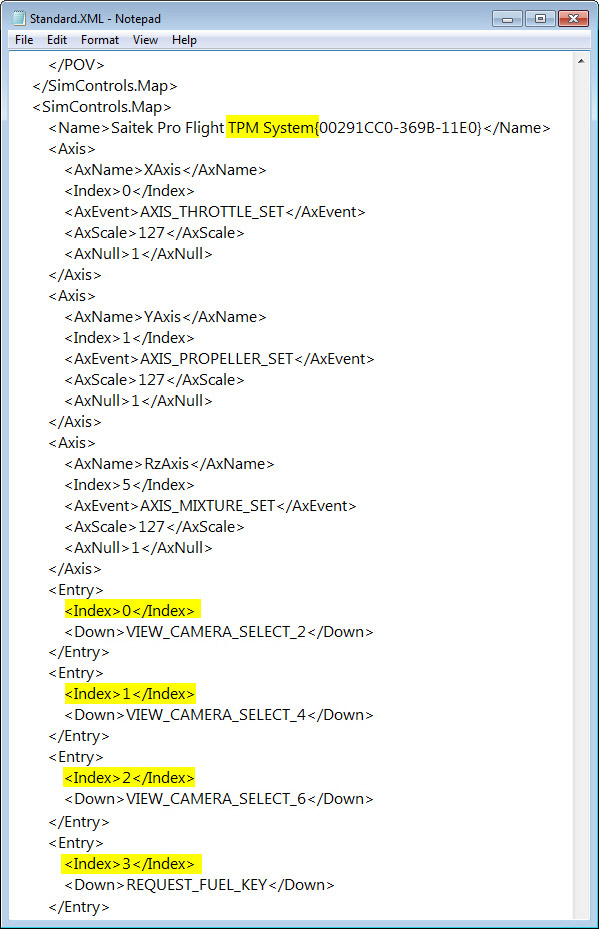
Look for keyword “TPM System” inside the file
3)
<Index>0</Index> to <Index>8</Index> represent the 9 toggle switches
4)
The <Down>key_command</Down> line represents the downward action of the toggle switch
5)
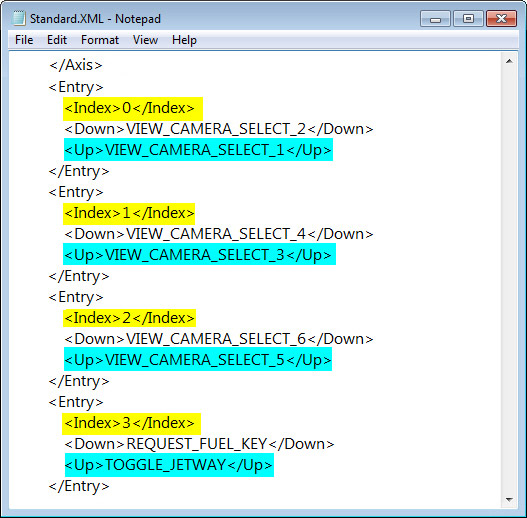
To add an upward action, insert an <Up>key_command</Up> line with specific command under each switch (see example below)
6)
When done, these new switches are now shown in SETTINGS’s Buttons/Keys assignment page.
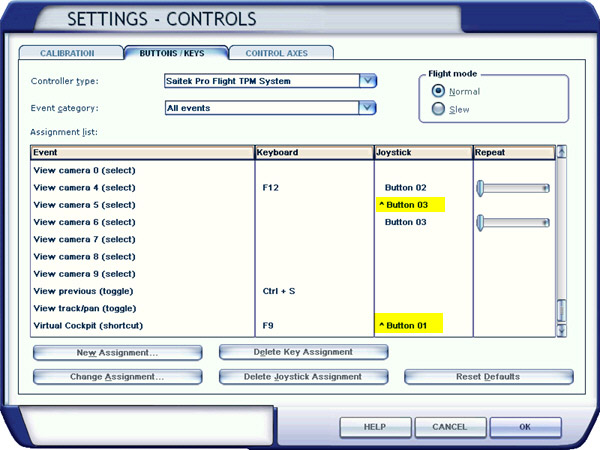
NOTE
These upward switch commands are all having a prefix of “^” in front of the button names.
 FS Times
Silly question here: I want to add labels (like Avery ones), by the TPM switches to label what assignments are. However, I don’t know the exact distances between switches (so I’d now how big the label needs to be). Does anyone know off the top of your head what the distances between switches are? It’s pretty difficult to measure them with a tape measure, since tape measures don’t usually fit in that small of an area.
Thanks,
Kevin Davis
LikeLike
Hi Kevin,
I remember that the layout specification of the TPM came with the product package. I searched my archives but couldn’t find it unfortunately. Hope others will have a copy of it.
Tom
LikeLike
this is great. anyone know how to do this same thing for x-plane??
LikeLike
If you are using SPAD.neXt, you should be able to program the button as mentioned in the post.
Tom
LikeLike
.. I am making progress here Tom, I found a way to edit the XML, I have inserted the AxNulls and saved them…. my question now is I have index7 showing GEAR_TOGGLE down and also index9 showing GEAR_TOGGLE down …what is your suggestion on either index7 or index9 to create a GEAR_TOGGLE up ???? thanks Tom …gary
LikeLike
Hi Gary, glad to hear that you are making progress. As you can see from my post example there, toggle switches G1 to G9 = Index 0 to Index 8. So just ignore Index 9. I don’t know what it’s referring to.
Tom
LikeLike
yes i was confused by index9. I followed your examples on the toggle but I get no response. do you use that sst programing from madcatz?? …I get nothing out of that as well but it is probably me not understanding it …thanks for the help Tom, just to use the TPM knobs is a pleasure …gary
LikeLike
You’re are welcome. Tom
LikeLike
Hi Tom:
It seems like the precise wording for the “key commands” that needs to be typed into the XML file need to be just that – precise. Is there an index of all the commands somewhere – in other words, a place where I can look up the precise wording for the key command for any given command? For example, if I wanted to use “VIEW_CAMERA_SELECT_6” as you use in your example, I would have had no idea where to find that language for the key command. HI hope my question is clear. Thanks!
LikeLike
Hi Tim,
You can find those key commands from the Standard.XML file inside the Controls folder where your fsx.CFG or Prepar3D.CFG file is loacted (e.g. C:\Users\Tom\AppData\Roaming\Microsoft\FSX ).
Or if you have FSUIPC, you can look for the “List of FSX controls” file in its Documents folder.
Tom
LikeLike
Unfortunately after following all the instructions, this didn’t work for me. I think part of the problem is the index numbers not corresponding to the Saitek switch numbers. In any event, after assigning the “up” command in the XML file to a switch, none of the switches did what I asked it to. Is there any further help on this? I called Saitek and they referred me to the manual, which is entirely unhelpful (as is the programming software they supply).
LikeLike
I gave up support from Saitek already. They are helpless.
Try add the following in the TPM section of your xml file. Index 7 refers to Toggle switch G8.
7
TOGGLE_PUSHBACK
TOGGLE_PUSHBACK
It should give you a better idea how the up switch works.
Tom
LikeLike
whats the key to getting it to work right in fsx… the throttle turns the yoke, the mix turns the rudders, etc. … help !!
LikeLike
Hi Gary,
not quite sure what’s your question. Should you want to find FSX commands, look for Standard.XML inside Controls folder.
It is the same location where your fsx.CFG is located, such as C:\Users\\AppData\Roaming\Microsoft\FSX\Controls
Tom
LikeLike
hi Tom …thanks for the reply ..I read where others had the same problems with TPM, mixture works the rudders, prop changes the views, throttle turns the yoke etc. I understand the concept of adding the other switch position on the toggle switches. I guess I need step by step instructions as to how to make the TPM throttle,prop,mix. actually work correct within fsx, to see the TPM knobs do the right things in the fsx planes. thanks again …any tips are appreciated !! :-)
LikeLike
I see. Here’s the image:

Just assign the Throttle, Propeller and Mixture buttons to the corresponding axes will do.
You could also find the FSX keyboard commands for the 3 axes in Post 50 here: https://fsxtimes.wordpress.com/2011/10/04/my-tpm-switch-assignments/
Hope this help.
Tom
Edit: Actually the commands are shown in this post already. You may just type the commands in your standard.xml file accordingly.
LikeLike
…wow…that was simple enough… in controls I clicked on the items you show with the different axis…then I just just pulled the throttle,prop,mix knobs on the TPM and it assigned each one correctly, then to get rid of the brake sign that was always showing I deleted,in the TPM controls the joystick assignment for brakes and that took care of that problem. could you possibly give me the step by step way to program toggle switch 3 to operate gear down with switch3 down and gear up with switch3 up …if I can get that to work I feel I will be able to program the remaining 8 switches …thanks so much for your help Tom it is worth its weight in gold to me !! …gary
LikeLike