
UPDATE (21-JAN-2012):
Download link for this ShadeShifter has just been sent out to all subscribers. If you are a subscriber but didn’t get my email, plesae let me know. Hope you all like it.
=====
Haven’t written any post these days since I am still deeply submerged in holiday mood as Chinese New Year is coming the next Monday. Even my FlyZone Switcher project which is waiting for refinements and there are zones to complete, I put them aside as well.
Anyway, I have just created another utility for the SHADE for FSX — seems like I should claim for some commissions from the developer for all the assisting utilities I have developed……just kidding.
Back to the utility. I call it the Shade Shifter — the  name is inspired by the shape-shifter, a goblin in the TV drama series, Supernatural. I found the name quite amusing.
From Post 124: Break the 10 Day Shade Cycle Limit, I wrote a utility to call up a Shade Preset according to 1) the day within the Shade cycle and 2) the actually date within a calendar month, so as to allocate a different Shade for each day in any month, and in particular, to create a randomized effect.
I am quite happy about the refreshing result from the randomized Shade Preset effect brought by the utility. However, there are still times that I would like to use a particular Preset, despite the day cycle and the calendar date.
SHADE for FSX comes with a GUI utility that in a way meets the needs. But it is a bit clumsy and not quite user-friendly. Therefore, I created the following utility to serve my needs.
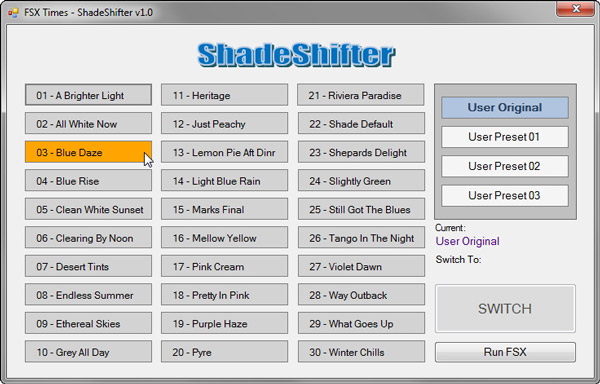
The Shade Shifter has already included 30 Presets from version 1.01 and 1.02 of SHADE for FSX — nearly all Presets from the developer. In addition, it allows the keeping and using of user’s current Shade settings, plus up to three other customized Presets.
The interface is intuitive — just point and click a Preset, and then the [SWITCH] button to activate. That’s all.
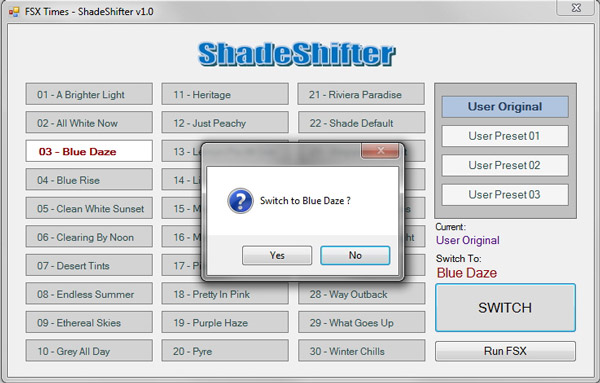
There is no limitation on the switching among the 30 Presets and the additional 4 user settings.
After the desired Preset is selected, just click the [Run FSX] button. SHADE for FSX with the desired Preset will be loaded, and then followed by the running of FSX.
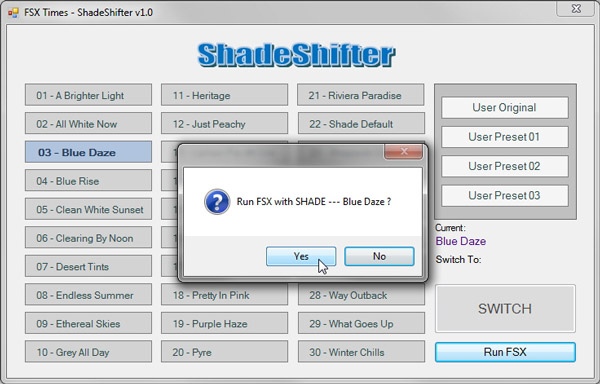
Similar to the SHADE for FSX, this utility must be run before FSX. Therefore, a function has been added to detect the status of FSX and close it automatically if it is running, in order to avoid erroneous situations.
For subscribers only, a download link will be sent by email in a few days if everything (beta testing and user instruction) goes well — just a little Chinese New Year present from FSX Times.
 FS Times
Hi Tom:-). First of all “sorry for my English” (I’m German native), but I’m sure it will be enough.
Thanks God for inspired guys like you, willingly to improve our Sim-Software constantly, not only freeware but payware as well.
I recently purchased S H A D E on Flight Sim Store, and must confess: i felt in love with this wonderful tool!
What an improvement for the “old” FSX, which becomes – from my point of my view- better and better. So, i really would like to try out your tool “ShadeShifter” – will certainly appreciate it.
So: P L E A S E send me your download link for this small little treasure :-); I’ve already subscribed.
Best regards to you and your little grandson :-),
Klaus from Germany
LikeLike
Hi Klaus,
Your English is good. No worry about it. Have just sent you the ShadeShifter by email. It should be in your mailbox now.
Have fun,
Tom
LikeLike
Dear Tom!
HOLY MOLY….this was REALLY fast. Many thanks to you for your fast reply; never expected it soooooo fast :-)). A very good time for me this sunny sunday aftertoon to experience new immersions in the depths of SHADE :-)).
God bless you!……and thanks to “PONS English-Dictionary”, smile.
Klaus
LikeLike
hai Tom, Im already subcribe, and want to know more about shadeshifter, could you send me a link for download it?thanks.
LikeLike
Hi Feri,
Just sent you the link.
Tom
LikeLike
Hai may I ask for a download link shade shifter??
Regards :)
LikeLike
Hi Christian,
Sorry for keeping you waiting. I’ll send you the file as early as possible when my new computer restores them.
Tom
LikeLike
Could you please send me the download link please for your shade shifter…thanks
LikeLike
Hi Richard, just sent you the link. Have fun.
Tom
LikeLike
hi, I have subscribed to your blog, may I ask for a download link shade shifter??
by: Rudy
LikeLike
just sent. check your mailbox. Tom
LikeLike
Hope you enjoyed the holidays Tom and appreciate all you do! I would like to get your shade shifter utility if possible. Looks like a great tool…thanks!
LikeLike
Hi Ed, it’s been sent to your mailbox. Wish you had a good holidays too. Tom
LikeLike
OK I was on another planet! I didn’t realise that and assumed it was something you’d packaged together. I’ll take a look at the addon and try again!
LikeLike
No problem at all. Even though I can offer the same function without the Shade For FSX, it is indecent to do that. So I’ll leave you to check it out.
LikeLike
Tom, Sorry, I meant to say “settings.ini”. I’m not sure I’m following this entirely. I unzip the file and get a folder called ShadeShifterV21 which then contains the app file, the PDF and a ShadeShifterSettings folder. In the PDF you mention “ensure your original settings.ini is in the directory as well” but I can’t see a file of that name anywhere in the extracted folder and as this is my first use of ShadeShifter then I wouldn’t have an original settings.ini. Or is it settings.ini related directly to FSX? Thanks and apologies if I’m overlooking the obvious!
LikeLike
Hi Derek, my utility is specially written for an FSX Addon called Shade for FSX. You have to get a copy of it before you can make use of my Shade Shifter utility. If you have the Addon already, make sure my files are put under the same folder of Shade for FSX.
Tom
LikeLike
Hi Tom. Just tried the app but I keep getting the error that the setting.ini file is not found. All the files have been extracted to the same folder but can’t find that file anywhere. Should I have been sent a previous version so that is initially set up, or am I missing something obvious?.
LikeLike
Hi Derek, check if you are installing the utility at the right directory. Also, check if your original settings.ini (NOT setting.ini) file was there. I have resent you the README file. Please check your email.
LikeLike
Hi Tom, just found your site and it’s a mine of information, Great stuff. Would love to try out your Shade Shifter utility. Many thanks in advance, Derek
LikeLike
No problem, Derek. The link has been sent to your mailbox.
Tom
LikeLike
Could you pkease send me the download link please
LikeLike
Sure but please subscribe my blog first.
LikeLike
Great work Tom Tsui ! I wouldd like to try your application. May you send me a link, pls ?
LikeLike
Hello Tom
Can you please send me a download link for your shadeshifter
Thank you
Chekib
LikeLike
Hi. Nice tool, a downloadlink is highly appreciated, thanks!
LikeLike
Very veru good app Tom! Would be very usefull to add a random button, so user can use also this function. Or a time-schema according with calendar date, for example 10 presets for winter (choosing random), 10 preset for spring and so on. I hope you understand what I mean. BTW, very good job!
LikeLike
Hi Riccardo, Your suggestion of grouping shades presets by seasons and then picking up them randomly sounds good but don’t quite worth the effort. Actually my Post 124 described some sort of random shade picking according to the date of month already. And it expands to 30 shades instead of 10. Anyway, will keep a note of your idea and see if it can be implemented in the next version of the Shade Shifter.
BTW, the email for Shade Shifter download link should be delivered within these two days.
LikeLike
Hello Tom would you please send me the download link of your Shade shifter
Vinny
LikeLike