
Via FSWidgets iGMapHD, iPad can be turned into a moving map device as reported in Post 63 and adds a lot of fun to FSX experience. However, should some one find the iPad display too small to read or want to be felt like in a flight control tower… Well, what about putting the moving map onto a 52-inch or larger TV set?
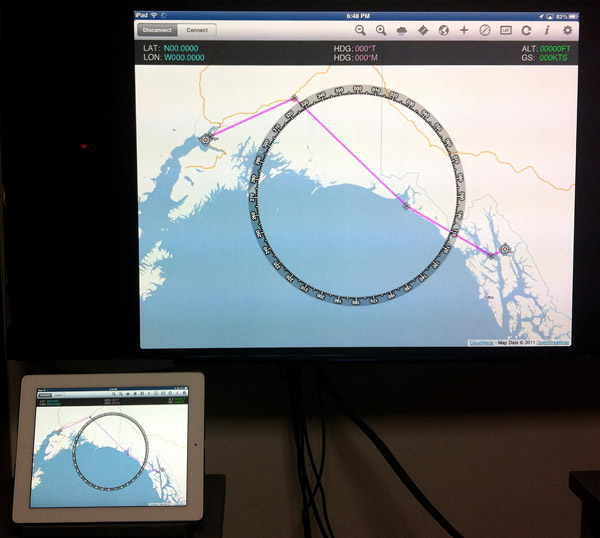
 Apple TV (2nd generation or newer) comes with a wireless Mirroring function, which mirrors everything on the iPad screen to the TV hooked up to the device and on the same WiFi network.
Note that the oldest iPad 1 doesn’t have the Mirroring function even it’s been updated to the latest iOS. Also, for the best result, the new iPad with the retina (2048 x 1536) display will bring a stunning performance.
To activate the Mirroring function:
1) Double press iPad’s Home button for the multitasking bar
2) Swipe to the Left for the iPod control
3) Tap on the AirPlay icon
4) Select the right Apple TV and toggle Mirroring to ON
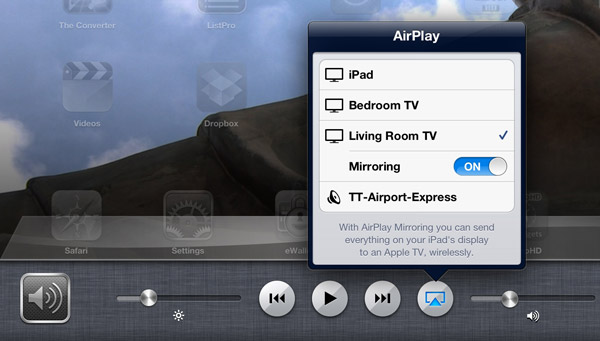
That’s all. The iPad content will now show up on the TV screen.
Currently, iPad doesn’t support 16:9 ratio. There will be black stripes shown on both sides of this type of TV.
So, blowing up the moving map to as large as the TV set available is not at all difficult. But how to arrange such a large TV set next to the main FSX monitor, definitely, is a real headache.
 FS Times
Nice one Tom! I’ve been wanting to link my FSX to my television this break, but I’m not doing very well :O
LikeLike
Unfortunately the Airplay Mirroring function is available only on iPad and the future Mountain Lion platform. X-Plane running on Macs definitely gains an upper hand in this respect.
LikeLike