
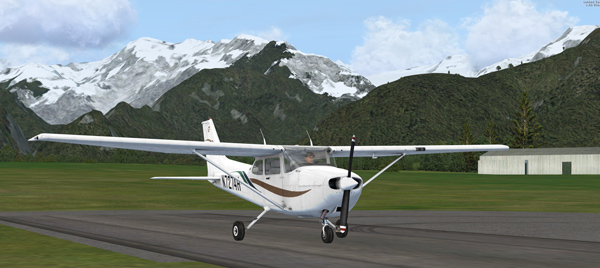
Just purchased the A2A C172 Trainer after Matthew Porter who notified me that the aircraft is now available from its store. After flying it for about an hour, the impression that this C172 gives me is sharp and responsive. Graphics is stunning. Also simmers can access many information via pressing the [Shft] + number keys.
Unfortunately, the aircraft doesn’t recognize some of the FSX functions via the buttons on Saitek panels or FIPs or by pressing the keyboard.
For example, the BAT and Panel Light buttons have to be toggled up and down a couple of times in order to reflect the status changed. The ALT button is not working.
When using with the SPAD driver, the BAT button is now working okay. But the Panel Light, ALT and even the Flaps are not working at all.
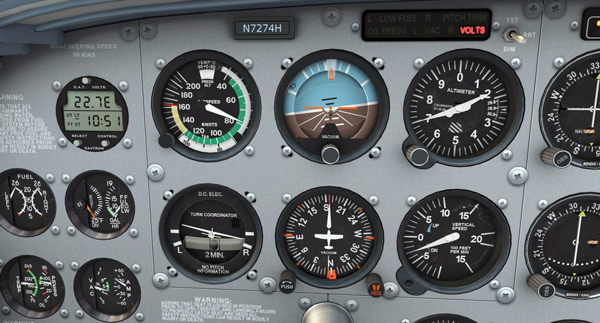
In addition, the readings on the RPM, Fuel Flow, EGT and Oil Temperature gauges I made for FIPs are all different from what are shown in the cockpit. These gauges are functioning correctly on the default as well as Carenado and other aircrafts (no matter if they are the C172).
When above issues are solved, this aircraft is no doubt to be my default favorite.
Surely will continue to “tune” it right. If you encounter the same problems, and especially how to solve them, let me know.
 FS Times
Tom, Just updated to P3D V2.4 with A2A 172 AccuSim Trainer for P3D and still have similar issues with Saitek devices: BAT and Panel Lights need to be flipped several times, ALT still doesn’t work. SPAD is not installed, (very clean build), however BIP and FIP now seem to be working. Any updates on getting the BAT and ALT switches to work?
LikeLike
Hi Ron,
As mentioned, I have given up the plane as it has codes incompatible to standard FSX and P3D.
Tom
LikeLike
Oh, same issue with the RPM gauge Tom.
Rick S.
LikeLike
There is a work around posted at there forum regarding the ALT/BAT issue using SPAD. Worked for me anyhow.
Best areoplane yet IMHO.
Rick S.
LikeLike
Using the Input Configurator in FSX/A2A/Tools and SPAD if memory serves.
LikeLike
Hi Rick,
I am new to the A2A aircraft. What functions are you implementing via this Configurator?
Can new functions be added in addition to those listed on the table?
It doesn’t solve the RPM reading issue, does it?
Tom
LikeLike
Yes Rick, SPAD can solve the button issues. That’s ok. And for now, I have no clue why the RPM and Fuel Flow gauges don’t match on the one the C172.
If the issue couldn’t be solved, the aircraft under Saitek cockpit setup is useless no matter how good it is.
Tom
LikeLike
The saitek SPAD problems are also there in other A2A aircraft. I get over this by setting up an ‘A2A Aircraft’ profile and then mapping the affected switches to keystrokes. If memory serves I also had to remap the flap key in FSX because the default didn’t work for some reason! Haven’t tried the bat and alt switches yet as I only installed last thing at night.
LikeLike
Thanks Tony and that’s what I am thinking to do. Just hope that there will be some easy and quick fixes to the issues.
Update me if you have any idea about the BAT, ALT and PANEL Light issues.
If you have FIPs, do you find the readings on RPM different from the cockpit one?
Tom
LikeLike
Found these two threads about it on the A2A Forums. I haven’t picked up the 172 yet to test it out though.
http://a2asimulations.com/forum/viewtopic.php?f=108&t=35754
http://a2asimulations.com/forum/viewtopic.php?f=108&t=35717
Hopefully that helps others.
LikeLike
Thanks but the two links don’t valid any more.
What are they talking about?
LikeLike
Map Generator/Alternator (toggle) to a key combination in FSX and then map Master ALT in SPAD for on and off. Also map Master Battery toggle in FSX to a key comb and then map Master BAT for on and off in SPAD. Works fine. Sorry I don’t use FIPs so can’t comment on that one.
LikeLike
Thank you Tony. I did that already via SPAD. Now the most frustrating thing is how to match the RPM reading with the one on the C172.
Tom
LikeLike
Disappointing to hear about all the things that don’t work. After building a home cockpit you grow accustomed to using those controls, rather than having to click something virtually with your mouse. Perhaps a note to Scott would get the Panel Light, Alt and Flaps working in a patch. He seems very responsive on his forums, and he’s jumped on the Teamspeak of the FSX community I’m a part of several times.
I hope you’re able to get the FIP’s working, with a full set of 172 gauges in the future. I don’t have any of yours yet, and would love links to the ones you have. Thanks!
LikeLike
You are right and will later notify the company about the issues I am facing.
LikeLike
D’oh, I totally glossed over your first mention of them back about 205, as I was focused on reading your posts of FTX Global. Then your images of them in 207 & 208… wow. Yeah put me on the list for those beauties!
And if I can get links to your other ones that would be great too. :) For fun, here’s my current pit: http://i.imgur.com/VcvLBBJ.jpg. 2 FIP’s down, 7 more to get… :S
LikeLike
No problem Waterman981. Have put you to the next mailing list.
Tom
LikeLike
hey tom same problems here
LikeLike
I am checking out its manual now. Also, there’s a Input Configurator under A2A folder inside FSX. Don’t know if that provides fixes.
Tom
LikeLike