
Standalone GPS panel has always been on top of my simulation gear purchasing list. Yet, with the three monitors in place, the on-screen GPS now looks a lot more promising than ever before.

To eliminate mouse-clicking actions associated with it, keypads on my keyboard are re-mapped according to my personal preference as shown below:
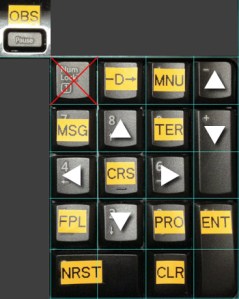 Note that the [NumLock] button of the keypad, due to OS limitation, cannot be simply re-mapped or disabled. Therefore I turn to the [Pause] key next to the keypad for the OBS function, since I don’t very often use the button.
Surely, applying the mappings onto a standalone keypad would add extra sophistication to the system. This handy, integrated approach does save money, desktop space, unnecessary cable fiddling, as well as a chance to fully utilize the keyboard section many people, included me, normally ignore.
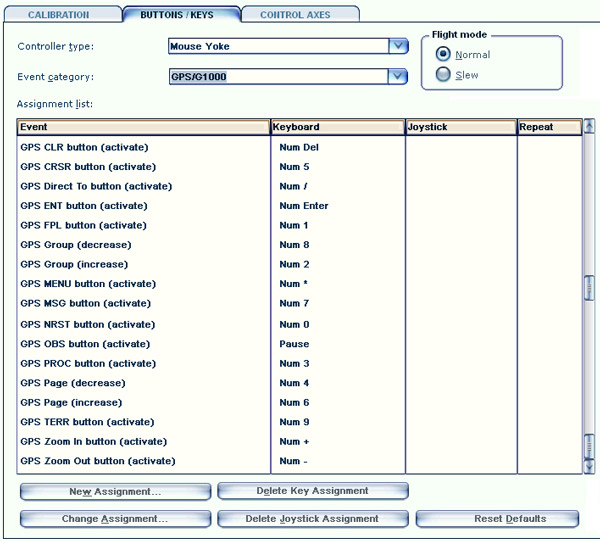
 FS Times
I use the Krozky 500W software with my GPS 500 and it works fine.
Free download : http://kronzky.info/fs/500wx/
Mario
LikeLike
Looks good Mario. Will give it a try later.
LikeLike
i had stand alone gps worked well try the desk top aviator sweet 16 roatry encoder
LikeLike
Hi Tom, Here is a link to the GPS panel I built for my flight panel. It’s on the Members Upload Files at Mutley’s Hangar.
http://forum.mutleyshangar.com/index.php/files/file/1829-gps-panel-rebuild/
It’s for your information and just to show you how pretty simple it is to make your own.
Cheers for now and keep up the good work.
Kindest Regards
Brian
LikeLike
Hi Tom, You would do best to read the first instalment first. :D
Here’s the link to it.
http://forum.mutleyshangar.com/index.php/files/file/1510-how-to-build-a-gps-panel-for-use-in-fsx/
I thought I had actually put both files together, but obviously not. :D
Cheers
Brian
LikeLike
Amazing! Just downloaded the file and will study it later.
Thanks Brian.
Tom
LikeLike
Looks good Tom.
I use the VR Insight GPS 5 I got second hand from Ebay at a good price, it uses a VGA port that I have a VGA to DVI cable for and USB and a further power adapter for the mains, this uses VR Insights own software and VRI say it can only be use with FSX in windowed mode but it can be used in FSX in full screen mode with a different set up procedure.
LikeLike
That GPS 5 looks awesome but quite expensive. Lucky you got one from eBay. ;)
Tom
LikeLike
Hi, seems to have problem on GPS-03 image !
LikeLike
Thanks for the note. Just fixed it and should be ok now.
LikeLike
…. and if you are really looking for the Real experience, get yourself the real GPS by DesktopAviator , it’s affordable, and proven to be one of my best investments ….
LikeLike
Do you mean you are using the real GPS unit in your flightsim system?
LikeLike
It does make a difference using key mapping instead of mouse for the GPS.
I finally finish wiring my GPS panel using a USB board Model 2095A Encoder Module from http://www.desktopaviator.com/ it works great only have to install my 5.6″ screen in it left. Plus the board as extra room for other switch I may install later.
As you say Tom even with a number key pad it works great.
Mario
LikeLike
They also carry a wired GPS panel with or without screen at a good price.
Without: http://www.desktopaviator.com/Products/Model_2420/index.htm
With: http://www.desktopaviator.com/Products/Model_2450/index.htm
Mario
LikeLike
Thanks Mario. Both 2450 and 2450B look good. The latter is out of stock.
Which one are you using? Does it require a VGA or DVI port? What’s the limitation of it?
Tom
LikeLike
It use a VGA and a USB.
Me I made my own before they had them for sale, but I might get one of them.
I use several of there boards with no issue.
Mario
LikeLike
Thanks for the reply Mario. I’ll seriously think about it. Seems that their products are the cheapest available on the market.
Tom
LikeLike
Make sure you note as Mario mentioned, the 2420B does not have a screen, it’s just a static piece of card stock basically, with the programmable buttons in the frame. So only the 2450B has the screen.
I emailed them back on March 13th, and received the reply:
“Due to the partial closure we experienced the past few weeks, we are way behind in the redesign of the GPS panel.
The 2450 should be available in about 4 weeks.”
So hopefully in the next couple weeks. I have a spot in my cockpit waiting to mount one.
LikeLike
Thanks for the note, Michael. Product infos are not so clear really. Glad to hear that and I might be getting one later after you.
Tom
LikeLike
Wanted to add a reply that I see they are back in stock now. It took them a bit longer it seems. You already have that new touch screen, but if you wanted physical buttons I thought I’d give you heads up.
LikeLike
Thanks for the news Michael. However, the price seems gone up quite a bit, making it just $15 less than the VRI’s GPS-5. The VRI looks better aesthetically and seems a bit more robust. Will compare and think about which one to get. Thanks again.
Tom
LikeLike
Tom,
Thanks for the GPS key assignments. Looks easy enough to assign the GPS keys. Is that the default GPS on your new three monitors? You really should try the Reality XP GNS.
BTW, what is your simulator airplane of choice nowadays?
Regards,
Ray
LikeLike
Yes, that’s the default GPS. Also the default C172 is my current choice on which I am completing the work of the gauges.
Thanks for the 3rd party GPS suggestion. I’ll take a look of it later.
Tom
LikeLike