

Besides backing up my system images, I also make individual copies of important files on my computer regularly. Orbx addon registry is certainly one of them.
During installation, Orbx addons firstly performs an online-store verification and then creates a corresponding entry containing the serial of the product in the registry. With this information in place, the verification process is no longer needed, no matter how many times the product is again reinstalled onto the same computer.
This principle similarly helps in my recent system break-down incidence. I just need to copy back 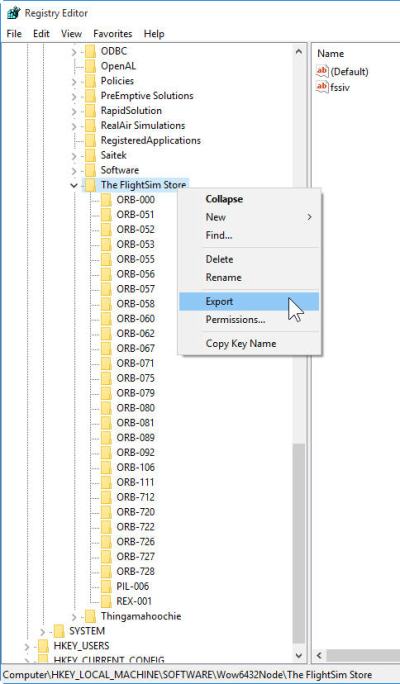 the Orbx registry to my newly restored system. I could then completely skip all the online checking process from the reinstallation. The time saved was quite noticeable.
To backup the registry is quite simple:
1. Press [Windows key] + R
2. Type in “regedit” and press [Enter]
3. When the Registry Editor is called up, look for “The FlightSim Store” under
“\HKEY_LOCAL_MACHINE\SOFTWARE” on 32-bit system,
or
“\HKEY_LOCAL_MACHINE\SOFTWARE\Wow6432Node” on 64-bit system
4. Right Click on “The FlightSim Store” and choose Export
5. Enter a name to save the registry, and quit the editor.
To put the saved registry back to the system, just double-click on the registry and choose [Yes].
 FS Times
Thank you, Tom, that’s a great idea. Just made a backup, you never know… Kind regards, Michael
LikeLike
You’re welcome Michael.
Tom
LikeLike
Thanks Tom,
Great timing for me. I’ll have to back that up also. I just went nuts buying ORBX scenery also got the Pilots 2010 wire mesh but have not installed that yet because I’m going to wait for the disks. BTW, it can be installed AFTER all the ORBX scenery right? Anything I have to do besides just install it?
LikeLike
Hi Jack,
Do you mean the 2010 Mesh? Yes, you can install it after other ORBX scenery.
Tom
LikeLike