
A friend who asked me what my nVidia 3D Settings were for P3D. I told him that I simply used the default values coming with the driver in the last few years.
In response to his question, I re-examined and tested the impact of each value to my system last week. Here’s the settings I am satisfied with:
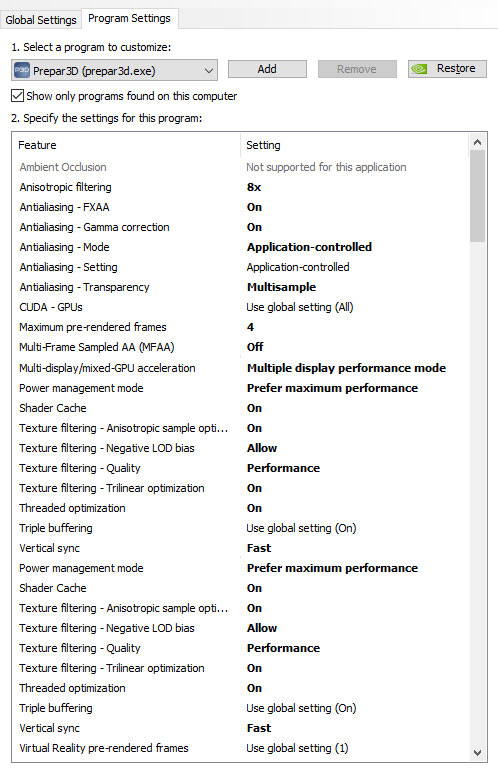
Note that above settings are tuned for my Titan X card. They may react differently on your system.
You can also use the Search function to look for my previous settings for other cards.
 FS Times
Tom hi, I have the GTX 1080ti and I need help about the settings for Nvidia control panel because I have no idea how to set up for best performance in p3dv4. I get som flutterings, maybe is not the word ( some objects in scenery are shaking) and I don’t know why. Also while airborne and in external view, while panning some scenery looks black and reloads normal.
Please can you advise me?
Best Regards, George
LikeLike
Hi Georgios,
Which CPU are you using and have you set the AffiniteMask for it in P3Dv4 ?
On my 4-core 4770K, I use
AffinityMask=95 — All for first 2 cores, and just logical for the remaining 2.
Regarding Nvidia Control panel, current I set as follows:
– Maximum pre-rendered frames = 4
– Power management mode = Prefer maximum performance
– Threaded optimization = On
– Triple buffering = On
– Vertical sync = Adaptive (half)
Worth a try and note that your case may be different.
Tom
LikeLike
Tom,HELP!I am a disabled veteran attempting to set up a flight simulator.Having quite a few issues.Would appreciate direct contact so you can straighten me out – put me on the right road.Thanks,Nick Nicholas C. BozickLieutenant Colonel (Ret) Special Forces (USA)
Selfless for Others… “And I heard the voice of the Lord saying whom shall I send and who will go for us? Then I said, here am I, send me.” Isiah 6:8
LikeLike
Hi Nicholas,
Have replied you by email and you can contact me directly.
Tom
LikeLike