
The Affinity Mask Calculator has just been enhanced to include the conversions from Affinity Mask values back to CPU combinations. Operation is as simple as 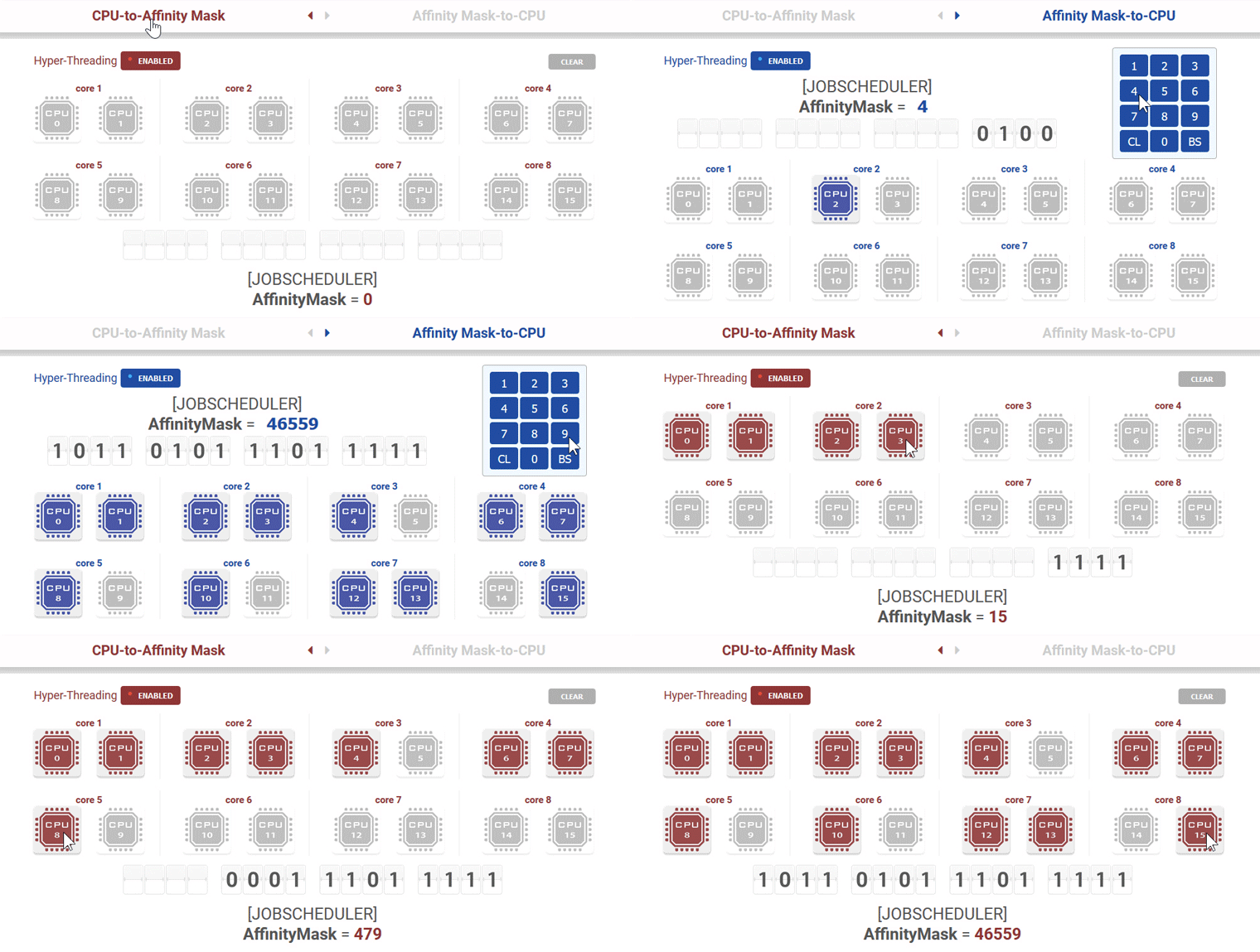 entering the Affinity Mask value in decimal via the keypad provided. To choose between the calculators, just click on the title bar for the conversion required.
Note that the maximum Affinity Mask value in decimal for computers with Hyper-Threading feature Enabled is 65535 and Disabled is 255. Incorrect values will not be processed.
As 10-, 12-, 14-, and even 16-core CPUs are entering the consumer market, the Affinity Mask Calculator will be updated accordingly when these newer CPUs are more common among flightsimmers.
Lastly, I don’t have any good Affinity Mask values for different types of CPUs. It is an on-going trial-and-error process to find out what is best for our system. You can find my approach from earlier Post 449.


Eh. Sorry does not seem simple to use. Can you please explain how i would calculate the infinity mask for my Intel i5 3340Ghz CPU
LikeLike
Hi Jeremy,
The calculator doesn’t directly give you what infinity mask you should use on your i5 CPU. Finding out the best value for your setup is a try-and-error process.
Please read my post 449.
Tom
LikeLike